Running LLMs with llama.cpp
Introduction
llama.cpp is a lightweight, high-performance C/C++ implementation for running LLMs. It enables efficient LLM inference on consumer-grade hardware including ARM64 devices like NVIDIA Jetson. It has become the default standard for local LLM inference due to its efficiency and wide format support.
While Ollama provides a user-friendly wrapper around llama.cpp, understanding llama.cpp directly gives you:
- Maximum control over inference parameters
- Better understanding of how LLMs work under the hood
- Ability to optimize for specific use cases
- Support for custom quantization formats

Why llama.cpp?
| Feature | Description |
|---|---|
| Pure C/C++ | No heavy dependencies, minimal footprint |
| Multiple Backends | CPU, CUDA, Metal, OpenCL, Vulkan support |
| GGUF Format | Native support for quantized models |
| Embeddable | Easy to integrate into applications |
| CPU Fallback | Works even without GPU |
| Streaming | Real-time token streaming |
Installation on Jetson
Prerequisites
Ensure you have build tools installed:
# Update package list
sudo apt-get update

# Install build essentials
sudo apt-get install -y build-essential git cmake

# Add CUDA environment variables to .bashrc
echo '
# CUDA Environment
export CUDA_HOME=/usr/local/cuda
export PATH=$CUDA_HOME/bin:$PATH
export LD_LIBRARY_PATH=$CUDA_HOME/lib64:$LD_LIBRARY_PATH
export CUDACXX=$CUDA_HOME/bin/nvcc
' >> ~/.bashrc

# Reload shell configuration
source ~/.bashrc

# Verify CUDA installation
nvcc --version
Clone and Build llama.cpp
# Clone the repository
cd ~
git clone https://github.com/ggerganov/llama.cpp.git
cd llama.cpp

# Build with CUDA support for Jetson
#make -j$(nproc) GGML_CUDA=1

# Alternative: Use CMake
mkdir build && cd build
cmake .. -DGGML_CUDA=ON
cmake --build . --config Release -j$(nproc)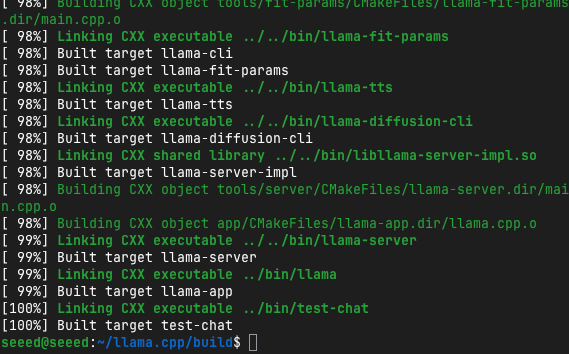
Verify Installation
# Check if binaries were built
ls ~/llama.cpp/build/bin/llama-cli

# Test version
~/llama.cpp/build/bin/llama-cli --version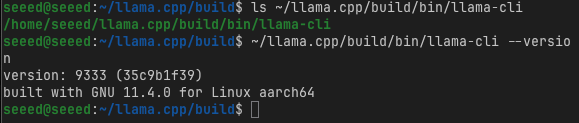
Getting Your First Model
llama.cpp uses the GGUF format (GGML Universal Format)—an efficient binary format for storing quantized models.
Download a Model
# Create a models directory
mkdir -p ~/llama.cpp/models
cd ~/llama.cpp/models

# Download Llama 3.2 3B (Q4_K_M quantization - 4-bit)
wget https://huggingface.co/bartowski/Llama-3.2-3B-Instruct-GGUF/resolve/main/Llama-3.2-3B-Instruct-Q4_K_M.gguf

# Or download from Hugging Face using curl
huggingface-cli download bartowski/Llama-3.2-3B-Instruct-GGUF Llama-3.2-3B-Instruct-Q4_K_M.gguf --local-dir ./models
Understanding GGUF Quantization
| Quantization | Bits | File Size | Quality | Speed |
|---|---|---|---|---|
| Q2_K | 2-bit | Very Small | Lower | Fastest |
| Q3_K_M | 3-bit | Small | Acceptable | Very Fast |
| Q4_K_M | 4-bit | Medium | Good | Fast |
| Q5_K_M | 5-bit | Medium-Large | Very Good | Moderate |
| Q6_K | 6-bit | Large | Excellent | Slower |
| Q8_0 | 8-bit | Very Large | Near-original | Slowest |
For Jetson devices:
- Orin Nano 4GB: Use Q2_K or Q3_K_M
- Orin Nano 8GB: Use Q3_K_M or Q4_K_M
- Orin NX 16GB+: Use Q4_K_M or Q5_K_M
Recommended Models for Jetson
# Download Qwen3 4B (excellent multilingual support)
wget https://huggingface.co/bartowski/Qwen3-4B-Instruct-GGUF/resolve/main/Qwen3-4B-Instruct-Q4_K_M.gguf

# Download DeepSeek-R1 1.5B (distilled reasoning model)
wget https://huggingface.co/bartowski/DeepSeek-R1-Distill-Qwen-1.5B-GGUF/resolve/main/DeepSeek-R1-Distill-Qwen-1.5B-Q4_K_M.gguf

# Download Gemma3 4B
wget https://huggingface.co/bartowski/gemma-3-4b-it-GGUF/resolve/main/gemma-3-4b-it-Q4_K_M.gguf
Basic Usage
Simple Text Generation
cd ~/llama.cpp

# Basic inference
./build/bin/llama-cli \
  -m models/Llama-3.2-3B-Instruct-Q4_K_M.gguf \
  -p "The future of edge AI is"
Chat Mode (Conversational)
# Start an interactive chat session
./build/bin/llama-cli \
  -m models/Llama-3.2-3B-Instruct-Q4_K_M.gguf \
  -cnv \
--chat-template llama3Note: The
-cnvflag enables conversational mode, and--chat-templatespecifies how to format the conversation.
Common llama-cli Flags
| Flag | Description | Example |
|---|---|---|
-m, --model | Model file path | -m models/model.gguf |
-p, --prompt | Initial prompt | -p "Hello world" |
-cnv | Conversation mode | -cnv |
-n, --n-predict | Number of tokens to generate | -n 256 |
-c, --ctx-size | Context size (in tokens) | -c 4096 |
--temp | Temperature (creativity) | --temp 0.7 |
--top-p | Nucleus sampling | --top-p 0.9 |
-ngl, --n-gpu-layers | GPU layers to offload | -ngl 35 |
-t, --threads | Number of CPU threads | -t 4 |
Optimizing for Jetson GPU
GPU Offloading
Offloading model layers to GPU dramatically improves performance:
# Determine optimal GPU layers
# Start with -ngl 999 (offload all layers)
./build/bin/llama-cli \
  -m models/Llama-3.2-3B-Instruct-Q4_K_M.gguf \
  -p "Explain quantum computing" \
  -ngl 35 \
-n 256Tip: Use
-ngl 999to automatically offload all possible layers to GPU.
Measuring Performance
# Run with performance stats
./build/bin/llama-cli \
  -m models/Llama-3.2-3B-Instruct-Q4_K_M.gguf \
  -p "What is the capital of France?" \
  -n 50 \
  -ngl 35 \
  --perf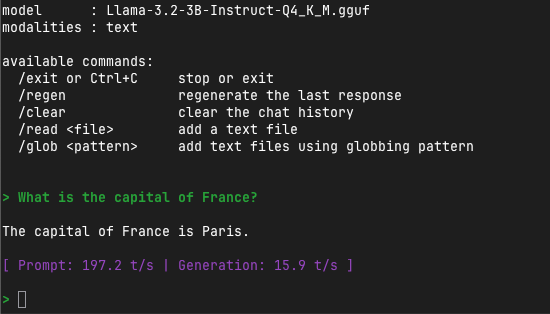
Key metric: eval time per token should be under 100ms for good real-time performance.
Advanced Features
Running the API Server
llama.cpp includes a server mode for REST API access:
# Start the server
./llama-server \
  -m models/Llama-3.2-3B-Instruct-Q4_K_M.gguf \
  --host 0.0.0.0 \
  --port 8000 \
  -ngl 35 \
  -c 4096
Access the server:
# Simple query
curl -X POST http://localhost:8000/completion \
  -H "Content-Type: application/json" \
  -d '{
    "prompt": "Once upon a time",
    "n_predict": 100
  }'

# Chat completion
curl -X POST http://localhost:8000/v1/chat/completions \
  -H "Content-Type: application/json" \
  -d '{
    "messages": [
      {"role": "user", "content": "What is machine learning?"}
    ],
    "max_tokens": 256
  }'
System Prompts
Set the model's behavior with system prompts:
./llama-cli \
  -m models/Llama-3.2-3B-Instruct-Q4_K_M.gguf \
  -p "You are a helpful coding assistant. Explain Python list comprehensions." \
  --system "You are an expert Python programmer. Provide concise, practical code examples."
Batch Processing
Process multiple prompts efficiently:
# batch_inference.py
import subprocess
import json

prompts = [
    "Explain neural networks",
    "What is GPU acceleration?",
    "Describe edge computing"
]

model_path = "~/llama.cpp/models/Llama-3.2-3B-Instruct-Q4_K_M.gguf"

for prompt in prompts:
    result = subprocess.run(
        ["./llama-cli", "-m", model_path, "-p", prompt, "-n", "100", "--temp", "0.7"],
        capture_output=True,
        text=True
    )
    print(f"Prompt: {prompt}")
    print(f"Response: {result.stdout}\n")
Converting Models to GGUF
If you have a model in Hugging Face format (PyTorch/SafeTensors), convert it to GGUF:
cd ~/llama.cpp

# Install Python requirements
pip install -r requirements.txt

# Convert Hugging Face model to GGUF
python convert_hf_to_gguf.py \
  /path/to/model \
  --outfile output-model.gguf \
  --outtype q4_k_m
Available output types:
f16: 16-bit float (no quantization)q8_0: 8-bit quantizationq6_k: 6-bit quantizationq5_k_m: 5-bit quantizationq4_k_m: 4-bit quantization (recommended balance)q3_k_m: 3-bit quantizationq2_k: 2-bit quantization (most compressed)
Integration Examples
Python Binding
# Install Python bindings
pip install llama-cpp-python

# For CUDA support (Jetson)
CMAKE_ARGS="-DGGML_CUDA=on" pip install llama-cpp-python --upgrade --force-reinstall --no-cache-dirfrom llama_cpp import Llama
# Load model
llm = Llama(
model_path="/path/to/model-Q4_K_M.gguf",
n_gpu_layers=35,
n_ctx=4096
)
# Generate text
output = llm(
"Q: What is the capital of France?\nA:",
max_tokens=50,
temperature=0.7
)
print(output["choices"][0]["text"])
# Chat completion
output = llm.create_chat_completion(
messages=[
{"role": "user", "content": "Tell me a joke"}
],
max_tokens=100
)
print(output["choices"][0]["message"]["content"])Performance Benchmarking
Jetson-Specific Optimizations
# Optimal settings for Jetson Orin Nano 8GB
./llama-cli \
  -m models/Llama-3.2-3B-Instruct-Q4_K_M.gguf \
  -p "Explain transformers in machine learning" \
  -ngl 35 \
  -t 6 \
  -c 4096 \
  -n 200 \
  --temp 0.7
Benchmark Script
#!/bin/bash
# benchmark.sh

MODEL="models/Llama-3.2-3B-Instruct-Q4_K_M.gguf"
PROMPT="Explain the concept of artificial intelligence and its applications."

echo "Benchmarking llama.cpp on Jetson"
echo "Model: $MODEL"
echo "Prompt: $PROMPT"
echo ""

for gpu_layers in 0 10 20 30 35; do
    echo "Testing with $gpu_layers GPU layers..."
    timeout 120 ./llama-cli \
        -m $MODEL \
        -p "$PROMPT" \
        -ngl $gpu_layers \
        -n 100 \
        --per-test 2>&1 | grep "eval time"
done
Common Issues and Solutions
Issue 1: CUDA Not Detected
Problem: GPU offloading doesn't work
Solution:
# Rebuild with CUDA
make clean
make -j$(nproc) GGML_CUDA=1

# Verify CUDA installation
nvidia-smi
nvcc --version
Issue 2: Out of Memory
Problem: Model loading fails with OOM
Solution:
# Reduce GPU layers
./llama-cli -m model.gguf -ngl 10  # Instead of -ngl 35

# Use smaller context
./llama-cli -m model.gguf -c 2048  # Instead of default 4096

# Use more aggressive quantization
# Switch from Q5_K_M to Q4_K_M or Q3_K_M
Issue 3: Slow CPU-Only Performance
Problem: Generation is too slow without GPU
Solution:
# Enable more threads
./llama-cli -m model.gguf -t 8  # Use 8 CPU threads

# Use smaller model or more aggressive quantization

# Ensure CPU governor is set to performance
sudo apt-get install cpufrequtils
sudo cpufreq-set -g performance
Practice Exercise
Complete these tasks:
- Build llama.cpp with CUDA support
- Download 3 different models and compare their sizes
- Run inference on each model with
-ngl 35 - Measure performance using
--perfflag - Start the server and test API requests
- Create a Python script that batches 5 different prompts
References
- llama.cpp GitHub
- GGUF Format Specification
- TheBloke's GGUF Models - Pre-converted models
- bartowski's GGUF Models - Updated model conversions
- Jetson AI Lab - NVIDIA's Jetson resources
Next: Continue to Module 5.4: High-Performance Inference with vLLM for production-grade LLM serving!