#7.1.3 ROS Architecture
ROS Filesystem
The ROS filesystem structure on the hard disk is organized as follows:
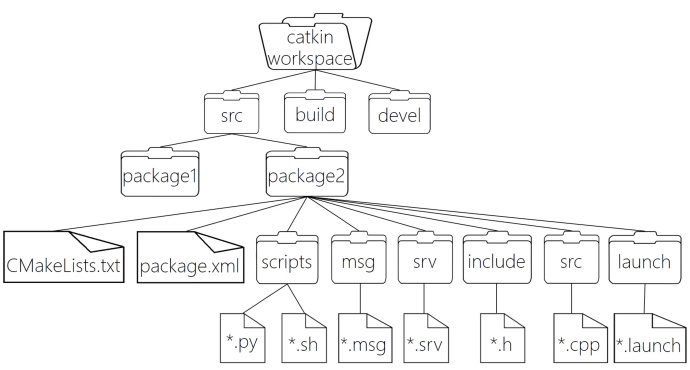
WorkSpace --- Custom workspace

    |--- build: Compilation space for storing CMake and catkin cache, configuration, and other intermediate files.
    |--- devel: Development space for storing compiled target files including headers, dynamic & static libraries, executables, etc.
    |--- src: Source code

        |-- package: ROS package (basic ROS unit) containing multiple nodes, libraries, and configuration files. Package names should be lowercase, consisting of letters, numbers, and underscores.
            |-- CMakeLists.txt: Configuration for compiling rules, including source files, dependencies, and target files.
            |-- package.xml: Package information such as name, version, author, dependencies.
            |-- scripts: Directory for Python files.
            |-- src: Directory for C++ source files.
            |-- include: Header files.
            |-- msg: Message communication format files.
            |-- srv: Service communication format files.
            |-- action: Action format files.
            |-- launch: Launch files for running multiple nodes at once.
            |-- config: Configuration files.

        |-- CMakeLists.txt: Basic configuration for compilation.
Some of these directories and files have already been discussed, such as package creation, writing C++ and Python files in the src and scripts directories, and creating launch files in the launch directory. The package.xml and CMakeLists.txt files have also been configured. Other directories will be introduced in later tutorials.
package.xml
The package.xml file defines the properties of the package, such as name, version, author, maintainer, and dependencies. The format is as follows:
<?xml version="1.0"?>
<package format="2">
  <name>hello_world</name>
  <version>0.0.0</version>
  <description>The hello_world package</description>
  <maintainer email="xuzuo@todo.todo">xuzuo</maintainer>
  <license>TODO</license>
  <buildtool_depend>catkin</buildtool_depend>
  <build_depend>roscpp</build_depend>
  <build_depend>rospy</build_depend>
  <build_depend>std_msgs</build_depend>
  <build_export_depend>roscpp</build_export_depend>
  <build_export_depend>rospy</build_export_depend>
  <build_export_depend>std_msgs</build_export_depend>
  <exec_depend>roscpp</exec_depend>
  <exec_depend>rospy</exec_depend>
  <exec_depend>std_msgs</exec_depend>
  <export>
  </export>
</package>
CMakeLists.txt
The CMakeLists.txt file is the input to the CMake build system and is used to build the package. It includes configuration for compiling C++ and Python files, as well as defining dependencies.
cmake_minimum_required(VERSION 3.0.2)
project(demo01_hello_vscode)

find_package(catkin REQUIRED COMPONENTS
  roscpp
  rospy
  std_msgs
)

catkin_package(
)

include_directories(
  ${catkin_INCLUDE_DIRS}
)

add_executable(hellow src/hello.cpp)

add_dependencies(hellow ${${PROJECT_NAME}_EXPORTED_TARGETS} ${catkin_EXPORTED_TARGETS})

target_link_libraries(hellow
  ${catkin_LIBRARIES}
)

catkin_install_python(PROGRAMS
  scripts/hello.py
  DESTINATION ${CATKIN_PACKAGE_BIN_DESTINATION}
)
ROS Filesystem Commands
Common commands for interacting with the ROS filesystem:
- Create Package:
catkin_create_pkg <package_name> <dependency_1> <dependency_2> ... - Install Package:
sudo apt install <package_name> - Remove Package:
sudo apt purge <package_name> - List Packages:
rospack list - Find Package:
rospack find <package_name> - Navigate to Package:
roscd <package_name> - List Package Files:
rosls <package_name> - Search Package:
apt search <package_name> - Edit Package File:
rosed <package_name> <file_name>
Executing ROS Commands
- Start ROS Core:
roscore - Run ROS Node:
rosrun <package_name> <executable_file_name> - Launch ROS File:
roslaunch <package_name> <launch_file_name>
ROS Computational Graph
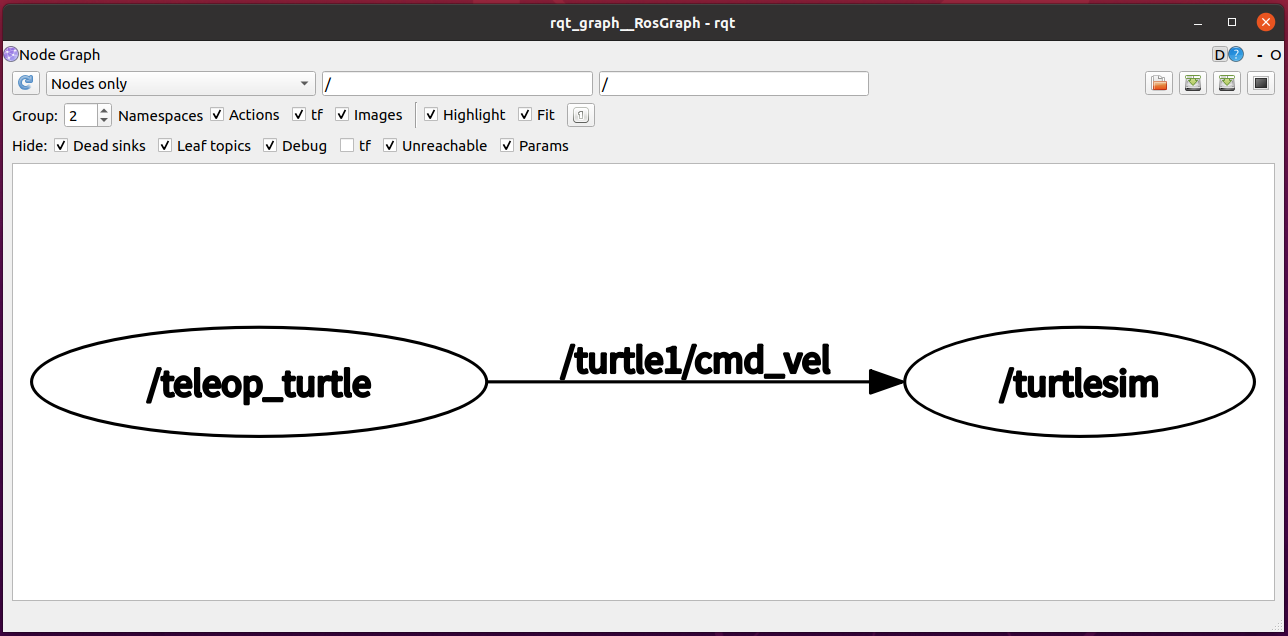
The computational graph in ROS represents the runtime structure of a ROS system, showing the data flow between different nodes. It can be visualized using rqt_graph:
rosrun rqt_graph rqt_graphIf not installed:
sudo apt install ros-<distro>-rqt
sudo apt install ros-<distro>-rqt-common-plugins
Replace <distro> with your ROS version (e.g., kinetic, melodic, noetic).
#Computational Graph Demonstration
Next, we'll demonstrate the computational graph using ROS's built-in turtle simulation.
-
Run the Example: Follow the previous instructions to run the turtle simulation.
-
View the Computational Graph: Open a new terminal and enter:
bashrqt_graphor
bashrosrun rqt_graph rqt_graph
You will see a network topology graph that displays the relationships between different nodes, similar to the image below.