LLMs mit llama.cpp ausführen
Zuletzt aktualisiert:
Einführung
llama.cpp ist eine leichtgewichtige, hochleistungsfähige C/C++-Implementierung zum Ausführen von LLMs. Sie ermöglicht effiziente LLM-Inferenz auf Consumer-Hardware, einschließlich ARM64-Geräten wie NVIDIA Jetson. Sie ist zum Standard für lokale LLM-Inferenz geworden, dank ihrer Effizienz und breiten Formatunterstützung.
Während Ollama eine benutzerfreundliche Oberfläche um llama.cpp bietet, gibt Ihnen das direkte Verständnis von llama.cpp:
- Maximale Kontrolle über Inferenzparameter
- Besseres Verständnis, wie LLMs intern funktionieren
- Fähigkeit, für spezifische Anwendungsfälle zu optimieren
- Unterstützung für benutzerdefinierte Quantisierungsformate

Warum llama.cpp?
| Funktion | Beschreibung |
|---|---|
| Reines C/C++ | Keine schweren Abhängigkeiten, minimaler Platzbedarf |
| Mehrere Backends | CPU, CUDA, Metal, OpenCL, Vulkan-Unterstützung |
| GGUF-Format | Native Unterstützung für quantisierte Modelle |
| Einbettbar | Einfach in Anwendungen integrierbar |
| CPU-Fallback | Funktioniert auch ohne GPU |
| Streaming | Echtzeit-Token-Streaming |
Installation auf Jetson
Voraussetzungen
Stellen Sie sicher, dass Build-Tools installiert sind:
# Paketliste aktualisieren
sudo apt-get update

# Build-Essentials installieren
sudo apt-get install -y build-essential git cmake

# CUDA-Umgebungsvariablen zu .bashrc hinzufügen
echo '
# CUDA Environment
export CUDA_HOME=/usr/local/cuda
export PATH=$CUDA_HOME/bin:$PATH
export LD_LIBRARY_PATH=$CUDA_HOME/lib64:$LD_LIBRARY_PATH
export CUDACXX=$CUDA_HOME/bin/nvcc
' >> ~/.bashrc

# Shell-Konfiguration neu laden
source ~/.bashrc

# CUDA-Installation überprüfen
nvcc --version
llama.cpp klonen und bauen
# Repository klonen
cd ~
git clone https://github.com/ggerganov/llama.cpp.git
cd llama.cpp

# Mit CUDA-Unterstützung für Jetson bauen
#make -j$(nproc) GGML_CUDA=1

# Alternative: CMake verwenden
mkdir build && cd build
cmake .. -DGGML_CUDA=ON
cmake --build . --config Release -j$(nproc)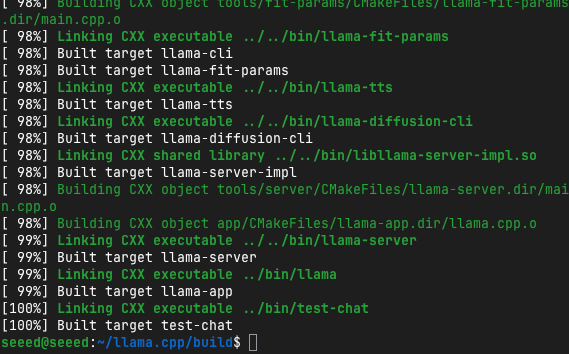
Installation überprüfen
# Überprüfen, ob Binärdateien gebaut wurden
ls ~/llama.cpp/build/bin/llama-cli

# Version testen
~/llama.cpp/build/bin/llama-cli --version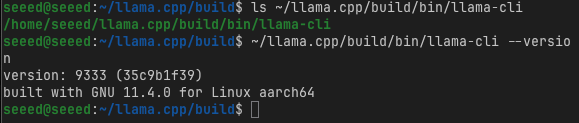
Ihr erstes Modell erhalten
llama.cpp verwendet das GGUF-Format (GGML Universal Format) – ein effizientes Binärformat zum Speichern quantisierter Modelle.
Ein Modell herunterladen
# Models-Verzeichnis erstellen
mkdir -p ~/llama.cpp/models
cd ~/llama.cpp/models

# Llama 3.2 3B herunterladen (Q4_K_M Quantisierung - 4-Bit)
wget https://huggingface.co/bartowski/Llama-3.2-3B-Instruct-GGUF/resolve/main/Llama-3.2-3B-Instruct-Q4_K_M.gguf

# Oder von Hugging Face mit curl herunterladen
huggingface-cli download bartowski/Llama-3.2-3B-Instruct-GGUF Llama-3.2-3B-Instruct-Q4_K_M.gguf --local-dir ./models
GGUF-Quantisierung verstehen
| Quantisierung | Bits | Dateigröße | Qualität | Geschwindigkeit |
|---|---|---|---|---|
| Q2_K | 2-Bit | Sehr klein | Niedriger | Schnellste |
| Q3_K_M | 3-Bit | Klein | Akzeptabel | Sehr schnell |
| Q4_K_M | 4-Bit | Mittel | Gut | Schnell |
| Q5_K_M | 5-Bit | Mittel-Groß | Sehr gut | Moderat |
| Q6_K | 6-Bit | Groß | Ausgezeichnet | Langsamer |
| Q8_0 | 8-Bit | Sehr groß | Nahe am Original | Langsamste |
Für Jetson-Geräte:
- Orin Nano 4GB: Q2_K oder Q3_K_M verwenden
- Orin Nano 8GB: Q3_K_M oder Q4_K_M verwenden
- Orin NX 16GB+: Q4_K_M oder Q5_K_M verwenden
Empfohlene Modelle für Jetson
# Qwen3 4B herunterladen (ausgezeichnete mehrsprachige Unterstützung)
wget https://huggingface.co/bartowski/Qwen3-4B-Instruct-GGUF/resolve/main/Qwen3-4B-Instruct-Q4_K_M.gguf

# DeepSeek-R1 1.5B herunterladen (destilliertes Reasoning-Modell)
wget https://huggingface.co/bartowski/DeepSeek-R1-Distill-Qwen-1.5B-GGUF/resolve/main/DeepSeek-R1-Distill-Qwen-1.5B-Q4_K_M.gguf

# Gemma3 4B herunterladen
wget https://huggingface.co/bartowski/gemma-3-4b-it-GGUF/resolve/main/gemma-3-4b-it-Q4_K_M.gguf
Grundlegende Verwendung
Einfache Textgenerierung
cd ~/llama.cpp

# Grundlegende Inferenz
./build/bin/llama-cli \
  -m models/Llama-3.2-3B-Instruct-Q4_K_M.gguf \
  -p "The future of edge AI is"
Chat-Modus (Konversation)
# Interaktive Chat-Sitzung starten
./build/bin/llama-cli \
  -m models/Llama-3.2-3B-Instruct-Q4_K_M.gguf \
  -cnv \
--chat-template llama3Hinweis: Die
-cnv-Flag aktiviert den Konversationsmodus, und--chat-templategibt an, wie die Konversation formatiert wird.
Häufige llama-cli-Flags
| Flag | Beschreibung | Beispiel |
|---|---|---|
-m, --model | Modell-Dateipfad | -m models/model.gguf |
-p, --prompt | Anfängliche Eingabeaufforderung | -p "Hello world" |
-cnv | Konversationsmodus | -cnv |
-n, --n-predict | Anzahl der zu generierenden Tokens | -n 256 |
-c, --ctx-size | Kontextgröße (in Tokens) | -c 4096 |
--temp | Temperatur (Kreativität) | --temp 0.7 |
--top-p | Nucleus-Sampling | --top-p 0.9 |
-ngl, --n-gpu-layers | GPU-Layer zum Auslagern | -ngl 35 |
-t, --threads | Anzahl der CPU-Threads | -t 4 |
Für Jetson GPU optimieren
GPU-Auslagerung
Das Auslagern von Modelllayern auf die GPU verbessert die Leistung dramatisch:
# Optimale GPU-Layer bestimmen
# Beginnen Sie mit -ngl 999 (alle Layer auslagern)
./build/bin/llama-cli \
  -m models/Llama-3.2-3B-Instruct-Q4_K_M.gguf \
  -p "Explain quantum computing" \
  -ngl 35 \
-n 256Tipp: Verwenden Sie
-ngl 999, um automatisch alle möglichen Layer auf die GPU auszulagern.
Leistung messen
# Mit Leistungsstatistiken ausführen
./build/bin/llama-cli \
  -m models/Llama-3.2-3B-Instruct-Q4_K_M.gguf \
  -p "What is the capital of France?" \
  -n 50 \
  -ngl 35 \
  --perf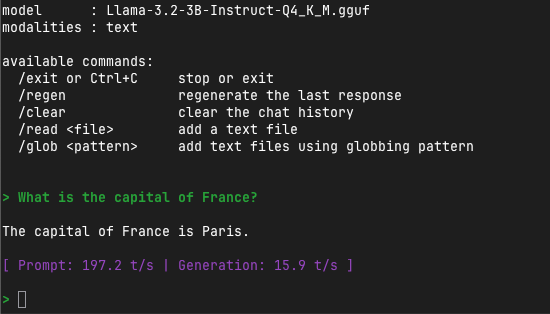
Wichtige Metrik: eval time per token sollte unter 100ms liegen für gute Echtzeitleistung.
Erweiterte Funktionen
API-Server ausführen
llama.cpp enthält einen Servermodus für REST-API-Zugriff:
# Server starten
./llama-server \
  -m models/Llama-3.2-3B-Instruct-Q4_K_M.gguf \
  --host 0.0.0.0 \
  --port 8000 \
  -ngl 35 \
  -c 4096
Auf den Server zugreifen:
# Einfache Abfrage
curl -X POST http://localhost:8000/completion \
  -H "Content-Type: application/json" \
  -d '{
    "prompt": "Once upon a time",
    "n_predict": 100
  }'

# Chat-Vervollständigung
curl -X POST http://localhost:8000/v1/chat/completions \
  -H "Content-Type: application/json" \
  -d '{
    "messages": [
      {"role": "user", "content": "What is machine learning?"}
    ],
    "max_tokens": 256
  }'
System-Prompts
Das Verhalten des Modells mit System-Prompts festlegen:
./llama-cli \
  -m models/Llama-3.2-3B-Instruct-Q4_K_M.gguf \
  -p "You are a helpful coding assistant. Explain Python list comprehensions." \
  --system "You are an expert Python programmer. Provide concise, practical code examples."
Stapelverarbeitung
Mehrere Prompts effizient verarbeiten:
# batch_inference.py
import subprocess
import json

prompts = [
    "Explain neural networks",
    "What is GPU acceleration?",
    "Describe edge computing"
]

model_path = "~/llama.cpp/models/Llama-3.2-3B-Instruct-Q4_K_M.gguf"

for prompt in prompts:
    result = subprocess.run(
        ["./llama-cli", "-m", model_path, "-p", prompt, "-n", "100", "--temp", "0.7"],
        capture_output=True,
        text=True
    )
    print(f"Prompt: {prompt}")
    print(f"Response: {result.stdout}\n")
Modelle in GGUF konvertieren
Wenn Sie ein Modell im Hugging Face-Format (PyTorch/SafeTensors) haben, können Sie es in GGUF konvertieren:
cd ~/llama.cpp

# Python-Anforderungen installieren
pip install -r requirements.txt

# Hugging Face-Modell in GGUF konvertieren
python convert_hf_to_gguf.py \
  /path/to/model \
  --outfile output-model.gguf \
  --outtype q4_k_m
Verfügbare Ausgabetypen:
f16: 16-Bit-Float (keine Quantisierung)q8_0: 8-Bit-Quantisierungq6_k: 6-Bit-Quantisierungq5_k_m: 5-Bit-Quantisierungq4_k_m: 4-Bit-Quantisierung (empfohlenes Gleichgewicht)q3_k_m: 3-Bit-Quantisierungq2_k: 2-Bit-Quantisierung (stärkste Komprimierung)
Integrationsbeispiele
Python-Bindung
# Python-Bindings installieren
pip install llama-cpp-python

# Für CUDA-Unterstützung (Jetson)
CMAKE_ARGS="-DGGML_CUDA=on" pip install llama-cpp-python --upgrade --force-reinstall --no-cache-dirfrom llama_cpp import Llama
# Modell laden
llm = Llama(
model_path="/path/to/model-Q4_K_M.gguf",
n_gpu_layers=35,
n_ctx=4096
)
# Text generieren
output = llm(
"Q: What is the capital of France?\nA:",
max_tokens=50,
temperature=0.7
)
print(output["choices"][0]["text"])
# Chat-Vervollständigung
output = llm.create_chat_completion(
messages=[
{"role": "user", "content": "Tell me a joke"}
],
max_tokens=100
)
print(output["choices"][0]["message"]["content"])Leistungs-Benchmarking
Jetson-spezifische Optimierungen
# Optimale Einstellungen für Jetson Orin Nano 8GB
./llama-cli \
  -m models/Llama-3.2-3B-Instruct-Q4_K_M.gguf \
  -p "Explain transformers in machine learning" \
  -ngl 35 \
  -t 6 \
  -c 4096 \
  -n 200 \
  --temp 0.7
Benchmark-Skript
#!/bin/bash
# benchmark.sh

MODEL="models/Llama-3.2-3B-Instruct-Q4_K_M.gguf"
PROMPT="Explain the concept of artificial intelligence and its applications."

echo "Benchmarking llama.cpp on Jetson"
echo "Model: $MODEL"
echo "Prompt: $PROMPT"
echo ""

for gpu_layers in 0 10 20 30 35; do
    echo "Testing with $gpu_layers GPU layers..."
    timeout 120 ./llama-cli \
        -m $MODEL \
        -p "$PROMPT" \
        -ngl $gpu_layers \
        -n 100 \
        --per-test 2>&1 | grep "eval time"
done
Häufige Probleme und Lösungen
Problem 1: CUDA nicht erkannt
Problem: GPU-Auslagerung funktioniert nicht
Lösung:
# Mit CUDA neu bauen
make clean
make -j$(nproc) GGML_CUDA=1

# CUDA-Installation überprüfen
nvidia-smi
nvcc --version
Problem 2: Nicht genügend Speicher
Problem: Modellladen schlägt mit OOM fehl
Lösung:
# GPU-Layer reduzieren
./llama-cli -m model.gguf -ngl 10  # Anstatt -ngl 35

# Kleineren Kontext verwenden
./llama-cli -m model.gguf -c 2048  # Anstatt Standard 4096

# Aggressivere Quantisierung verwenden
# Von Q5_K_M zu Q4_K_M oder Q3_K_M wechseln
Problem 3: Langsame reine CPU-Leistung
Problem: Generierung ohne GPU zu langsam
Lösung:
# Mehr Threads aktivieren
./llama-cli -m model.gguf -t 8  # 8 CPU-Threads verwenden

# Kleineres Modell oder aggressivere Quantisierung verwenden

# Sicherstellen, dass CPU-Governor auf Performance eingestellt ist
sudo apt-get install cpufrequtils
sudo cpufreq-set -g performance
Übungsaufgaben
Schließen Sie diese Aufgaben ab:
- llama.cpp mit CUDA-Unterstützung bauen
- 3 verschiedene Modelle herunterladen und ihre Größen vergleichen
- Inferenz auf jedem Modell ausführen mit
-ngl 35 - Leistung messen mit der
--perf-Flag - Server starten und API-Anfragen testen
- Ein Python-Skript erstellen, das 5 verschiedene Prompts stapelt
Referenzen
- llama.cpp GitHub
- GGUF-Formatspezifikation
- TheBloke's GGUF-Modelle - Vorberechnete Modelle
- bartowski's GGUF-Modelle - Aktualisierte Modellkonvertierungen
- Jetson AI Lab - NVIDIA's Jetson-Ressourcen
Weiter: Fahren Sie mit Modul 5.4: Hochleistungs-Inferenz mit vLLM für Produktions-LLM-Serving fort!