reComputer RK3576 DEEPX DX-M1 M.2 Accelerator
Last updated:
The DEEPX DX-M1 is an M.2 PCIe AI accelerator with three NPU cores and onboard LPDDR5 memory. This tutorial shows how to detect the card on a reComputer RK3576, build a runtime compatible with the installed firmware, verify runtime initialization, and monitor the NPU status.
The card used for this guide runs firmware v1.6.0, which is paired with DX-RT v2.6.0.
Before you begin
Have a DX-M1 module and terminal access with sudo privileges. Shut down and disconnect power before fitting the M.2 card. Match the runtime to the firmware version in the configuration table before installing software.
System configuration
| Item | Configuration |
|---|---|
| Host | reComputer RK3576 Dev Kit |
| Operating system | Armbian unofficial 26.05.0-trunk, Debian 12 (bookworm) |
| Kernel | 6.1.115-vendor-seeed-rk3576 |
| Accelerator | DEEPX DX-M1A M.2, LPDDR5 4 GB class |
| PCIe device | 1ff4:0001 |
| Negotiated link | PCIe Gen2 x1 |
| NPU driver | dxrt-driver-dkms 2.4.1-2 |
| Card firmware | v1.6.0 |
| Runtime | DX-RT v2.6.0, built from the DEEPX source tag |
Install the PCIe driver
Download DX-All-Suite v2.4.2 for AArch64 Linux from the DEEPX software download page, then copy the archive to the RK3576. Extract the package and enter its dx-runtime directory:
tar -xzf dx-all-suite_v2.4.2.tar.gz
cd dx-all-suite/dx-runtime
Select and install the driver version that matches the configuration above. Only the PCIe driver is installed in this step; the card firmware is not changed.
ln -sfn 2.4.1 dx_rt_npu_linux_driver/release/latest
./install.sh --target=dx_rt_npu_linux_driver --exclude-fw
sudo reboot
After the system restarts, continue with the hardware check below. The compatible DX-RT user-space library is built separately rather than installed from the current suite.
Hardware and driver check
Install the DX-M1 in the board's M.2 PCIe slot, then boot the RK3576 and inspect the PCIe function:
lspci -nnk -s 01:00.0
Check the device node created by the DEEPX driver:
ls -l /dev/dxrt0
The /dev/dxrt0 device node confirms that the PCIe driver has initialized the accelerator. Resolve a missing device node before building or running DX-RT.
Build the compatible DX-RT version
DX-RT v3.3.0 requires firmware v2.5.2 or later, so it cannot initialize a card running firmware v1.6.0. DX-RT v2.6.0 lists firmware v1.5.9 as its minimum and is compatible with this card.
Install the build tools if they are not already available:
sudo apt-get update
sudo apt-get install -y build-essential cmake ninja-build python3-dev git
Clone the exact DX-RT tag. Its CMake configuration requests pybind11 v2.12; shallow-cloning that dependency first avoids an unnecessary full-history download:
cd ~
git clone --branch v2.6.0 --depth 1 https://github.com/DEEPX-AI/dx_rt.git
cd dx_rt
git clone --depth 1 --branch v2.12 https://github.com/pybind/pybind11.git extern/pybind11
Configure and build the runtime for the RK3576's AArch64 CPU:
cmake -S . -B build_aarch64 -G Ninja \
  -DCMAKE_BUILD_TYPE=Release \
  -DCMAKE_TOOLCHAIN_FILE=cmake/toolchain.aarch64.cmake \
  -DCMAKE_INSTALL_PREFIX=/usr/local \
  -DPython_EXECUTABLE="$(command -v python3)"
cmake --build build_aarch64 --parallel 4
The commands above build the runtime without changing the system installation. For the initial validation, use the binaries and shared library directly from the build directory:
export LD_LIBRARY_PATH="$HOME/dx_rt/build_aarch64/lib${LD_LIBRARY_PATH:+:$LD_LIBRARY_PATH}"
$HOME/dx_rt/build_aarch64/bin/dxrt-cli -s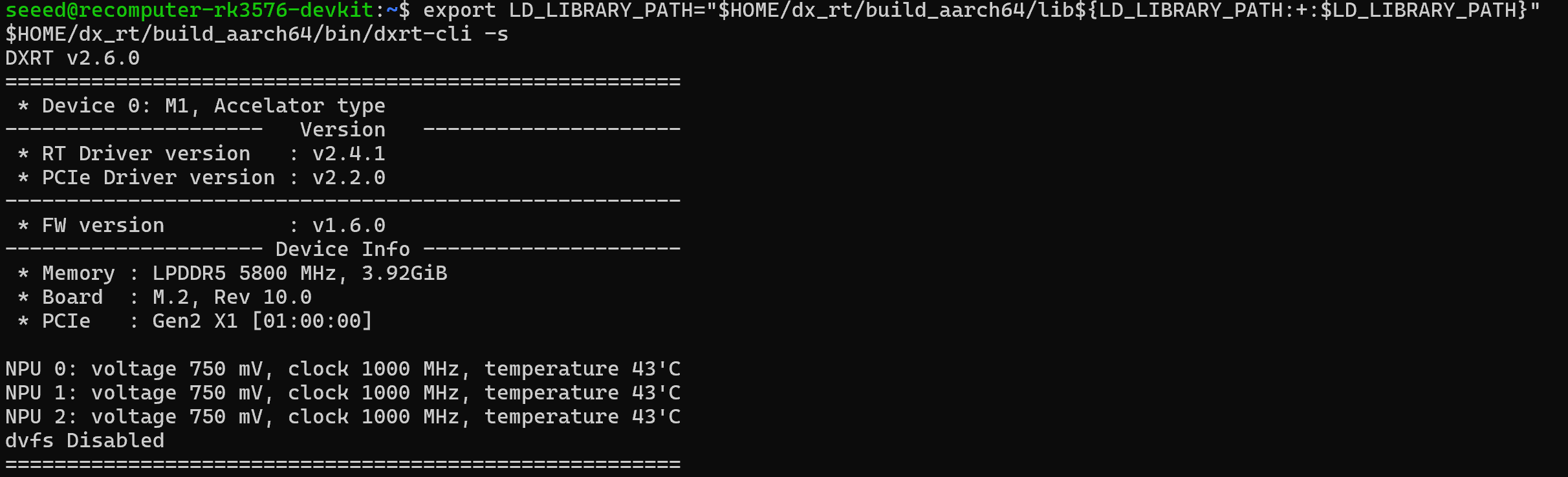
Verify the runtime service
Stop any incompatible DX-RT service before launching the build-tree service. The following command runs it temporarily: it terminates automatically after 20 seconds and does not install a systemd unit.
sudo systemctl stop dxrt
timeout --signal=TERM 20s "$HOME/dx_rt/build_aarch64/bin/dxrtd"
Successful initialization includes these messages:
[DXRT_SVC][DxrtService] Initialized Devices count=1
[DXRT_SVC][DxrtService] Initialized Scheduler
[DXRT_IPC][DxrtService] Initialized IPC Server
These messages indicate that the Runtime has opened the driver and initialized the DX-M1.
Monitor the NPU status
DX-RT v2.6.0 includes a monitoring mode in dxrt-cli. The command below samples the device once per second and stops after three seconds:
timeout --signal=INT 3s "$HOME/dx_rt/build_aarch64/bin/dxrt-cli" -m 1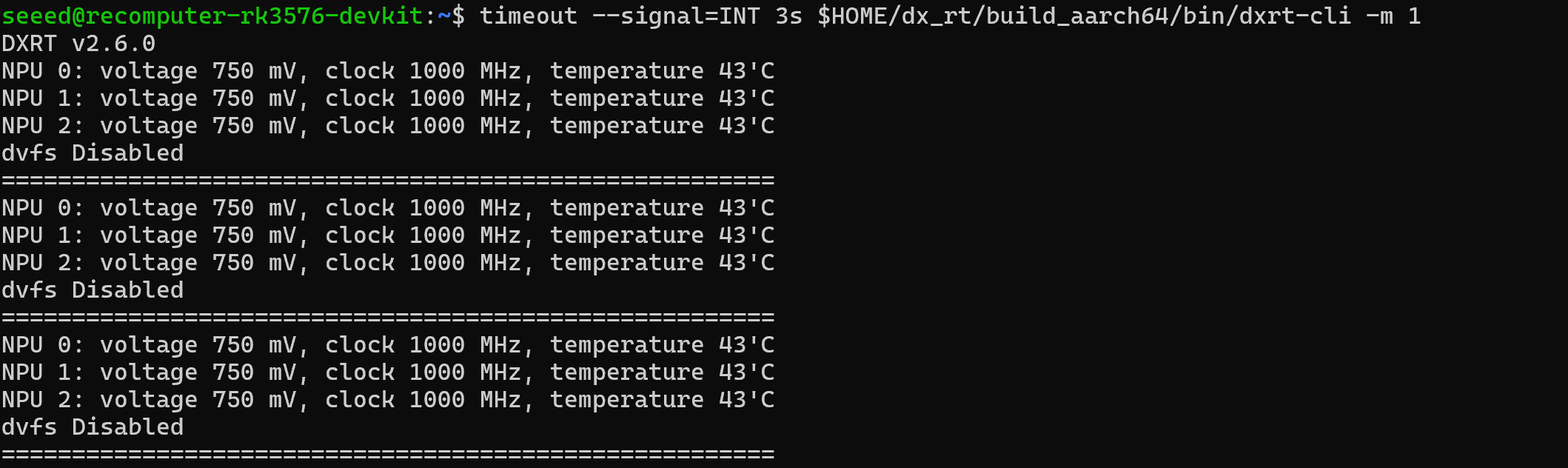
The monitor displays the voltage, clock, temperature, and DVFS status of all three NPU cores.
Install Model Zoo (optional)
To browse the available models, install the Model Zoo package and its Python dependencies from the extracted DX-All-Suite directory:
sudo apt-get install -y python3-venv
cd ~/dx-all-suite/dx-modelzoo
python3 -m venv .venv
source .venv/bin/activate
python -m pip install --upgrade pip
python -m pip install -e .
dxmz list
dxmz info resnet50_224x224
DXNN models depend on the DX-COM and DX-RT versions used to create them. Before running a model, check the DEEPX Model Zoo page to confirm that the model, Runtime, and firmware versions are compatible. This guide uses DX-RT v2.6.0 with firmware v1.6.0.
Troubleshooting
lspcidoes not list1ff4:0001: power off the board, reseat the M.2 module, then check the M.2 PCIe slot and board firmware configuration./dev/dxrt0is missing: confirm that thedx_dma_pciedriver is loaded and that its version supports the device.- DX-RT 3.x fails during initialization on firmware
v1.6.0: use the verified legacy v2.6.0 path or update firmware only with the DEEPX-supported migration procedure for the exact module revision. dxtopreports an undefined symbol or requests an incompatible service: the installeddxtopbelongs to a different DX-RT generation. Use the v2.6.0dxrt-cli -m 1command shown above, or install a complete version-matched tool set.