reComputer RK3576 ASUS UGen300 USB AI Accelerator
Last updated:
The ASUS UGen300 is a USB AI accelerator built around the Hailo-10H processor with 8 GB of LPDDR4 memory. This tutorial shows how to connect it to a reComputer RK3576, install the version-matched ASUS USB driver and HailoRT, update the device firmware when required, and verify that HailoRT can communicate with the accelerator.
Before you begin
Have the UGen300, its data cable, and terminal access with sudo privileges. Check existing Hailo packages before installing the USB stack. Follow the firmware-matching step only after checking the installed versions.
Tested configuration
| Item | Tested configuration |
|---|---|
| Host | reComputer RK3576 Dev Kit |
| Operating system | Armbian-unofficial 26.05.0-trunk, Debian 12 (bookworm) |
| Kernel | 6.1.115-vendor-seeed-rk3576 |
| Host architecture | AArch64 (arm64) |
| Accelerator | ASUS UGen300 USB AI Accelerator, Hailo-10H, 8 GB LPDDR4 |
| USB device ID | 0b05:1d6f |
| Negotiated USB link | 5000M on the tested RK3576 port |
| USB driver | hailort-usb-driver 5.3.0 |
| Runtime | HailoRT 5.3.0 |
| Device firmware after update | 5.3.0 (release,app) |
ASUS specifies a USB 3.1 Gen 2 Type-C interface with a maximum link rate of 10 Gbps. The tested RK3576 connection negotiated at 5 Gbps, as reported by lsusb -t.
Connect and inspect the accelerator
Connect the UGen300 directly to a USB 3 host port with the bundled cable or another USB 10 Gbps Type-C cable.
Check that the host can see the accelerator:
lsusb -d 0b05:1d6f
Before the Hailo image is loaded, a newly connected device can appear as UGen300 USB Loader. Check the negotiated link speed as well:
lsusb -t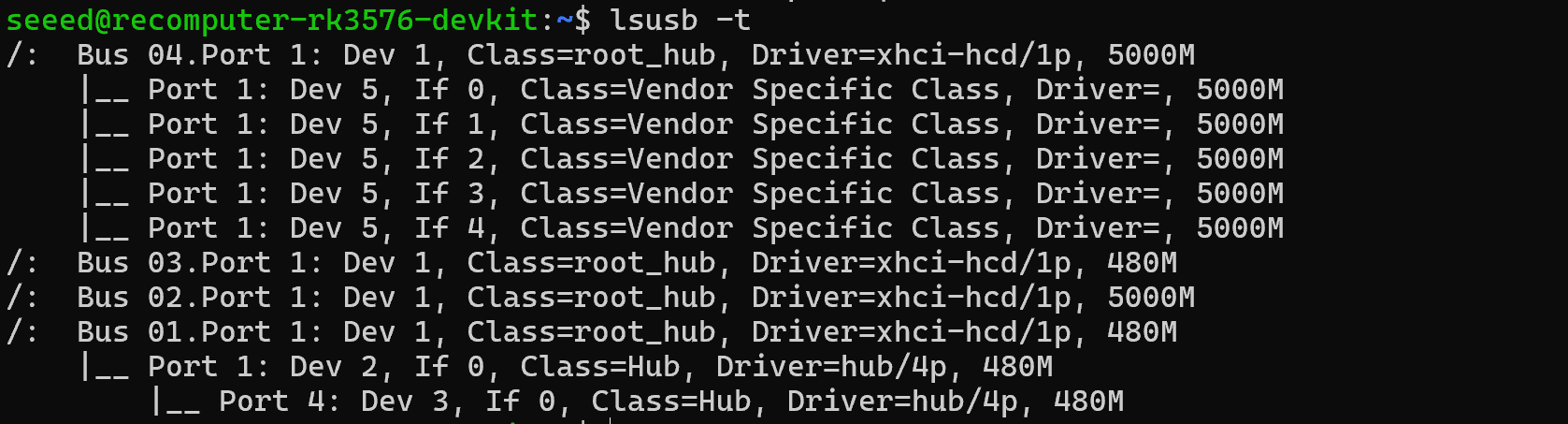
The UGen300 branch reported 5000M on the tested reComputer RK3576. A 480M entry means that the connection fell back to USB 2.
Check existing accelerator software
The ASUS manual states that the HailoRT PCIe and USB drivers cannot be installed at the same time, and that Hailo-8 and Hailo-10H drivers cannot coexist. Inspect the installed packages before continuing:
dpkg -l | grep -Ei 'hailo|ugen'Remove an existing Hailo PCIe or Hailo-8 driver before installing the UGen300 USB package. Do not remove an unrelated accelerator stack unless you intend to switch away from it.
Download and verify the ASUS driver package
Download the ARM64 USB driver package published on the ASUS UGen300 support page:
mkdir -p ~/ugen300
cd ~/ugen300

curl -fL -o UGen300_USB_5.3.0_driver_Linux_arm64.zip \
  https://dlcdnets.asus.com/pub/ASUS/AI_ACCELERATION_DEVICE/Driver/UGen300_USB_5.3.0_driver_Linux_arm64.zip
Verify the archive before extracting it. The checksum below is the SHA-256 value published by ASUS for version 5.3.0:
echo '6a98b46d8f88a7911fea142a8b3f4a69715f5166cc112e1352eba93f8a2bcbc4  UGen300_USB_5.3.0_driver_Linux_arm64.zip' \
  | sha256sum --check
Extract the archive:
unzip UGen300_USB_5.3.0_driver_Linux_arm64.zip
cd UGen300_USB_5.3.0_driver_Linux_arm64
The archive contains the ARM64 HailoRT package and its version-matched user-space USB driver. The USB package also contains the Hailo-10H image used when the device starts.
Install the USB driver and HailoRT
Install both version-matched packages together:
sudo apt install ./hailort_5.3.0_arm64.deb \
  ./hailort-usb-driver_5.3.0_arm64.deb
The USB driver installs a udev rule for 0b05:1d6f. When a UGen300 in Loader mode is detected, the rule starts the Hailo USB image loader and the device re-enumerates.
Confirm the installed versions:
dpkg-query -W hailort hailort-usb-driver
hailortcli --version

Match the device firmware to HailoRT
Scan for the USB device and query its firmware:
hailortcli scan
hailortcli fw-control identify
If identify reports that the firmware is incompatible and explicitly asks for hailo_usb_loader fw-update, update the UGen300 flash with the image supplied by the installed USB driver:
sudo hailo_usb_loader fw-updateThe update took approximately two minutes on the tested device. Keep the RK3576 powered, leave the cable connected, and wait until the tool reports that the update completed successfully.
The UGen300 disconnects and re-enumerates during this process. If it does not return after the command finishes, unplug it, reconnect it directly to the USB host port, and wait for the udev image loader to complete.
Verify the running device
Inspect the final USB state and link speed:
lsusb -d 0b05:1d6f
lsusb -t
After the successful update and image load, the tested unit appeared as UGen300 USB AI Accelerator (Hailo-10H) instead of UGen300 USB Loader.
Verify HailoRT communication:
hailortcli scan
hailortcli fw-control identify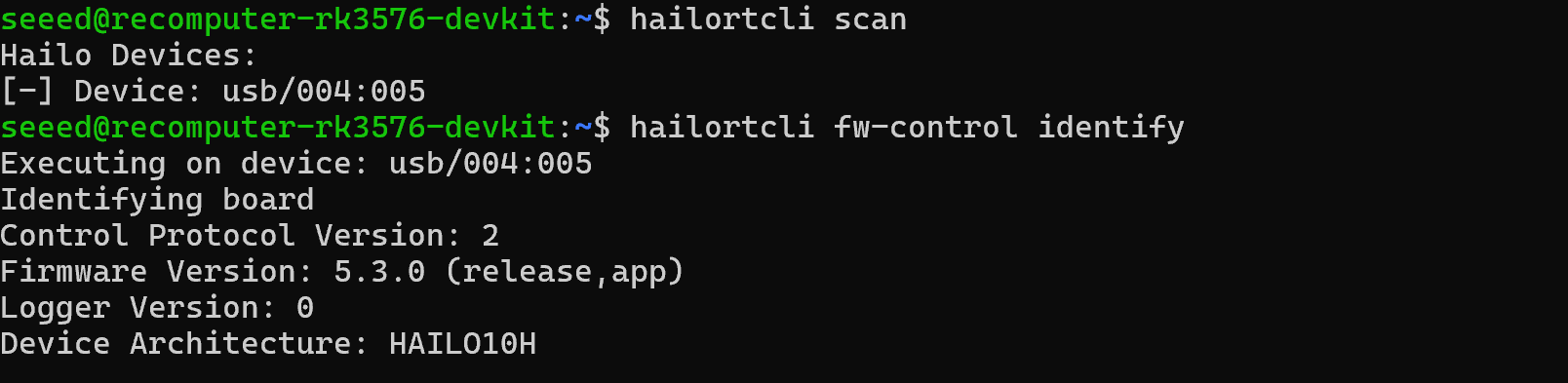
On the tested system, the final identification reported HailoRT firmware 5.3.0 (release,app) and device architecture HAILO10H.
Run a HEF model
Download the YOLOv8n HEF compiled for Hailo-10H from the Hailo Model Zoo:
mkdir -p ~/ugen300/models
cd ~/ugen300/models

curl -fL -o yolov8n.hef \
  https://hailo-model-zoo.s3.amazonaws.com/ModelZoo/Compiled/v5.3.0/hailo10h/yolov8n.hef
Confirm that the downloaded HEF is compatible with Hailo-10H, then run it for five seconds:
hailortcli parse-hef yolov8n.hef
hailortcli run2 -t 5 set-net yolov8n.hef
The parser should report HEF Compatible for: HAILO15H, HAILO10H. A completed run2 command prints the measured FPS and confirms that the model executed on the accelerator. HailoRT 5.3.0 does not support the older hailortcli run command on this device type.
Troubleshooting
lsusbdoes not show0b05:1d6f: reconnect the accelerator directly to the host, check the cable and port, then inspect recent USB events withsudo dmesg | tail -n 50.- The device remains
UGen300 USB Loader: inspect the loader messages withjournalctl -t hailo-usb --no-pager. If HailoRT reports a firmware mismatch, run the firmware update command above. hailortcli scanfinds the USB path butidentifyreports incompatible firmware: keep the driver and HailoRT at the same version, then perform the ASUS-documented firmware update.480Mappears inlsusb -t: the device negotiated at USB 2 speed. Use a USB 3 port and a cable rated for the required link speed.HAILO_LIBUSB_FAILUREorHAILO_COMMUNICATION_CLOSEDappears duringrun2: the accelerator disconnected under load. Reconnect it directly to a USB 3 host port, check the USB-C cable and power delivery, then repeathailortcli fw-control identifybefore retrying.- A previously installed Hailo PCIe or Hailo-8 stack is present: remove the conflicting Hailo driver before installing the UGen300 USB driver.
Remove the UGen300 software
Remove the USB driver and HailoRT packages with:
sudo dpkg --purge hailort-usb-driver hailort
sudo udevadm control --reload-rules