reComputer RK3576 Hailo-8 M.2 Accelerator
Last updated:
This tutorial installs the Hailo-8 PCIe driver and HailoRT on a reComputer RK3576, checks that the accelerator is ready, and runs a Hailo Model Zoo HEF on the device. The tested module is the Seeed Studio Hailo-8 M.2 Key M 2280 module, not a Hailo-8L.
Before you begin
Have the Hailo-8 Key M module and terminal access with sudo privileges. Read the kernel-header checks before installing the driver. If this system also uses a USB Hailo accelerator, review the package-conflict instructions before changing HailoRT.
System configuration
| Item | Tested configuration |
|---|---|
| Host | reComputer RK3576 Dev Kit |
| Operating system | Armbian-unofficial 26.05.0-trunk, Debian 12 (bookworm), ARM64 |
| Kernel | 6.1.115-vendor-seeed-rk3576 |
| Accelerator | Seeed Studio Hailo-8 M.2 Key M 2280 module |
| PCIe device | 1e60:2864 |
| Negotiated link | PCIe Gen2 x1, 5.0 GT/s |
| Runtime and PCIe driver | HailoRT 4.23.0, hailort-pcie-driver 4.23.0 |
| Test HEF | Hailo Model Zoo v2.17.0, centerpose_regnetx_800mf.hef, HAILO8, 512 × 512 × 3 input |
Install the module and check PCIe
Shut down the RK3576 and disconnect its power supply before installing or reseating the M.2 module. Fit the Hailo-8 in the board's M.2 Key M slot, secure it, and reconnect power.
After boot, check the PCIe function and negotiated link:
lspci -nnk -s 01:00.0
cat /sys/bus/pci/devices/0000:01:00.0/current_link_speed
cat /sys/bus/pci/devices/0000:01:00.0/current_link_width
The tested card enumerated as Hailo-8 AI Processor [1e60:2864] at 01:00.0, with a 5.0 GT/s PCIe x1 link. The bus address can differ on another system; use the address shown by lspci when checking its sysfs link files.

Download HailoRT 4.23.0
Hailo-8 uses the HailoRT 4.x stack. Download the matching ARM64 runtime and PCIe driver packages from Hailo's public Hailo-8 release directory:
mkdir -p ~/hailo8-4.23.0
cd ~/hailo8-4.23.0

curl -fL -O https://dev-public.hailo.ai/2025_10/Hailo8/hailort_4.23.0_arm64.deb
curl -fL -O https://dev-public.hailo.ai/2025_10/Hailo8/hailort-pcie-driver_4.23.0_all.deb

dpkg-deb -f hailort_4.23.0_arm64.deb Package Version Architecture
dpkg-deb -f hailort-pcie-driver_4.23.0_all.deb Package Version Architecture
The two packages must both report 4.23.0; the runtime package must report arm64. Hailo provides these direct package links in its community installation guidance.
The driver is built against the running kernel. Confirm that its matching headers and DKMS are available before installation:
ls -ld /lib/modules/$(uname -r)/build
command -v dkms
On the tested Armbian image, the header path resolves to linux-headers-6.1.115-vendor-seeed-rk3576. If either check fails, install the headers for the exact running kernel and DKMS before continuing.
Install the runtime and PCIe driver
Check for an existing Hailo installation before changing packages:
dpkg-query -W -f='${binary:Package}\t${Version}\n' | grep -i hailoIf the board previously used the ASUS UGen300 USB accelerator, remove its HailoRT 5.x runtime and USB driver before installing the Hailo-8 PCIe stack:
sudo apt-get purge hailort-usb-driver hailortInstall the 4.23.0 packages from the download directory:
cd ~/hailo8-4.23.0
sudo apt-get install ./hailort-pcie-driver_4.23.0_all.deb \
  ./hailort_4.23.0_arm64.deb
When prompted, enable DKMS so the driver is built for the running kernel. The tested installation also enabled hailort.service. The PCIe driver package includes the matching hailo8_fw.4.23.0.bin boot image; driver initialization loads it onto the card. This installation does not use hailortcli fw-update.
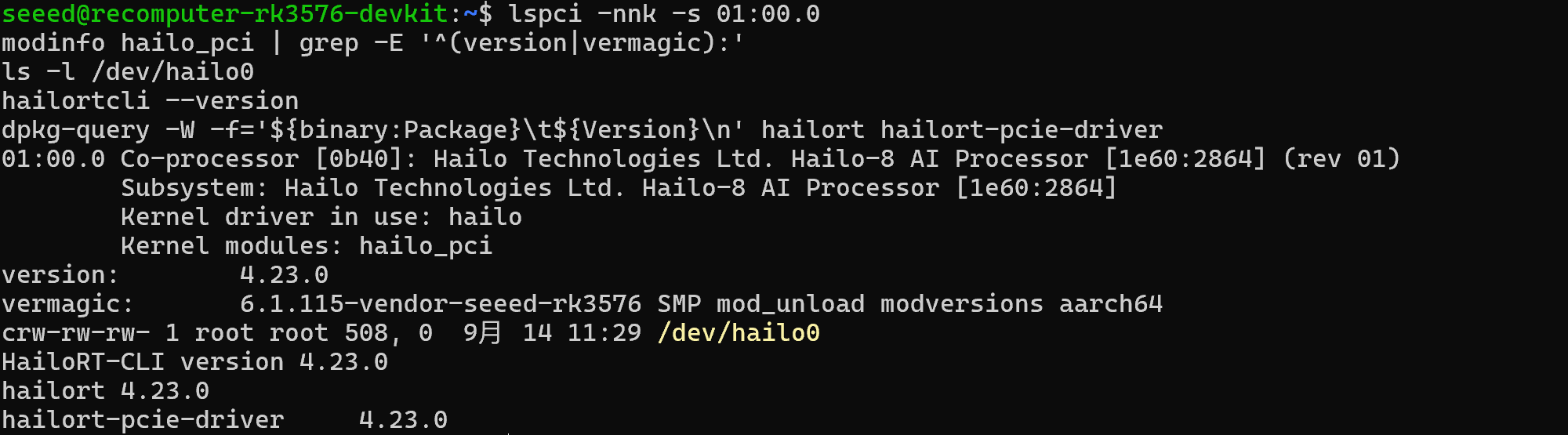
Reboot, then confirm the driver is bound and the device node exists:
sudo rebootlspci -nnk -s 01:00.0
modinfo hailo_pci | grep -E '^(version|vermagic):'
ls -l /dev/hailo0
hailortcli --versionOn the tested board, lspci reported Kernel driver in use: hailo, and both the module and HailoRT CLI reported 4.23.0.
Identify the accelerator
Use HailoRT to scan the PCIe bus and read the module information:
hailortcli scan
hailortcli fw-control identify
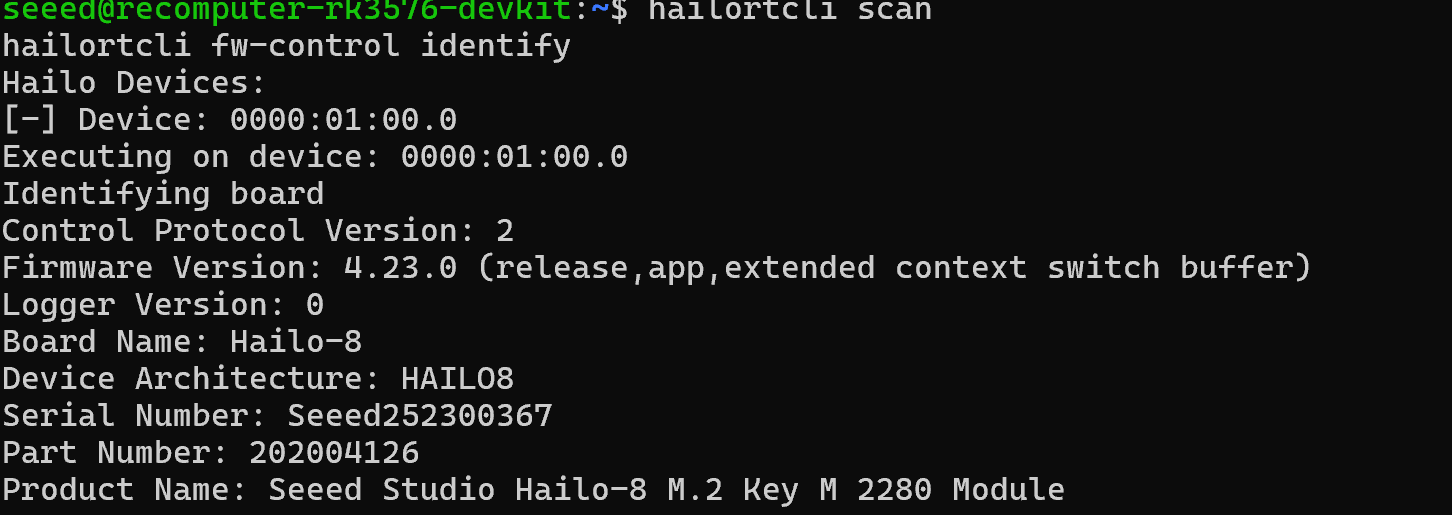
The tested device was found at 0000:01:00.0. Identification reported Device Architecture: HAILO8, Firmware Version: 4.23.0, and Product Name: Seeed Studio Hailo-8 M.2 Key M 2280 Module.
Run a Hailo Model Zoo HEF
Download the precompiled HAILO8 CenterPose model from Hailo Model Zoo v2.17.0:
cd ~/hailo8-4.23.0
curl -fL -o centerpose_regnetx_800mf.hef \
  https://hailo-model-zoo.s3.eu-west-2.amazonaws.com/ModelZoo/Compiled/v2.17.0/hailo8/centerpose_regnetx_800mf.hef

hailortcli parse-hef centerpose_regnetx_800mf.hef
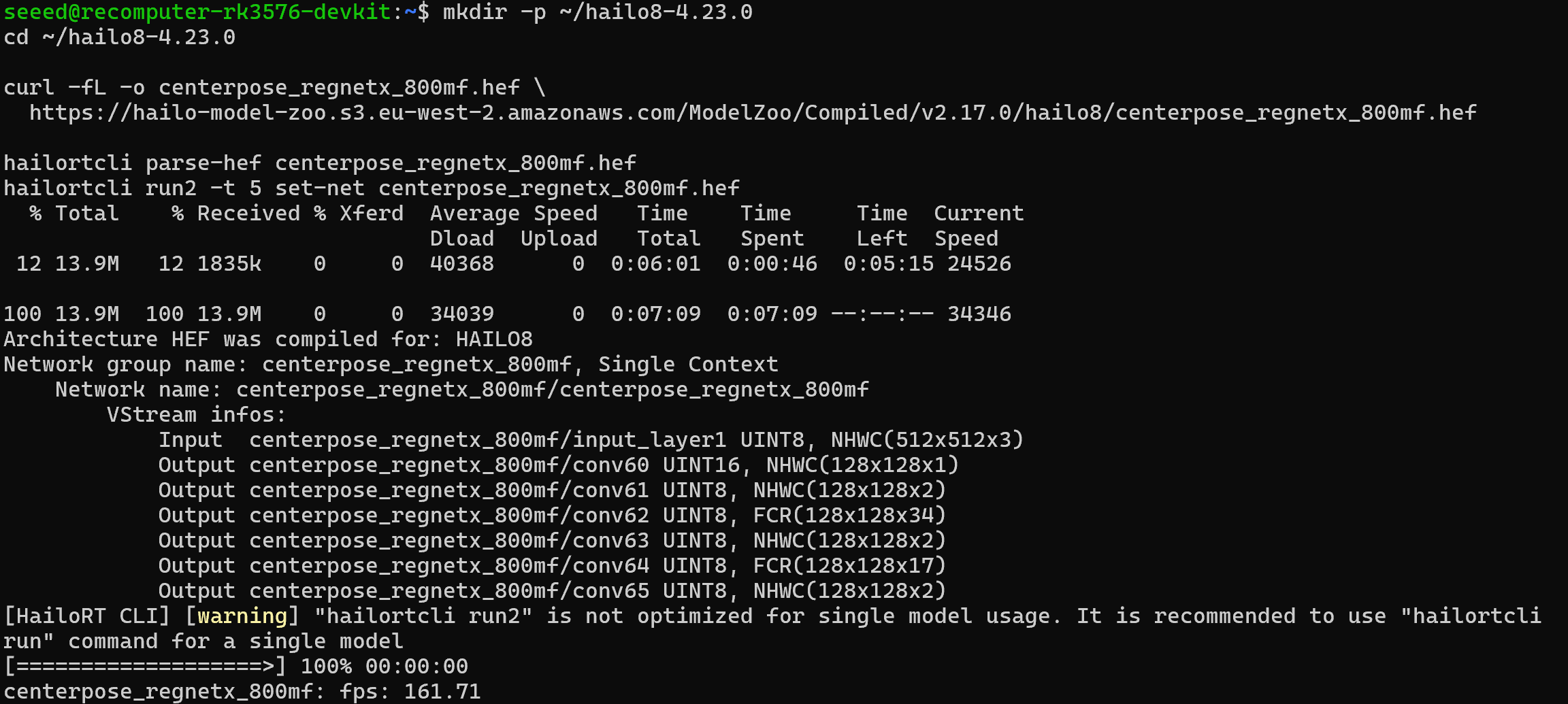
parse-hef should report Architecture HEF was compiled for: HAILO8 and an input of UINT8, NHWC(512x512x3). The tested Model Zoo v2.17.0 HEF has SHA-256 625cbd18736c87ba708f46011cc683261690e8d68f054adc0e3df1e1a925a369.
Run the network for five seconds using HailoRT's generated input data:
hailortcli run2 -t 5 set-net centerpose_regnetx_800mf.hefThe command must reach 100% and report a nonzero FPS for centerpose_regnetx_800mf. This executes inference on the accelerator; it does not decode the CenterPose output into visible keypoints. HailoRT 4.23.0 may print a warning recommending run for a single model even though run2 works for this test.
Troubleshooting
- No
1e60:2864device inlspci: fully power off the RK3576, reseat the M.2 card, and check that it is fitted in the Key M PCIe slot. - PCIe device present but no
/dev/hailo0: checkdkms status,modinfo hailo_pci, andsudo dmesg -T | grep -i hailofor a failed driver build or firmware load. - HailoRT reports a driver version mismatch: check
hailortcli --versionandmodinfo hailo_pci; both must report4.23.0. - The HEF is rejected: confirm
hailortcli parse-hefreportsHAILO8and use a Hailo-8 model from the Model Zoov2.xseries, not a Hailo-8L or Hailo-10H HEF.