Building an AI robotic arm project involves more than connecting the hardware. Developers must configure the robot, collect reliable task data, train a model, evaluate its performance, and repeat the process when the results are not good enough.
These stages often involve different tools and computing environments. SenseCraft Robotics brings device setup, teleoperation, data collection, model training, model management, and validation into one project-based workflow.
Every SenseCraft Robotics account can claim 1,000 free credits once. The credits remain valid permanently and can be used for cloud training and inference under the current platform rules.
Quick answer: SenseCraft Robotics is a robotic arm training platform that connects calibration, teleoperation, data collection, training, model management, and validation in one workflow.
What Is an AI Robotic Arm?
In this article, an “AI robotic arm” refers to a robotic arm used with a data-driven training and inference workflow. SenseCraft Robotics is the software platform that manages this workflow; it is not the robotic arm hardware itself.
In an imitation-learning workflow, a model can be trained using recorded robotic arm demonstrations. For example, an operator can guide a robotic arm through a pick-and-place task several times, record those demonstrations as a dataset, and use the dataset to train an action model.
A typical workflow includes:
- Connecting and calibrating the robotic arm
- Demonstrating the target action through teleoperation
- Recording motion and camera data
- Reviewing and cleaning the dataset
- Training an action model
- Selecting the trained model and running inference
- Evaluating the result and collecting better data when necessary
The final result depends on the hardware configuration, data quality, task consistency, training settings, and operating environment. Model training does not guarantee that the robotic arm will successfully complete every task, so testing and iteration remain essential.
Why AI Robotic Arm Development Can Be Difficult
A robotic learning project usually involves several connected systems. Hardware configuration, camera setup, dataset management, GPU training, model storage, and inference may otherwise require separate tools.
This creates several practical challenges:
- Device roles and serial ports must be configured correctly.
- The robotic arm must be calibrated before teleoperation or data collection.
- Camera views must clearly capture the robot, objects, and target area.
- Failed or obstructed demonstrations must be identified and removed.
- Training hardware and parameters must match the project requirements.
- Models must be associated with the correct device and task.
- The workspace must remain safe during data collection and inference.
SenseCraft Robotics organizes these stages within a guided workflow, reducing the need to switch between separate tools during development.
One Platform for the Robotic Arm Training Workflow
SenseCraft Robotics provides a project-based environment for managing device configurations, actions, datasets, training tasks, models, and runtime validation.
Choose Supported Hardware and Download the Software
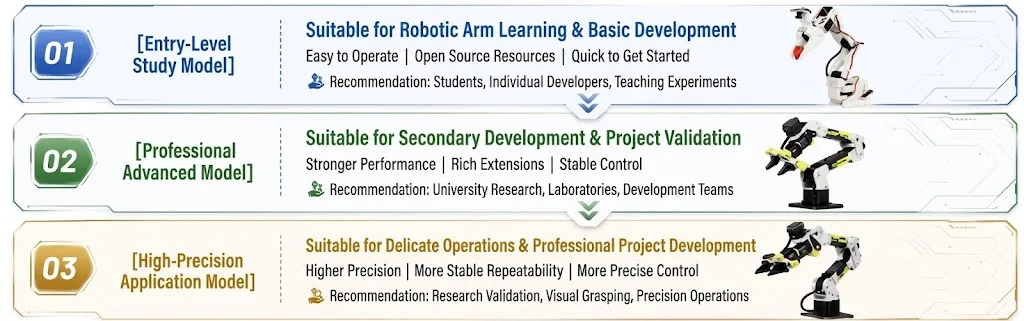
Before starting, download SenseCraft Robotics for your operating system and choose a leader–follower combination listed in the official supported-device guide. The current Wiki documents SO100/SO101, reBot B601 DM, and reBot B601 RS configurations. SO100 and SO101 share one software device option; B601 RS uses the documented CAN workflow on supported systems. Follow the model-specific Wiki instructions instead of mixing wiring, port, or calibration steps across models.
Compatible hardware options include the SO-ARM101 Low-Cost AI Arm Kit Pro, reBot Arm B601-DM, and reBot Arm B601-RS assembled kit with gripper. Check each product page and the supported-device guide before purchase because included components and supported leader/follower combinations differ.
Create and Manage a Project
Each robotic arm application begins as a project. Users can create a project with a name and description, then access its device settings, recorded actions, datasets, training tasks, models, and runtime status from the project overview.
This project structure helps keep the data and models for different tasks separate.
Connect and Calibrate the Robotic Arm
The documented device setup workflow includes:
- Selecting the robotic arm configuration
- Binding the correct device ports
- Calibrating the leader and follower arms
- Verifying teleoperation
- Connecting and checking the cameras
Calibration and teleoperation should be completed before collecting data.
If the follower arm moves in the wrong direction, responds inconsistently, or does not follow the leader arm, users should return to the device configuration and calibration steps before continuing.
Demonstrate and Record an Action
Teleoperation allows an operator to guide the follower arm through a target task using the leader arm. The action can be recorded and replayed to check whether the movements and gripper behavior are complete and consistent.
For example, the documented reBot Arm 102 and B601 DM workflow demonstrates a task in which the robotic arm:
- Moves toward an object at position A
- Grasps the object
- Transfers it to position B
- Releases the object
- Returns to its initial position
The same workflow may be adapted to other suitable tasks, such as sorting, moving, packing, pressing buttons, or inserting and removing objects. Actual results will depend on the hardware, task design, collected data, and operating environment.
Collect and Review Training Data
Training data is created by recording repeated demonstrations of the target task.
The reBot Arm guide recommends collecting data in smaller batches. This makes it easier to identify hardware disconnections, unsuccessful actions, camera problems, or software issues before they affect a larger dataset.
After collection, users can:
- Review recorded episodes
- Replay actions and camera footage
- Identify failed or incomplete demonstrations
- Remove abnormal episodes
- Create a cleaned copy of a dataset
- Merge compatible datasets
Datasets intended for merging should use consistent task descriptions, device configurations, and camera arrangements. During initial experiments, keeping the object type, camera placement, background, and lighting reasonably stable can also make the collected demonstrations more consistent.
For the Wiki’s beginner fixed-position A-to-B example, about 20 valid episodes are a starting recommendation. Intermediate or variable tasks may require around 50 episodes, while complex or long-duration tasks may require substantially more. These figures are guidance, not a guarantee of task success.
Configure Model Training
Once a dataset is ready, users can select it and configure a training task.
In the documented reBot Arm workflow, users can choose between:
- Cloud training: Use cloud GPU resources and consume platform credits according to the selected configuration and actual GPU usage.
- Local training: Train on the user’s computer without consuming cloud-training credits. It requires a compatible runtime, dependencies, disk space, and sufficient compute resources for the selected policy.
The current documented workflow uses ACT as the default action-control strategy.
For the fixed-position pick-and-place example, the guide suggests starting with approximately 10,000–15,000 training steps. More difficult tasks may require additional demonstrations and training steps, but increasing these values alone does not guarantee better performance.
Users can view the status of current and previous training tasks within the platform.
Manage Models and Run Validation
Completed models are available in the model section of the project. Before running a model, users should confirm that it matches the current robotic arm configuration and target task.
The documented workflow supports cloud and local inference. For local ACT runs, the Policy device setting can use the backend default or an available CPU, MPS, or CUDA device. Select an option supported by the computer and follow the current Wiki guidance.
During validation, users should observe whether the robotic arm completes the target task consistently and safely.
If the result is not satisfactory, users can return to the dataset, remove problematic demonstrations, collect additional valid episodes, retrain the model, and test it again.
This creates a repeatable development loop:
Demonstrate → Collect → Review → Train → Run → Validate → Improve
Example: Training an AI Robotic Arm for Pick and Place
A fixed-position pick-and-place task provides a practical way to understand the complete workflow.
Start by marking two positions on the work surface:
- Position A: the object’s starting point
- Position B: the target placement point
Place the cameras where they can capture the robotic arm, gripper, object, and both positions. Keep the working area clear and make sure the cameras are not obstructed.
Next, use the leader arm to guide the follower arm through the complete task. Each episode should include the full process of grasping the object at position A, moving it to position B, releasing it, and returning the arm to its initial position.
Review the recordings and remove episodes containing:
- Failed grasps
- Dropped or unstable objects
- Incomplete movements
- Camera obstruction
- Video lag or missing frames
- Unexpected interruptions
- Unsafe or uncontrolled movements
After reviewing the dataset, configure a training task and run the resulting model with the connected robotic arm.
If performance is unreliable, check whether the issue may be related to inconsistent demonstrations, abnormal episodes, camera placement, insufficient data, environmental changes, or a mismatch between the selected model and the current setup.
The objective of the first experiment is to establish a controlled and repeatable workflow. A successful result in one setup does not guarantee the same performance with different objects, positions, lighting conditions, cameras, or hardware configurations.
Flexible Cloud Training with Clear Credit Usage
Before a cloud training task begins, SenseCraft Robotics estimates the required credits based on the selected GPU, configured training steps, and expected runtime.
After the task runs, credits are settled according to the actual GPU usage time. Any unused portion of the estimated credits is returned automatically.
According to the current campaign information, credits are not consumed when:
- A task is waiting in the queue
- A training task fails to start
- A platform issue prevents the task from running
These rules allow users to review the estimated credit requirement before starting a cloud training task while settling the final amount according to actual GPU usage.
Get 1,000 Free Credits Once per Account
Every account can claim 1,000 credits once for cloud training and inference. The credits remain valid permanently.
The current offer follows these rules:
- Each account can claim the offer once.
- The credits remain valid permanently.
- The credits can be used for cloud training according to the current platform credit rules.
This gives users a starting point for exploring cloud training without first configuring a local training environment.
Credit availability and usage rules are subject to the latest information displayed in SenseCraft Robotics.
Get started: Download SenseCraft Robotics and follow the official Wiki guides
Who Is SenseCraft Robotics For?
SenseCraft Robotics is intended for education and laboratories, robotics R\&D and proof-of-concept work, and early-stage application validation. Teams can organize device configuration, datasets, training tasks, models, and validation in one project, but results still depend on task design, data quality, and engineering verification.
Research and development teams can use the platform to organize early experiments involving suitable tasks such as grasping, moving, and sorting objects.
Early-Stage Application Validation
Developers can collect task data and evaluate model behavior before moving toward a larger integration.
Testing at this stage may help identify issues involving data quality, camera coverage, task design, or environmental consistency. It does not replace the engineering validation required for deployment in a real application.
Safety and Practical Limitations
An AI robotic arm is a physical system and should always be operated in a controlled workspace.
Before calibration, teleoperation, data collection, or inference:
- Secure the robotic arm to a stable surface.
- Remove people, loose cables, fragile objects, and other obstacles from its operating range.
- Check all hardware connections before applying power.
- Disconnect power before connecting or removing applicable power and signal cables.
- Confirm that the cameras provide a clear and unobstructed view.
- Stop the robot immediately if uncontrolled movement or a collision risk occurs.
- Do not disconnect or disassemble the robotic arm while it is running.
Model performance can vary with the dataset, object position, lighting, camera placement, hardware condition, task complexity, and training settings.
A successful demonstration proves that a particular workflow worked under its recorded conditions. It does not demonstrate universal reliability, autonomous operation in every environment, or suitability for industrial deployment.
Frequently Asked Questions
What is SenseCraft Robotics?
SenseCraft Robotics is a robotic arm training platform that connects calibration, teleoperation, data collection, training, model management, and validation within one project workflow.
Can beginners use SenseCraft Robotics?
SenseCraft Robotics provides guided setup and workflow steps intended to make the robotic arm training process more accessible. Beginners should still follow the hardware documentation and safety instructions carefully and begin with a simple, controlled task.
Do I need a local GPU to train a robotic arm?
Not if you use cloud training. SenseCraft Robotics provides a cloud-training option that uses platform credits.
Local training does not consume cloud-training credits, but it requires a compatible runtime, dependencies, disk space, and sufficient compute resources for the selected policy.
Does local inference use my computer’s GPU?
SenseCraft Robotics supports local and cloud inference. For local ACT runs, the Policy device setting can use the backend default or an available CPU, MPS, or CUDA device, depending on the computer and current software support.
How many demonstrations are required?
There is no universal number.
For the Wiki’s beginner fixed-position A-to-B example, about 20 valid episodes are a starting recommendation. Intermediate or variable tasks may require around 50 episodes, while complex tasks may require more.
How many training steps should I use?
For the fixed-position pick-and-place example, the guide suggests approximately 10,000–15,000 training steps as an initial range.
The appropriate number depends on the task, dataset, selected training hardware, and actual model performance. More training steps do not automatically guarantee a better result.
What can cause poor model performance?
Possible causes include unsuccessful demonstrations, abnormal episodes, inconsistent task execution, insufficient data, camera obstruction, changing environmental conditions, or using a model that does not match the current device and task.
How do the 1,000 free credits work?
Every SenseCraft Robotics account can claim 1,000 credits once. The credits remain valid permanently and may be used for cloud training and inference under the current platform rules.
The credits can be used for cloud training according to the current platform rules. Users should check the latest information displayed in the platform before starting a task.
Start Building Your AI Robotic Arm Workflow
Developing an AI robotic arm requires a repeatable process for connecting hardware, collecting reliable data, training a model, and validating the result.
SenseCraft Robotics brings these stages into one project-based workflow for education, research, proof-of-concept development, and early application validation.
Download SenseCraft Robotics, review the official setup guides, and choose supported hardware before starting your first project.
Comments
Leave a reply. It will appear after moderation.