YOLO11 Quantization Comparison on reComputer RK3576
Convert YOLO11n from ONNX to RKNN and compare FP16, INT8, and W4A16 model size, inference speed, runtime memory, and COCO accuracy on reComputer RK3576.
YOLO11 Quantization Comparison on reComputer RK3576
Can a computer-vision model really run at 4-bit precision on Rockchip hardware? Is RK3576 the only Rockchip platform that supports it, and does a smaller model automatically run faster?
This project converts the same YOLO11n ONNX model into FP16, INT8, and W4A16 RKNN models, runs all three on a reComputer RK3576, and evaluates them under one repeatable test protocol.
The result is not simply “fewer bits are better.” W4A16 produced the smallest model file, but INT8 delivered the best balance of throughput and accuracy.
What 4-bit means on RK3576
In W4A16, W describes the weight precision and A describes the activation precision:
| Format | Weights | Activations | Common description |
|---|---|---|---|
| FP16 | 16-bit floating point | 16-bit floating point | Half precision |
| W8A8 | 8-bit integer | 8-bit integer | INT8 quantization |
| W4A16 | 4-bit integer | 16-bit floating point | 4-bit weight quantization |
| W4A4 | 4-bit integer | 4-bit integer | Full or pure INT4 |
W4A16 stores weights at 4 bits while keeping activations at 16 bits. It is therefore a 4-bit weight-quantized model, not a fully W4A4 network.
This distinction matters for computer vision. Weights are fixed and can be analyzed offline, while activations change for every image. Detection heads, small-object features, confidence scores, and bounding-box regression are often sensitive to activation quantization. Keeping 16-bit activations reduces this risk, but it also means runtime memory does not shrink in proportion to model-file size.
RKNN-Toolkit2's changelog explicitly documents W4A16 symmetric quantization for RK3576. This should not be generalized into “RK3576 is the only Rockchip SoC capable of any INT4 computation.” Other chips may expose specific low-bit operations, but that is not the same as the complete RKNN W4A16 CV conversion workflow used here.
Hardware and software
- Board: reComputer RK3576, 8 GB
- OS: Debian 12 / Armbian
- Kernel:
6.1.115-vendor-seeed-rk3576 - RKNN-Toolkit2: 2.3.2
- RKNN-Toolkit-Lite2: 2.3.2
- RKNN Runtime: 2.3.0
- RKNPU driver: 0.9.8
- Model: optimized YOLO11n ONNX from the Rockchip Model Zoo
- Input: 640 × 640 RGB
- Calibration set: the same fixed 20 COCO val2017 images for INT8 and W4A16
- Accuracy set: a fixed 1,000-image COCO val2017 subset, random seed 3576
Conversion workflow
YOLO11n ONNX
      +-- FP16 RKNN ------------------------+
      +-- INT8/W8A8 + calibration ---------+--> RK3576 NPU --> benchmark
      +-- W4A16 + GDQ + group128 ----------+
1. Install RKNN-Toolkit2
python3 -m venv .venv
source .venv/bin/activate

python -m pip install \
  rknn-toolkit2==2.3.2 \
  rknn-toolkit-lite2==2.3.2 \
  numpy==1.26.4 onnx==1.16.1 \
  onnxruntime opencv-python pycocotools psutil
2. Prepare representative calibration data
Create dataset.txt with one image path per line:
./calibration/000000000139.jpg
./calibration/000000000285.jpg
./calibration/000000000632.jpg
Use images representative of the real deployment environment. Keep the ONNX source and calibration set identical when comparing quantization settings.
3. Establish an FP16 baseline
from rknn.api import RKNN

rknn = RKNN(verbose=True)
rknn.config(
    mean_values=[[0, 0, 0]],
    std_values=[[255, 255, 255]],
    target_platform="rk3576",
    float_dtype="float16",
    optimization_level=3,
)
rknn.load_onnx(model="yolo11n.onnx")
rknn.build(do_quantization=False)
rknn.export_rknn("yolo11n_fp16.rknn")
This configuration lets the RKNN runtime accept uint8 RGB input and normalize it from 0–255 to 0–1. Do not divide by 255 again in the application.
4. Build INT8/W8A8
Use the same preprocessing configuration, then add:
quantized_dtype="w8a8"
quantized_algorithm="normal"
quantized_method="channel"
Build the model with calibration enabled:
rknn.build(do_quantization=True, dataset="dataset.txt")
rknn.export_rknn("yolo11n_int8.rknn")
5. Build W4A16
The basic w4a16 + normal + channel configuration compiled and ran, but accuracy collapsed. The strongest W4A16 configuration in this test was GDQ + group128:
rknn = RKNN(verbose=True)
rknn.config(
    mean_values=[[0, 0, 0]],
    std_values=[[255, 255, 255]],
    target_platform="rk3576",
    quantized_dtype="w4a16",
    quantized_algorithm="gdq",
    quantized_method="group128",
    float_dtype="float16",
    optimization_level=3,
)
rknn.load_onnx(model="yolo11n.onnx")
rknn.build(do_quantization=True, dataset="dataset.txt")
rknn.export_rknn("yolo11n_w4a16_gdq_group128.rknn")
Regular W4A16 conversion took approximately 27 seconds on this board. GDQ-group128 took approximately 641 seconds. This is an offline conversion cost and does not recur during inference.
group128 is not universally optimal. Compare channel quantization, several group sizes, and GDQ on your own validation data.
Run the model on RK3576
import cv2
import numpy as np
from rknnlite.api import RKNNLite

runtime = RKNNLite()
runtime.load_rknn("yolo11n_w4a16_gdq_group128.rknn")
runtime.init_runtime(core_mask=RKNNLite.NPU_CORE_0_1)

image = cv2.imread("test.jpg")
image = cv2.resize(image, (640, 640))
image = cv2.cvtColor(image, cv2.COLOR_BGR2RGB)
outputs = runtime.inference(
    inputs=[image[np.newaxis, ...].astype(np.uint8)]
)

runtime.release()
This minimal example only checks that the model starts. Production YOLO11 inference must use matching letterbox preprocessing, DFL decoding, class filtering, NMS, and coordinate restoration.
Benchmark protocol
For performance, each model used NPU_CORE_0_1, 50 warm-up iterations, and 500 measured inferences. The complete sequence was repeated three times with rotated model order. Latency covers the RKNNLite inference() call and excludes image loading, letterboxing, and NMS.
For accuracy, all models used the same 1,000 COCO images, letterbox settings, confidence threshold of 0.001, NMS threshold of 0.65, and COCOeval configuration.
Real inference comparison
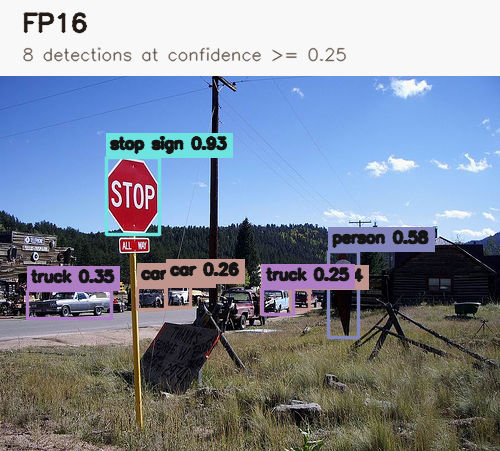
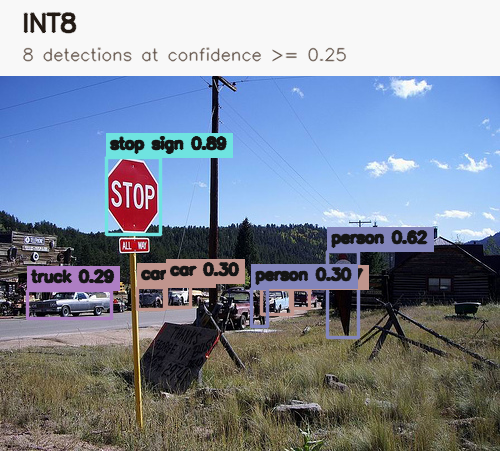
The following images use the same COCO val2017 source image (000000222094.jpg) and the predictions saved during the formal 1,000-image evaluation. For readability, only detections with confidence of at least 0.25 are drawn; NMS remains 0.65.
FP16 — 8 detections
INT8 — 8 detections
W4A16 GDQ-group128 — 2 detections
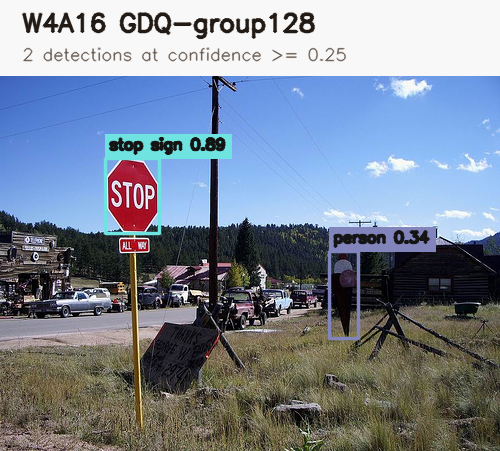
This example was selected because the quantization difference is easy to see. It is an illustration, not a substitute for the aggregate COCO AP results below.
Results
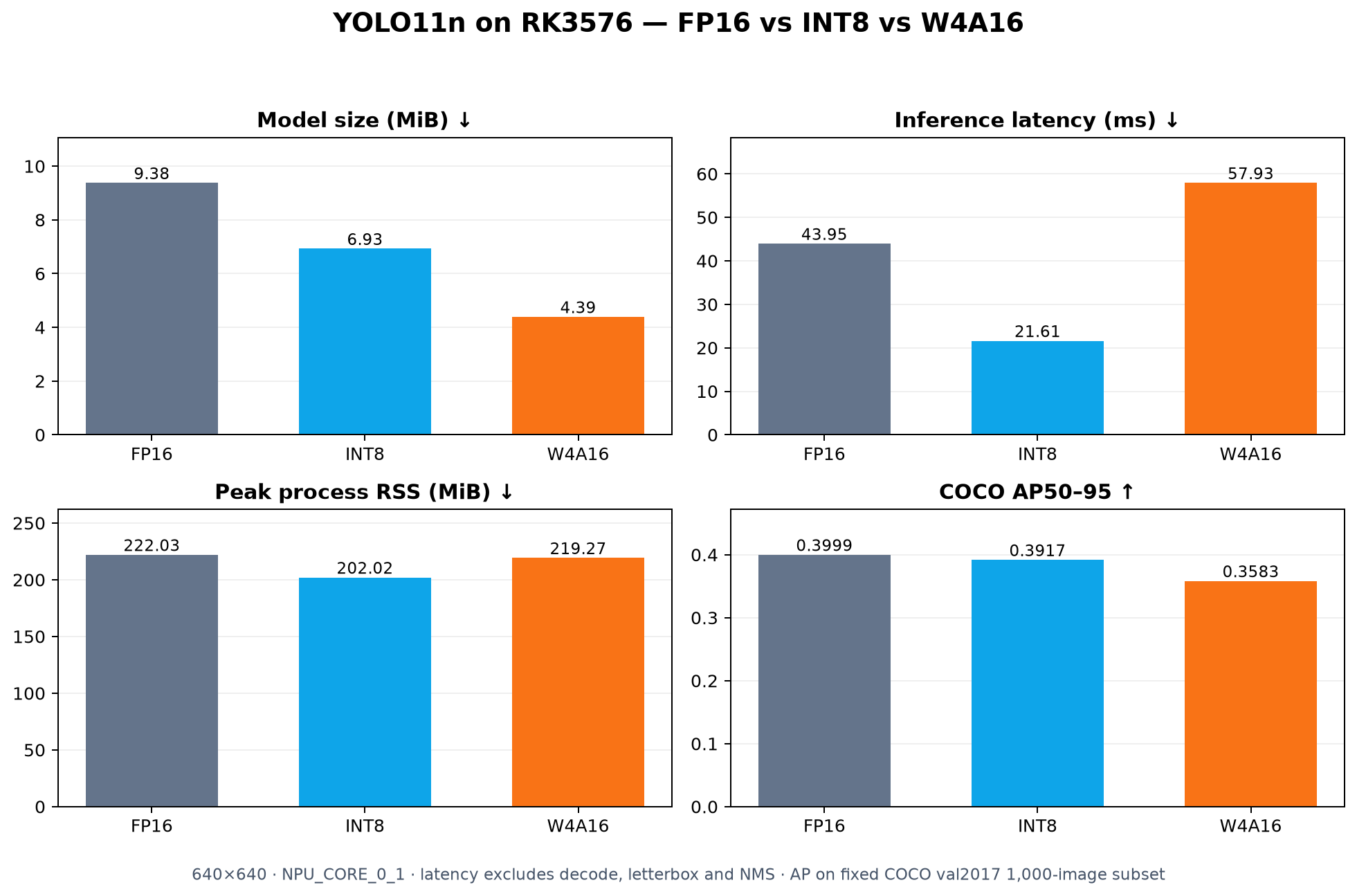
| Precision | Model size | Mean latency | Throughput | Peak RSS | AP50–95 |
|---|---|---|---|---|---|
| FP16 | 9.38 MiB | 43.95 ms | 22.76 FPS | 222.03 MiB | 0.3999 |
| INT8 | 6.93 MiB | 21.61 ms | 46.36 FPS | 202.02 MiB | 0.3917 |
| W4A16 GDQ-group128 | 4.39 MiB | 57.93 ms | 17.30 FPS | 219.27 MiB | 0.3583 |
INT8 reached approximately 2.04× the FP16 throughput while losing only 0.82 AP points.
W4A16 reduced the RKNN file to 46.8% of the FP16 size, but its throughput was 24.0% below FP16 and 62.7% below INT8. Its AP50–95 was 4.16 points below FP16.
The first normal + channel W4A16 model scored only 0.0121 AP50–95, even though it loaded and returned tensors with valid shapes. GDQ-group128 recovered accuracy to 0.3583, demonstrating why conversion success cannot replace validation.
Which precision should you choose?
- Choose FP16 to establish a reliable deployment and accuracy baseline.
- Choose INT8 when throughput and accuracy balance matter.
- Test W4A16 when model storage or weight bandwidth is the primary constraint.
For this YOLO11n deployment, INT8 was the strongest overall choice. W4A16 was useful as weight compression, but it was not an automatic speed upgrade.