GLASSFLOW / Glass Bottle Showcase is an industrial glass bottle detection and counting demo for reComputer RK3576. It combines a trained glass-bottle RKNN model with object tracking, directional line-crossing counts, and a local Web dashboard. Upload a production-line MP4 or use the bundled sample, review annotated video, and export counting events for analysis.
The project provides a starting point for bottle handling, packaging-line monitoring, and industrial visual inspection prototypes at the edge.
Demo capabilities and use cases
- Upload an MP4 or select the bundled glass-bottle video.
- Detect and track bottle bodies, then count directional crossings through a finite line segment.
- Adjust the line position, extent, direction, and detection confidence for a different video.
- Review analysis progress, seek through result video, and download MP4, JSON reports, and CSV events.
- Keep task history across restarts, cancel jobs, or delete cases through the interface.
- Switch the application between Chinese and English, with the language preference saved.
Use the demo to evaluate counting stations and visualize bottle-transfer events before integrating vision into a production process. Validate counting accuracy, camera placement, lighting, occlusion handling, security, and runtime stability for the actual line.
Requirements
- reComputer RK3576 running ARM64 Linux, with Docker and a working NPU kernel driver.
- A user with Docker permissions, plus Bash,
tar, andsha256sum. - At least 3 GB of free disk space for a fresh installation, plus space for videos and results.
- A browser device on the same trusted network, with access to TCP port
8089. - The release archive and its matching checksum file in the same directory.
This package targets RK3576.
Download the release package
The bundle includes an ARM64 Docker image, the model, application source, a sample video, deployment documentation, and validation evidence. It does not include the complete training dataset or training environment.
Verify the package
Run this command from the directory containing both downloaded files:
sha256sum -c glass-bottle-showcase-rk3576-20261116.tar.gz.sha256Continue only when verification reports OK. If it fails, download both files again
before installing.
Install and run
After verification, extract the archive and run the installer:
tar -xzf glass-bottle-showcase-rk3576-20261116.tar.gz
cd glass-bottle-showcase-rk3576-20261116
bash install.sh
The installer verifies SHA256SUMS, loads the bundled image, and starts the service
without pulling an image online. The default port is 8089, and persistent data is
stored under the installation directory. For a complete quick start:
sha256sum -c glass-bottle-showcase-rk3576-20261116.tar.gz.sha256
tar -xzf glass-bottle-showcase-rk3576-20261116.tar.gz
cd glass-bottle-showcase-rk3576-20261116
bash install.sh
To specify the port and data directory:
GLASSFLOW_PORT=8089 \
GLASSFLOW_DATA=/home/rk76/glass-bottle-showcase/data \
bash install.sh
The installer exits if a container with the same name already exists. See the upgrade instructions below before replacing an existing installation.
Open the Web UI
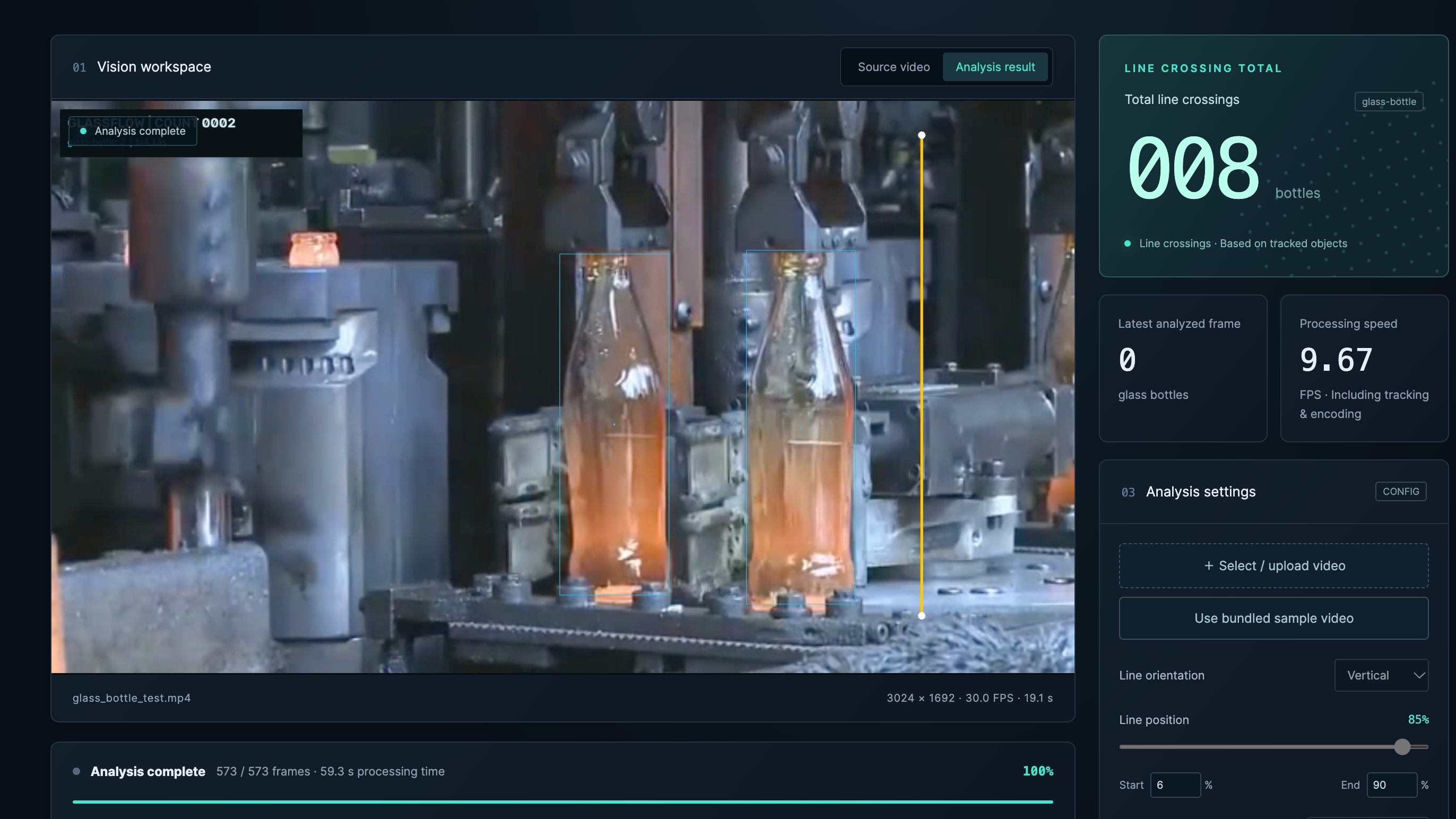
Open the following address from a browser that can reach the RK3576:
http://<RK3576_IP>:8089Replace <RK3576_IP> with the board's actual IP address. If you changed the port,
use the corresponding port in the URL.
Run the bundled example
- Click Use bundled sample video, or upload
source/video/glass_bottle_test.mp4from the bundle. - Use the default horizontal counting line: 48% height, spanning 35%–90% of the width, upward direction, confidence
0.25. - Click Start analysis and wait for all 573 frames to finish.
- Review playback, seeking, and total crossings; download the JSON report and CSV events.
- Switch between EN and 中文, then reload to check that the preference persists.
The sample is 19.1 seconds long: 573 frames, 3024×1692, 30 FPS, H.264. It is included
at source/video/glass_bottle_test.mp4 in the bundle and /app/video/glass_bottle_test.mp4
in the image. Its checksum can be checked against the bundle records. The bundled-sample
button uses the normal upload workflow.
Understand the counting results
The default line counts upward bottle transfers through that segment, rather than every bottle visible in the recording. Each track counts at most once; first appearing on one side does not itself count. Reconfigure the line and direction for other videos. Occlusion, mechanical transfer, recirculation, and fragmented tracks can affect the result. Counting accuracy requires manually labelled crossing events as ground truth.
The application processes every frame offline, with one active job at a time. MP4 inputs are limited to 200 MB, 10 minutes, 4096×2160, and 1–120 FPS. Results retain the source frame rate, fit within 1920×1080 with the aspect ratio preserved, and use H.264/yuv420p with faststart and no audio. A 30 FPS source video does not imply 30 FPS processing.
Model and bundle details
The model detects glass-bottle bodies, not can tops, and has no separate plastic-bottle or defect class. The supplied model's SHA-256 is:
9c3999392d3bc765e120f0b127c24242cb8bd96149c1bb942321daf7c2913db8- Input: 640×640, RGB NHWC
uint8, batch 1, letterbox padding value114. - Normalization is included in the RKNN compilation configuration; do not divide by 255 again.
- The ONNX graph has nine outputs across three scales. RKNN removes constant output
462and returns eight tensors; the application restores the constant frommodel/462.npybefore DFL16 decoding and NMS. - Defaults: confidence
0.25, NMS IoU0.7. - Compilation: RKNN Toolkit2
2.3.2; the image includes Lite22.3.2and the runtime.
glass-bottle-showcase-rk3576-20261116/
  glass-bottle-showcase-rk3576.image.tar.gz
  install.sh
  README_zh.md
  validation.md
  SHA256SUMS
  source/
    .dockerignore
    model/glass_bottles_rk3576.rknn
    model/462.npy
    model/provenance/
    video/glass_bottle_test.mp4
    showcase/{app.py,detector.py,tracker.py,static/,tests/,Dockerfile,...}
  validation/
Read validation.md and validation/ for release-specific evidence. Model structure,
classes, and historical training evaluations are under source/model/provenance/.
Those historical model metrics do not establish counting accuracy for this demo video.
Build from source
Build natively on RK3576. The Dockerfile pins the following base-image digest, installs FFmpeg and SciPy, and copies the model, sample video, and application:
ghcr.io/seeed-projects/recomputer-rk-cv/rk3576-yolo11@sha256:428363ee6526f670733b66d211c817892f5aedf5bceeeacf9e0aba9567fdcb27From the directory containing the extracted release:
cd glass-bottle-showcase-rk3576-20261116/source
docker build --pull=false -f showcase/Dockerfile \
  -t glass-bottle-showcase:2026.11.16 .
The build context must contain model, video, and showcase; do not build from only
the showcase subdirectory. Source builds may require internet access. Use the bundled
image for exact deployment reproduction because APT dependencies may change.
Run one Uvicorn worker to keep the process-local NPU model and task queue serialized.
To start the built image manually:
mkdir -p /home/rk76/glass-bottle-showcase/data
docker run -d --name glass-bottle-showcase \
  --restart unless-stopped --privileged \
  --device /dev/dri/renderD128:/dev/dri/renderD128 \
  --device /dev/dri/renderD129:/dev/dri/renderD129 \
  -v /proc/device-tree/compatible:/proc/device-tree/compatible:ro \
  -v /home/rk76/glass-bottle-showcase/data:/data \
  -p 8089:8089 \
  --log-driver json-file --log-opt max-size=10m --log-opt max-file=3 \
  glass-bottle-showcase:2026.11.16
Operations and backup
Check container health, application health, logs, and bundled tests:
docker inspect glass-bottle-showcase --format '{{.State.Health.Status}}'
curl -fsS http://127.0.0.1:8089/api/health
docker logs --tail 100 glass-bottle-showcase
docker exec glass-bottle-showcase python -m unittest discover -s showcase/tests -v
Health checks do not replace a real NPU inference test. History persists in the mounted
data directory; interrupted jobs are marked interrupted. Deleting a case removes its
videos and reports after confirmation in the interface.
Before upgrading, finish or cancel jobs and back up the data directory. Then stop and remove the old container and run the new installer with the same data location:
docker stop glass-bottle-showcase
docker rm glass-bottle-showcase
GLASSFLOW_DATA=/home/rk76/glass-bottle-showcase/data bash install.sh
To export the image:
set -o pipefail
docker save glass-bottle-showcase:2026.11.16 | gzip -1 > glass-bottle-showcase-rk3576.image.tar.gz
The image includes the sample video but not historical jobs in the mounted data directory;
back up that directory separately. If bundle files change, regenerate SHA256SUMS, then
rebuild the outer archive and its .sha256 file.
Troubleshooting
Checksum verification or extraction fails
Keep the archive and .sha256 file in the same directory, with matching release dates.
Download both again if verification fails. Confirm sufficient disk space before extraction.
The Web UI does not open or video does not play
Confirm that installation succeeded and the browser uses the board's IP and configured port. Check network reachability and firewall rules. Use an H.264-capable Chrome or Edge browser for playback. Check the default listening port on the board:
ss -lnt | grep ':8089'An inherited Docker EXPOSE entry such as 8000/tcp does not establish a host listener;
use the published port mapping and ss output.
NPU initialization fails or the count is unexpected
For initialization failures, check the RK3576 model, NPU driver, device permissions, and compatible-file mount. For unexpected counts, review detection boxes, motion direction, line placement, and manually labelled crossing events. Free space by deleting unneeded completed jobs through the interface or expanding storage.