1. Project Overview
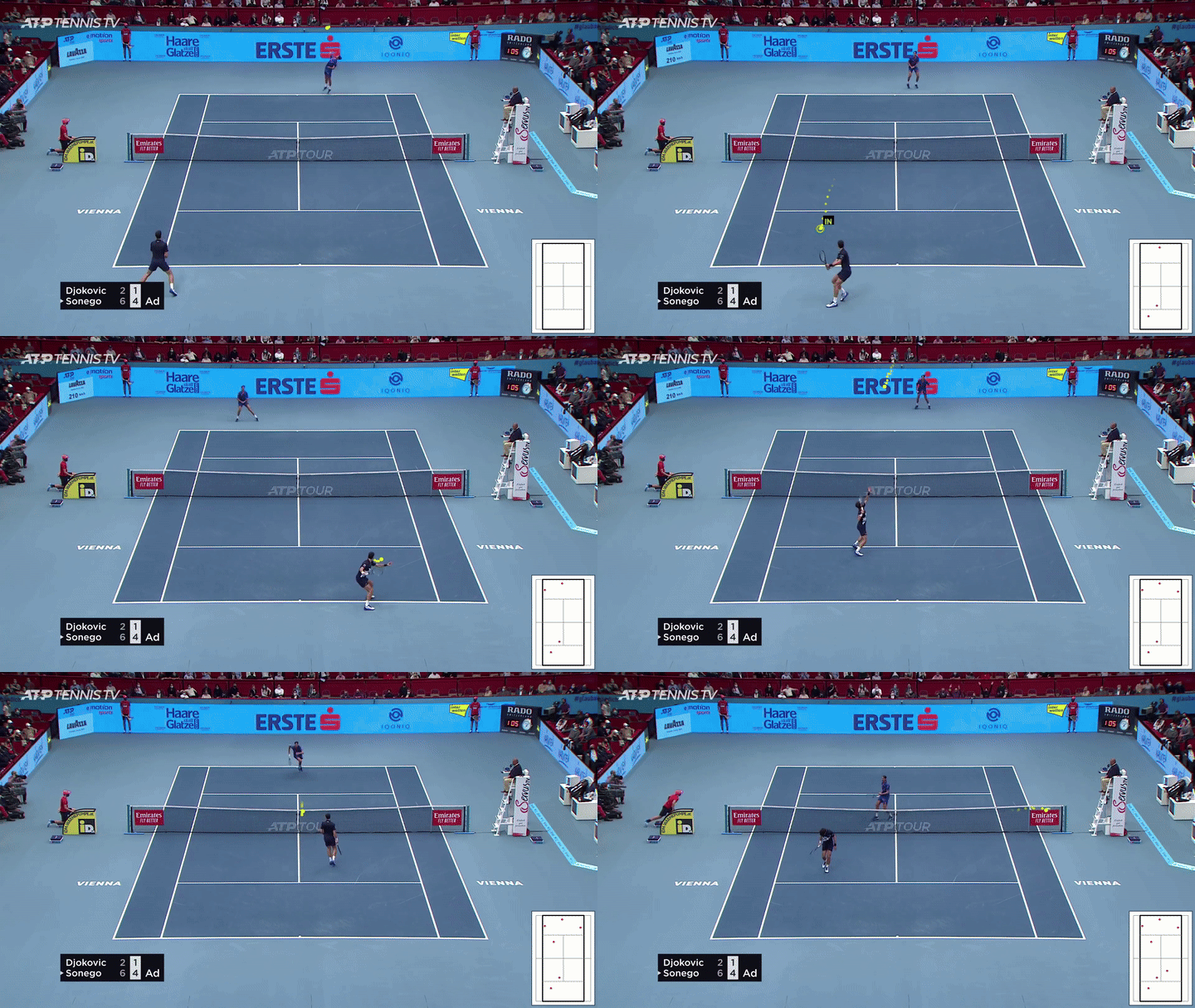
This project implements a monocular tennis-tracking and line-calling demonstration on reComputer RK3576. It locates the ball in match footage, detects court landmarks and estimates an image-to-court mapping. Trajectory analysis then proposes bounce events, and retained candidates receive an IN/OUT estimate.
Three neural networks run on the onboard NPU through the C++ RKNN API. Python handles video input, trajectory decoding, bounce detection, geometry and visualization. The project reuses existing pretrained weights without retraining.
Source code, RKNN models and deployment files: GitHub repository
Project Capabilities
- Tracks the moving tennis ball with an INT8 TrackNetV4 RKNN model and draws its recent trajectory.
- Detects court landmarks with MobileNetV3 and projects bounce candidates onto a 2D court minimap.
- Reuses a pretrained GBM to score bounce candidates from trajectory features.
- Uses YOLO11n player detection and trajectory checks to reject some racket contacts, duplicate events and poorly supported candidates.
- Produces IN/OUT estimates for retained candidates and preserves a review state near court lines.
- Exports annotated videos, per-frame trajectories, event records and runtime statistics.
- Includes the three RKNN models and portable GBM file used by the board demonstration.
- Provides a Chinese/English WebUI for video upload, sample selection, singles/doubles bounds and background progress.
- Supports task cancellation, persistent history, candidate-linked playback and result downloads.
Hardware and Software
- Seeed Studio reComputer RK3576 running 64-bit Linux.
- A compatible RKNN Runtime and RKNPU driver supplied by the board image.
- Git, a C++17-capable
g++compiler and Python 3.11. - An ARM64 Python environment with Torch, torchvision, OpenCV and SciPy available.
- GitHub access during preparation to fetch pinned upstream code, source clips and the SDK header.
- Optional FFmpeg for compressed H.264 output with the original audio.
The tested base environment used Debian 12, Torch 2.2, torchvision 0.17, OpenCV 4.11 and SciPy 1.17. Neural inference executes in C++; reused upstream modules and some Python decoders still import Torch/torchvision.
Model Configuration
| Model | Task | Deployment | File size |
|---|---|---|---|
| TrackNetV4 | Ball localization | RK3576 NPU, INT8 RKNN | 23.3 MB |
| MobileNetV3-Small pose | Court landmarks | RK3576 NPU, nonquantized RKNN | 5.5 MB |
| YOLO11n | Player detection | RK3576 NPU, nonquantized RKNN | 13.5 MB |
| Pretrained GBM | Bounce-candidate scoring | CPU, numeric-tree JSON | 1.8 MB |
The RKNN files were compiled with RKNN-Toolkit2 2.3.2 for RK3576. INT8 calibration determines quantization ranges; it does not retrain the model.
2. RK3576 Deployment Guide
Deploy to the Board
Clone the project:
git clone https://github.com/inteintegrity/rk3576-tennis-line-calling.git
cd rk3576-tennis-line-calling
Choose a Python environment that already provides Torch, torchvision, OpenCV and SciPy. The commands below use python3; change TENNIS_PYTHON to the appropriate interpreter path if those packages are installed elsewhere.
export TENNIS_PYTHON=python3

"$TENNIS_PYTHON" tools/prepare_assets.py --code-only
"$TENNIS_PYTHON" -m pip install --target .deps -r requirements-board-extra.txt
"$TENNIS_PYTHON" -m pip install --target .deps --no-deps ultralytics==8.4.96

bash scripts/build_board.sh
The preparation script fetches the pinned upstream algorithm code, original sample videos and RKNN API header, and verifies the relevant files. Runtime models are already included in the repository, so running the demo does not require ONNX export or RKNN conversion on the board. Additional Python packages go into the project's .deps directory, and the C++ build produces build/libtennis_rknn.so.
Web Interface
Start the browser dashboard after preparing dependencies and building the C++ library:
bash scripts/run_web.shOpen the following address from another device on the same LAN:
http://<RK3576_IP>:8080Choose a sample or upload a local video, select the court bounds and start analysis. The page shows real frame progress and allows cancellation. Completed results support video playback, timestamp jumps and downloads of the video, events, trajectories and filtering audit.
The initial example is explicitly labelled as a previously generated actual RK3576 result. Starting a new analysis runs the C++ RKNN pipeline on the board. Only one task runs at a time, and task history survives page refreshes and service restarts.
The interface supports Chinese and English. A project-local FFmpeg encoder produces browser-playable H.264/AAC output even when system FFmpeg is absent. The service is intended for a trusted LAN and has no authentication or TLS by default.
Use another port if required:
bash scripts/run_web.sh --port 8081Command-Line Video Processing
Process the complete demonstration clip:
bash scripts/run_board.sh assets/video_input2.mp4 outputs/rknn_long_int8The script first performs ball tracking, court calibration and GBM bounce detection. It then runs the player model on the board to filter candidates and renders the annotated output.
The default clip contains 929 frames at 60 FPS and lasts 15.48 seconds. Ball C++ inference messages report progress through ball inference. View the generated files after processing finishes.
Use Another Video
Process another local match clip:
bash scripts/run_board.sh /path/to/match.mp4 outputs/my_matchUse a continuous rally from a fixed camera with clear court lines. Remove advertisements, spectator close-ups and camera cuts before processing. The published implementation has been validated with local video files.
View the Outputs
Default output structure:
outputs/rknn_long_int8/
  annotated.mp4
  trajectory.json
  events.json
  calibration.json
  summary.json
  refined/
    annotated.mp4
    events.json
    candidate_audit.json
    player_boxes.json
summary.jsontrajectory.json: per-frame ball coordinates, visibility and timestamps.refined/events.json: retained bounce candidates and their estimated calls.refined/candidate_audit.json: all candidates and rejection reasons for inspection.summary.json: backend, throughput and elapsed time for the raw pipeline.refined/annotated.mp4: the annotated video after candidate filtering.
When FFmpeg is available, the script also creates tennis_demo.mp4 under refined/. Otherwise, copy the annotated video to a computer with FFmpeg and run:
python tools/transcode_demo.py \
  --input outputs/rknn_long_int8/refined/annotated.mp4 \
  --source assets/video_input2.mp4 \
  --output outputs/rknn_long_int8/refined/tennis_demo.mp4
This step compresses the video and restores the source audio. It preserves the predictions, events and original timeline.
3. Calling Logic and Runtime Guidance
From Ball Tracks to Bounce Candidates
TrackNetV4 receives the previous, current and following RGB frames as a nine-channel input and produces a ball intensity map. The application reuses the upstream decoding method to obtain ball coordinates. Court landmarks support homography estimation between the image and a standard court layout.
The GBM proposes bounce events using trajectory velocity, acceleration and temporal-neighborhood features. Postprocessing checks observation support and motion changes, uses player locations to reject some racket-contact events, and merges closely spaced candidates.
For retained candidates, the mapped position is compared against the selected singles or doubles bounds. The default run script uses singles bounds; the underlying CLI supports --bounds singles and --bounds doubles. A configurable 0.12 m near-line review margin is a demonstration parameter, not a statement of measurement accuracy. Review events retain review in JSON and receive no forced IN/OUT label in the video.
The minimap displays retained bounce candidates only, avoiding interpretation of an airborne ball's planar projection as its true landing position.
Measured Board Results
| Metric | Result |
|---|---|
| Input clip | 15.48 seconds, 929 frames, 1920 × 1080, 60 FPS |
| Ball model | TrackNetV4 INT8 RKNN |
| Ball-tracking throughput | Approximately 0.97 FPS |
| Mean C++ ball-model call | 995.3 ms, including input-layout conversion and output retrieval |
| Raw pipeline elapsed time | 1093.0 seconds, including video input and raw annotated-video rendering |
| Bounce candidates | 17 before filtering; 8 retained |
The 1093.0-second measurement excludes the later filtered-video rendering and final video compression. The delivered clip still follows the original timeline and lasts approximately 15.48 seconds. Its 60 FPS playback rate is separate from the measured processing throughput of approximately 0.97 FPS.
This clip was also used for development and quantization calibration. Candidate counts are not ground-truth bounce counts, and fewer candidates do not establish an accuracy improvement. The current version demonstrates pretrained-model deployment, C++ NPU inference and monocular trajectory analysis.
Deployment Recommendations
- Use a fixed camera, keep the court visible and reduce occlusion and strong motion blur.
- Process continuous rallies separately and re-estimate court geometry after camera cuts.
- Keep models, RKNN Runtime and the driver compatible; use the original demonstration clip to check the environment first.
- Preserve the expected image sizes, RGB order, normalization and tensor layouts.
- Inspect
candidate_audit.jsonand the source frames when reviewing near-line events or calls close to players.
Known Limitations
- The WebUI processes local video files as background tasks. Real-time line calling, USB-camera input and RTSP input are not supported.
- Monocular geometry, court calibration, missed detections, occlusion and motion blur can affect landing estimates.
- Conservative filtering can reject genuine bounces near players or distant out-of-bounds shots.
- Calls use candidate-point centers and court boundaries. Ball contact area and a complete service/match rules engine are not modeled.