Overview
This demo analyzes a recorded conveyor clip at startup. The C++ engine uses MPP for decoding, RGA for preprocessing, and RKNN to run the YOLO26n INT8 pill detector on the RK3576 NPU. The browser uses the video timestamps to overlay tracked detections during playback.
Run on reComputer RK3576
Use a board image with working MPP, RGA, and RKNPU drivers. Install Python with virtual environment support and FFmpeg with ffprobe. The demo uses ffprobe to recover timestamps if MPP repeats the last frame's timestamp.
Place the rk3576-ai-demos and rockchip-yolo-cpp checkouts side by side. From the rockchip-yolo-cpp checkout root, use commit 2b30157 or a later revision containing its fix for decoding spatial classification logits. Build the engine CLI.
./nvr build --cli-onlySwitch to the rk3576-ai-demos checkout root. Check that examples/cv/pill-counter/run.py is present and that models/pills-rk3576-int8/ contains both best-rk3576.rknn and its matching metadata.yaml. Place your local H.264 MP4 at examples/cv/pill-counter/data/watermarked_preview.mp4 or change the --video argument to point to your clip.
python3 -m venv .venv
source .venv/bin/activate
python -m pip install fastapi==0.115.6 'uvicorn[standard]==0.34.0'
If you built the engine with its local SDK, add its runtime libraries to your shell's library path.
engine_repo="$(cd ../rockchip-yolo-cpp && pwd)"
export LD_LIBRARY_PATH="$engine_repo/.local/deps/rknn/lib:$engine_repo/.local/deps/rga/lib:$engine_repo/.local/deps/mpp/lib${LD_LIBRARY_PATH:+:$LD_LIBRARY_PATH}"
Start the demo from the same shell.
python examples/cv/pill-counter/run.py \
  --engine ../rockchip-yolo-cpp/.local/build/bin/rk-nvr \
  --video examples/cv/pill-counter/data/watermarked_preview.mp4
Draw a line and review the count
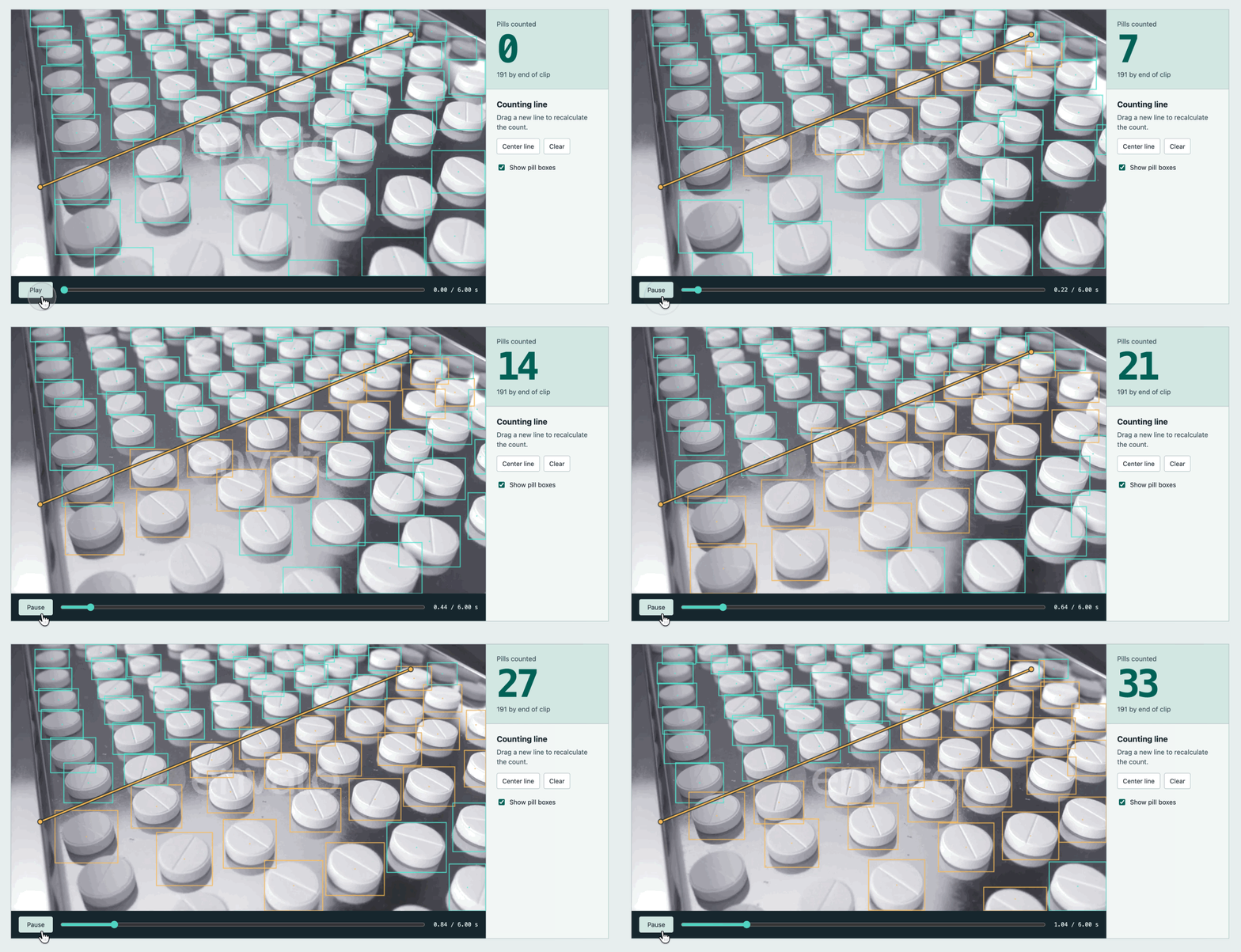
Open http://<RK3576_IP>:8010 in a browser on the same network and wait for analysis to finish. Drag across the video to draw a line across the pills' direction of travel, or select Center line, then select Play. Teal boxes mark detections, and amber boxes mark pills already counted at the current playback position.
Each tracked pill counts once when its center crosses the line segment in either direction. Redrawing the line recalculates crossings for the whole clip. Seeking or replaying shows the count up to the current playback position. Line placement and tracking continuity affect the count.