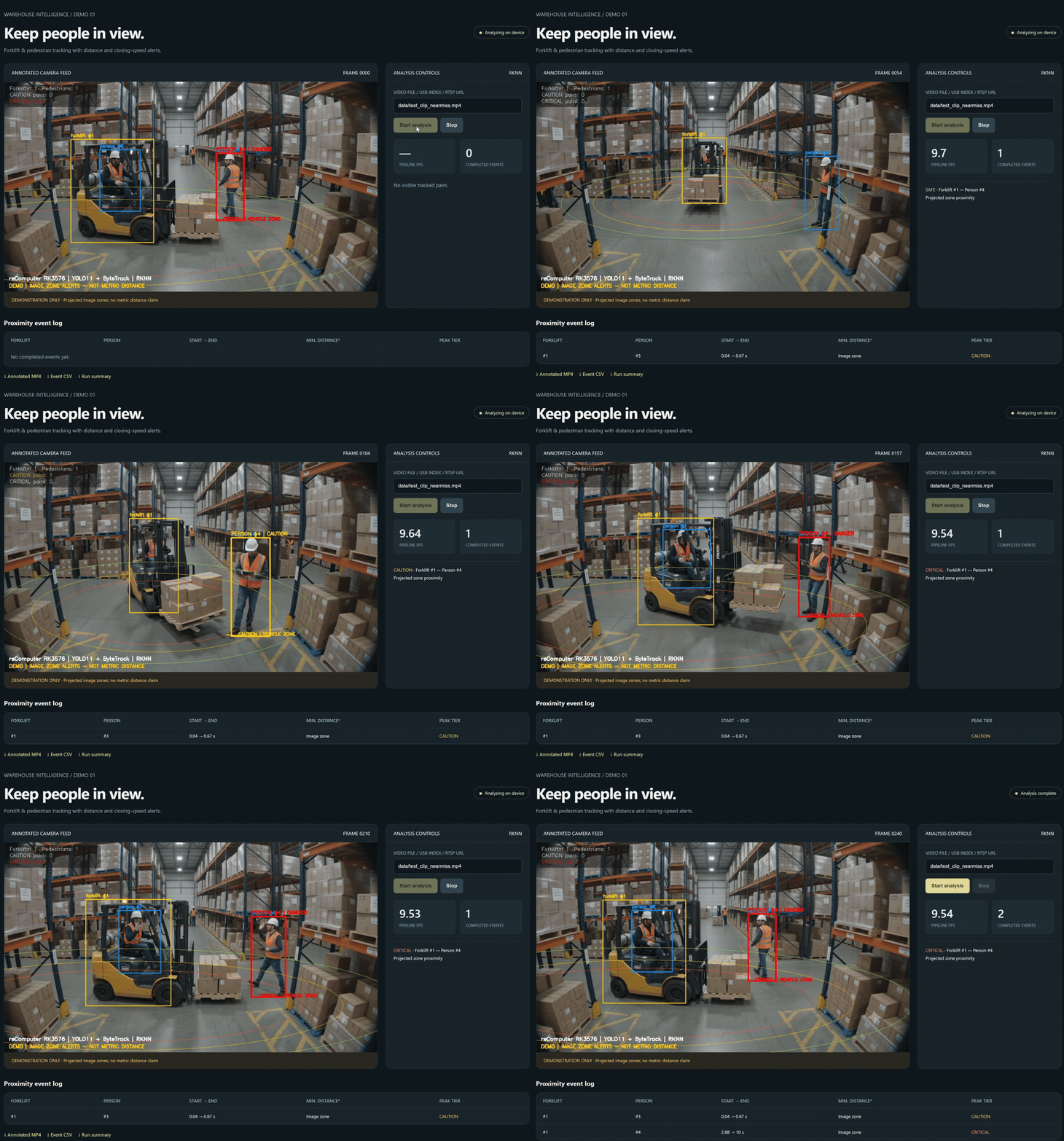
In warehouse aisles shared by forklifts and pedestrians, spotting a close approach is an important part of safety monitoring. This project brings vehicle detection, person tracking, and zone alerts into a local Web UI, showing the operator who is approaching a forklift and the current risk state.
This project runs a warehouse-trained YOLO11n model on the reComputer RK3576 NPU, uses ByteTrack to follow forklifts and people, and shows CAUTION and red DANGER alerts when a pedestrian approaches the projected vehicle zones. A browser dashboard provides an annotated feed, current risk pairs, and event downloads. Inference and analysis run locally on the board.
Source code: rk3576-warehouse-safety-monitor
Forklift and Pedestrian Safety Features
| Feature | Behavior |
|---|---|
| Forklift and person detection | A custom two-class YOLO11n model runs on the RK3576 NPU. |
| Persistent identities | ByteTrack assigns IDs across frames. |
| Operator exclusion | A bounding-box heuristic excludes the forklift operator from pedestrian risk pairing. |
| Graduated alerts | Green monitoring, yellow CAUTION, and red DANGER indicate projected-zone proximity. |
| Local Web UI | View annotated frames, current pairs, and completed events in a browser. |
| Exportable results | Save annotated MP4, event CSV, run-summary JSON, and per-frame traces. |
| Showcase rendering | Add translucent glowing floor zones to recorded inference results on a desktop. |
The sample is a 10-second, 1280 × 720 video at 24 FPS. The close-approach moments around 5 and 8 seconds trigger red danger alerts. The driver is labeled separately as OPERATOR.
How It Works
Video file / USB camera / RTSP
  → resize and letterbox to 640 × 640 RGB
  → YOLO11n RKNN inference on the RK3576 NPU
  → CPU detection decoding and NMS
  → CPU ByteTrack tracking
  → operator exclusion and pairwise zone analysis
  → Web UI, annotated video, and event logs
YOLO11n detects forklifts and people, while ByteTrack maintains their identities across frames. The system pairs each forklift with nearby pedestrians outside the vehicle, updates alerts from their positions relative to the zones, and records continuous alerts as exportable events. Detection runs on the NPU; tracking, alert logic, drawing, and recording run on the CPU.
How Proximity Alerts Work
The system builds projected image-space zones around the forklift's detection box and continuously checks each pedestrian's position relative to those zones. The point on the pedestrian's bottom box edge closest to the forklift center determines whether a proximity warning or danger alert is triggered.
Approaching the warning region displays yellow CAUTION. Entering the inner danger region raises red DANGER. The zones visualize proximity in the image; they do not report uncalibrated distances in meters.
What the Colors Mean
| State | Display | Trigger |
|---|---|---|
| Monitoring | Green person box | Outside the warning region. |
| CAUTION | Yellow person box and caution message | Near the projected vehicle zone. |
| DANGER | Red person box, danger message, and red border in the showcase | Enters the inner projected zone. |
The ellipse is centered at the forklift box's bottom center. Its base horizontal radius is 2.4 box widths and vertical radius is 0.4 box heights. In normalized ellipse coordinates, danger starts at radius 0.85 and caution at 1.05. Danger clears beyond 0.93, and caution clears beyond 1.20, reducing boundary flicker. The outer green display ring has radius 1.35.
These are configurable image-region settings. They do not describe measured floor distances or the true dimensions of the forks and load.
The prepared project includes models/warehouse_yolo11_rk3576_int8.rknn and
models/warehouse_yolo11_rk3576_fp16.rknn, with checksums in models/manifest.json.
Their class order is 0: forklift, 1: person. A stock COCO detector cannot
replace them because COCO has no forklift class.
Run on reComputer RK3576
Use ARM64 Linux with Python 3.11 and a working RK3576 NPU driver/runtime. Clone the project, prepare its environment, and start the dashboard:
git clone https://github.com/inteintegrity/rk3576-warehouse-safety-monitor.git
cd rk3576-warehouse-safety-monitor
bash run.sh setup
bash run.sh web
Open http://<board-ip>:8088 from a computer on the same trusted LAN, replacing
<board-ip> with the board's address. In the dashboard:
- Keep
data/test_clip_nearmiss.mp4as the source for the supplied sample. - Select Start analysis and watch the feed and current risk pairs.
- Select Stop to end analysis early, or let the sample finish.
- Download the annotated MP4, event CSV, or summary JSON after completion.
Press Ctrl+C in the terminal to stop the server. To use another port, run
bash run.sh web --port 8089. The input field accepts an existing video path,
USB index, or RTSP URL; it does not have an upload control. File-source inference
and preview were verified; USB/RTSP still require testing with your cameras.
The single-operator dashboard has no authentication and is intended for a trusted LAN.
For analysis without the dashboard:
bash run.sh videoResults go to outputs/demo: annotated.mp4, events.csv, summary.json, and
frame-trace.jsonl. Add --source /path/to/video.mp4 to use another video.
Events record paired IDs, start/end times, duration, and peak tier. Image-zone
mode leaves metric distance empty rather than presenting uncalibrated meters.
bash run.sh check checks dependencies and model hashes; bash run.sh --help
lists all launcher commands.
RK3576 NPU Performance
The final INT8 CLI run processed all 240 frames without a dashboard stream:
| Measurement | Result |
|---|---|
| End-to-end time, excluding initialization | 22.805 s |
| Complete pipeline throughput | 10.52 FPS |
| Median NPU API inference, after 15 warmup frames | 25.551 ms |
| 95th-percentile NPU API inference, after warmup | 31.269 ms |
Pipeline throughput includes decoding, preprocessing, NPU inference, CPU postprocessing, tracking, drawing, trace writing, and MP4 recording. The later Web UI check completed 240 frames at approximately 9.5 FPS, with MJPEG preview and CSV/JSON downloads verified. These are individual demo runs, not sustained performance guarantees.
Make the Glowing Showcase Video
The board's live view uses lightweight zone outlines and colored alert boxes. The translucent red/yellow/green glow is rendered offline from the original video and the board's per-frame results:
bash run.sh render outputs/demoRun this step in a Bash environment with Pillow, OpenCV, and FFmpeg after copying the sample video and board outputs into the corresponding project directories. Activate the rendering machine's Python environment first. The script handles frame rendering and H.264 MP4 encoding. The exported showcase is 1920 × 1080 at 24 FPS and preserves the source's 10-second timeline. Its playback rate is not a 24 FPS live-inference claim.
Validation and Limits
Eight regression checks passed, covering driver exclusion, DFL decoding, preprocessing, empty detections/logs, timestamp handling, invalid inputs, red alerts at the close-approach frames, and alert hysteresis. Run them with:
bash run.sh testThe original model was trained with 24 labeled frames from the same sample video. The demo also uses sample frames for INT8 calibration, so the clip verifies the pipeline rather than independent detection accuracy. New camera angles, occlusions, load shapes, and operator poses require further validation. The zones are a visual proximity heuristic, not a safety-certified collision prediction system.