Abstract
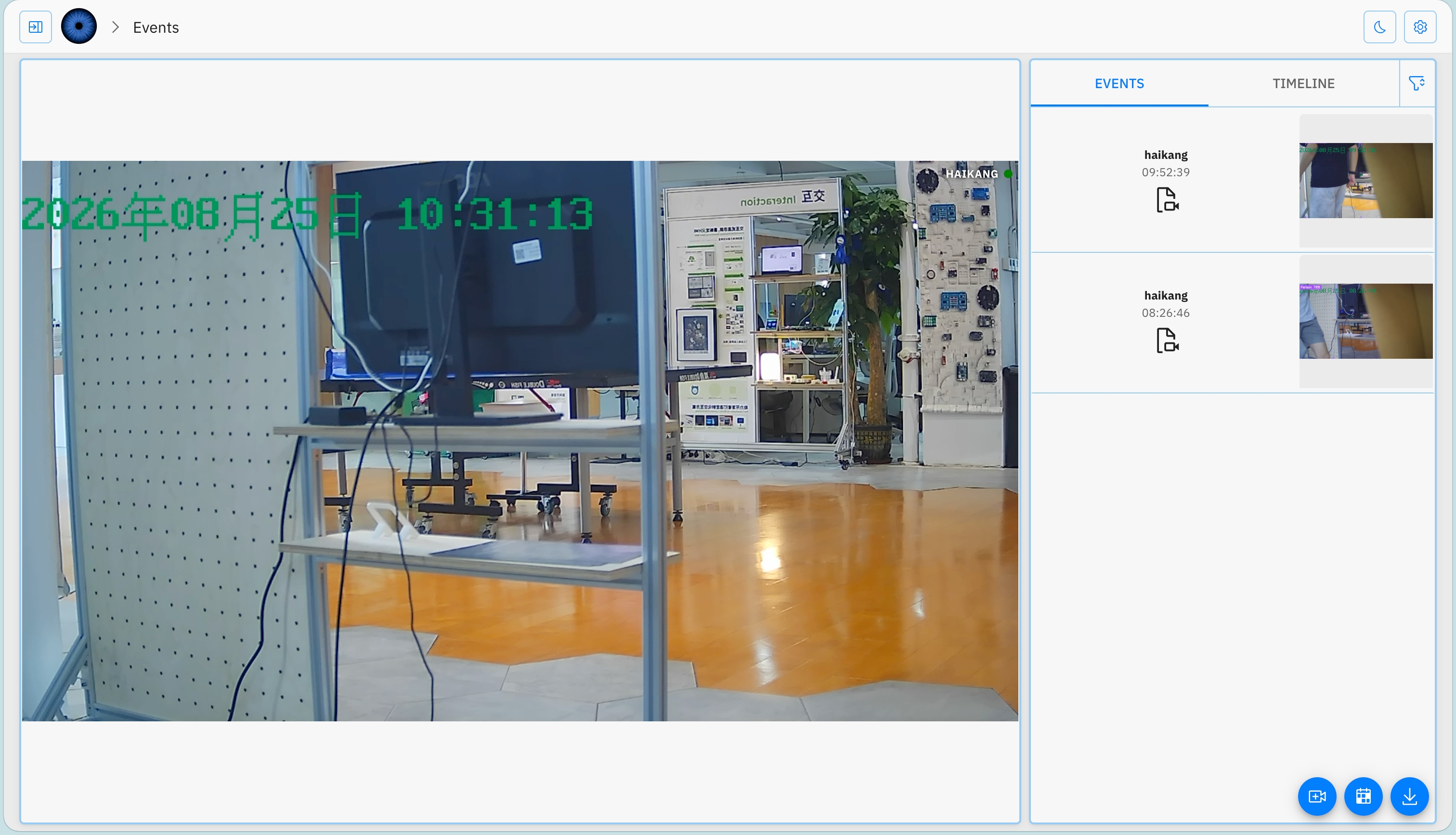
This project was conducted on a reComputer R2245 equipped with a 4GB Raspberry Pi CM5, 64-bit Debian 13, and a Hailo-8 AI accelerator. A Viseron 3.5.3 container had already been running continuously for approximately nine days. A single 1280×720 H.264 camera was able to record continuously, and the Viseron web interface remained accessible. With Darknet performing continuous detection at 1 FPS, the container used approximately 50.7% CPU, the combined RSS of its processes was approximately 1.11GiB, and the CM5 temperature ranged from approximately 40.6°C to 42.8°C.
The Hailo-8 hardware itself operated normally. In a five-second random-input test using a YOLOv8s HEF model, it processed 503 frames, equivalent to approximately 100.6 FPS, with a hardware latency of 6.66ms. The average Hailo chip temperature was 29.55°C, and the CM5 showed no throttling.
1. Test Environment
1.1 Hardware and System
| Item | Result on the Test Device |
|---|---|
| Device | Seeed Studio reComputer R2245, hostname reComputer-R22 |
| Compute module | Raspberry Pi Compute Module 5 Rev 1.0 |
| CPU | Quad-core Arm Cortex-A76, up to 2.4GHz |
| Memory | 4.0GiB |
| Operating system | Debian GNU/Linux 13.2 (trixie), ARM64 |
| Kernel | 6.12.62+rpt-rpi-2712 |
| System storage | 29.1GB eMMC; 66% used during testing, with approximately 9.3GB available |
| AI accelerator | Hailo-8 M.2, device node /dev/hailo0 |
| HailoRT/driver/firmware | 4.23.0 / 4.23.0 / 4.23.0 |
| Docker | Docker CE 29.7.2, Compose 5.4.0 |
| Network | ETH0 on a Gigabit IPv4 LAN; the other interfaces were disabled during testing |
| Camera | One H.264 stream; the recording initialization file reported 1280×720 |
2. Deployment
2.1 Confirm That the Recording Drive Is Actually Mounted
Do not identify a drive from its directory name alone.
findmnt -T /mnt/nvme
lsblk -o NAME,SIZE,FSTYPE,MOUNTPOINTS,MODEL
df -hT /mnt/nvme
The directory should be treated as a recording drive only when the SOURCE reported by findmnt points to an NVMe partition such as /dev/nvme0n1p1. If the NVMe drive has not been installed or mounted, stop continuous recording first instead of allowing Docker to create a directory with the same name on the system drive.
Recommendations for a production deployment:
- Use a high-endurance NVMe SSD formatted as
ext4. - Add the drive to
/etc/fstabusing its UUID. - Confirm that it is mounted successfully before starting Viseron.
- Add a mount dependency to the service so that a missing NVMe drive does not cause recordings to fall back to eMMC.
- Back up
/srv/viseron/config, which contains both the PostgreSQL data and the Viseron configuration.
2.2 Recommended Compose File
The following Compose configuration is suitable for the R2245. Replace the image tag with a fixed version that has passed regression testing. Mapping the Hailo device is useful only when the HailoRT versions match.
services:
  viseron:
    image: roflcoopter/viseron:3.5.3
    container_name: viseron
    restart: unless-stopped
    shm_size: "1024mb"
    ports:
      - "8888:8888"
    volumes:
      - /srv/viseron/config:/config
      - /mnt/nvme/viseron/segments:/segments
      - /mnt/nvme/viseron/snapshots:/snapshots
      - /mnt/nvme/viseron/thumbnails:/thumbnails
      - /mnt/nvme/viseron/event_clips:/event_clips
      - /mnt/nvme/viseron/timelapse:/timelapse
      - /etc/localtime:/etc/localtime:ro
    # Enable this only after aligning the HailoRT version.
    # Viseron requires version 4.22.0.
    # devices:
    #   - /dev/hailo0:/dev/hailo0
Start and inspect the service:
cd /srv/viseron
docker compose up -d
docker compose logs --tail=200
Open the web interface at:
http://DEVICE_IP:88882.3 Recommended Camera Configuration
Use secrets.yaml to store camera credentials.
# secrets.yaml
camera_host: 192.168.10.101
camera_username: admin
camera_password: "REPLACE_WITH_THE_ACTUAL_PASSWORD"# config.yaml
ffmpeg:
camera:
camera_1:
name: Front Gate
host: !secret camera_host
port: 554
path: /Streaming/Channels/101/
username: !secret camera_username
password: !secret camera_password
substream:
port: 554
path: /Streaming/Channels/102/
stream_format: rtsp
mog2:
motion_detector:
cameras:
camera_1:
fps: 2
darknet:
object_detector:
cameras:
camera_1:
fps: 1
scan_on_motion_only: true
labels:
- label: person
confidence: 0.75
trigger_event_recording: true
nvr:
camera_1:Using the main stream for direct-copy recording and a lower-resolution substream for decoding and detection is one of the most effective optimizations for the CM5. Hailo accelerates neural-network inference only; it does not replace H.264/H.265 video decoding.
3. Single-Camera Recording and Resource Tests
3.1 Test Conditions
- One H.264 camera stream
- Recording initialization file reported 1280×720
- FFmpeg wrote fMP4 segments using
-c:v copy, without re-encoding - Darknet object detection at 1 FPS
scan_on_motion_only: false, meaning inference continued even when there was no motion- Five consecutive samples taken approximately two seconds apart
- No multi-camera browser preview or concurrent playback
3.2 Results
| Metric | Measured Result |
|---|---|
| Average Viseron container CPU usage | 50.66% |
| CPU range across five samples | 49.78%–51.94% |
| Combined RSS of processes in the container | Approximately 1140.5MiB |
| Process count | 158–159 |
| CM5 temperature | 40.6–42.8°C |
| Throttling/undervoltage flag | 0x0 |
| Short-term recording data rate | Approximately 4.259Mbps |
| Estimated recording volume per day | Approximately 46.0GB/day |
| Web home-page response over the LAN | 39.29ms average across 10 requests |
A Docker CPU value of 50% corresponds to approximately half of one CPU core.
The recording directory grew by 7,986,412 bytes in 15 seconds, equivalent to approximately 4.259Mbps. This result applies only to the current camera stream. Actual storage requirements should be calculated from the combined bit rate of all cameras:
Daily storage (GB) ≈ Total bit rate (Mbps) × 10.8With 10GB of available storage, the current single-camera bit rate would provide space for only about five hours of additional recordings if no cleanup policy were applied. Therefore, an NVMe drive must be installed and verified before adding more cameras.
3.3 User Experience
During testing, the web home page returned HTTP 200, camera recording segments continued to grow, and valid object-detection snapshots were generated. Viseron's component-based configuration makes it possible to combine cameras, detectors, recording, and storage policies independently, making it well suited to users who are comfortable with YAML.
4. Hailo-8 Testing and Viseron Integration
4.1 Standalone Hardware Test
The host successfully detected the Hailo-8. A five-second inference test was performed with the system-provided yolov8s_h8.hef model:
| Metric | Measured Result |
|---|---|
| Frames processed | 503 |
| Equivalent throughput | Approximately 100.6 FPS |
| Hardware latency | 6.66ms |
| Minimum Hailo temperature | 29.02°C |
| Average Hailo temperature | 29.55°C |
| Maximum Hailo temperature | 29.68°C |
| CM5 temperature before/after the test | 40.6°C / 44.4°C |
| CM5 throttling flag | 0x0 |
4.2 Integrating Hailo-8 Using the Official Viseron Method
The expected Viseron configuration is:
hailo:
  object_detector:
    cameras:
      camera_1:
        fps: 1
        scan_on_motion_only: true
        labels:
          - label: person
            confidence: 0.75
            trigger_event_recording: true

nvr:
  camera_1:
The device must also be mapped into the container:
devices:
  - /dev/hailo0:/dev/hailo0
The official Viseron documentation explicitly warns that its container currently uses HailoRT 4.22.0 and that other host driver versions may be incompatible. An example of the resulting error is:
Driver version (4.23.0) is different from library version (4.22.0)
HAILO_INVALID_DRIVER_VERSION(76)
Failed to detect Hailo architecture
Failed to start Hailo 8 detector
5. Viseron vs. Frigate
| Category | Viseron | Frigate |
|---|---|---|
| Open-source license | MIT | MIT |
| ARM64 Docker support | Supports multi-architecture images | Supports ARM64, including builds intended for Raspberry Pi |
| Configuration model | Cameras, motion detection, object detection, NVR, storage, and other components can be combined freely | Organized around cameras, detection, tracking, Review, and recording |
| Continuous/event recording | Supported, with flexible tiered storage | Supported, with straightforward retention policies |
| Object detection | Hailo, Coral, Darknet, Ultralytics, external services, and more | Hailo, Coral, ONNX, OpenVINO, TensorRT, and more |
| Hailo-8 status on this device | Container 4.22 conflicts with host 4.23 and is currently unusable | Seeed provides an R2000/Hailo reference tutorial; actual versions must still be verified |
| Object tracking | Can record around detection events, but tracking is not its strongest feature | Tracking and Review are core parts of the workflow |
| Audio detection | Not a primary feature | Built-in audio event detection |
| Storage | Multiple tiers with independent event and continuous-recording controls | Clear retention policies for continuous, motion, alert, and detection recordings |
| Home Assistant | Available through MQTT Discovery | More mature integration and community resources |
| Learning curve | Higher, with flexible component composition | Moderate, with a more unified onboarding path |
| Best suited for | Users who want custom detection pipelines and storage policies | Users who prioritize tracking, Review, Home Assistant, and established deployment examples |
Viseron's main advantage is its openness and composability. For example, MOG2 can filter motion first, Hailo can then perform object detection, and post-processing or MQTT can handle the result. Its storage tiers also support architectures such as keeping recent continuous recordings on NVMe while archiving long-term events to a NAS.
Frigate's advantage is that detection, tracking, Review, and Home Assistant form a more complete product workflow. If the goal is to deploy Hailo-8 on an R2245 as quickly as possible rather than experiment with Viseron's components, Frigate is currently the safer default choice.
6. Recommendations
When to Choose Viseron
- You plan to deploy a small system with one to four cameras and primarily local recording.
- You are comfortable with Docker, YAML, RTSP, and basic Linux administration.
- You value tiered storage and flexible component composition.
- You can begin with motion detection or CPU-based detection while waiting for the Hailo versions to be aligned.
- You are willing to troubleshoot camera paths, dependencies, and drivers through logs.
When Frigate Is Currently the Better Choice
- Hailo-8 must be used for object detection immediately.
- You rely heavily on Home Assistant.
- Object tracking, Review, and audio events are higher priorities.
- You want to follow Seeed's existing R2000 deployment tutorial.
- You do not want to maintain a custom HailoRT container.