After buying an RK3588 development board, you may power it on, flash an image, and boot successfully, excited by its 6-TOPS NPU. Then you find a YOLO example for the RK3588 and run it:
rknpu driver version is too low
failed to initialize rknn runtime
invalid rknn model
unsupported target platform
failed to submit task
What happened?
Many people encounter situations like this when deploying an AI application to a non-general-purpose edge-computing platform for the first time. Why does software that works on my computer stop working after it is moved here? Why does conversion succeed while execution on the board fails? Why can the same model run on one board but not another?
This article explains NPU use in Rockchip solutions in an approachable but thorough way.
It answers the following core questions:
- What are RKNN-Toolkit2, RKNN Runtime, and the RKNPU driver?
- Why might updating
librknnrt.sostill not make an application run? - Why should you not replace
rknpu.kocasually? - How do the deployment paths for CNNs, Transformers, and LLMs differ?
- How can you tell whether a problem is in the model, Runtime, driver, or system image?
- When should you avoid using the NPU altogether?
1. Start with the Big Picture: RK NPU Is Not a Single Software Package
“Calling the NPU” may sound like calling one function: pass in a model and an image, and the NPU computes the result. In reality, moving from a PyTorch model to actual NPU execution involves at least five parts: the model-conversion tool, model file, on-device Runtime, Linux kernel driver, and NPU hardware.
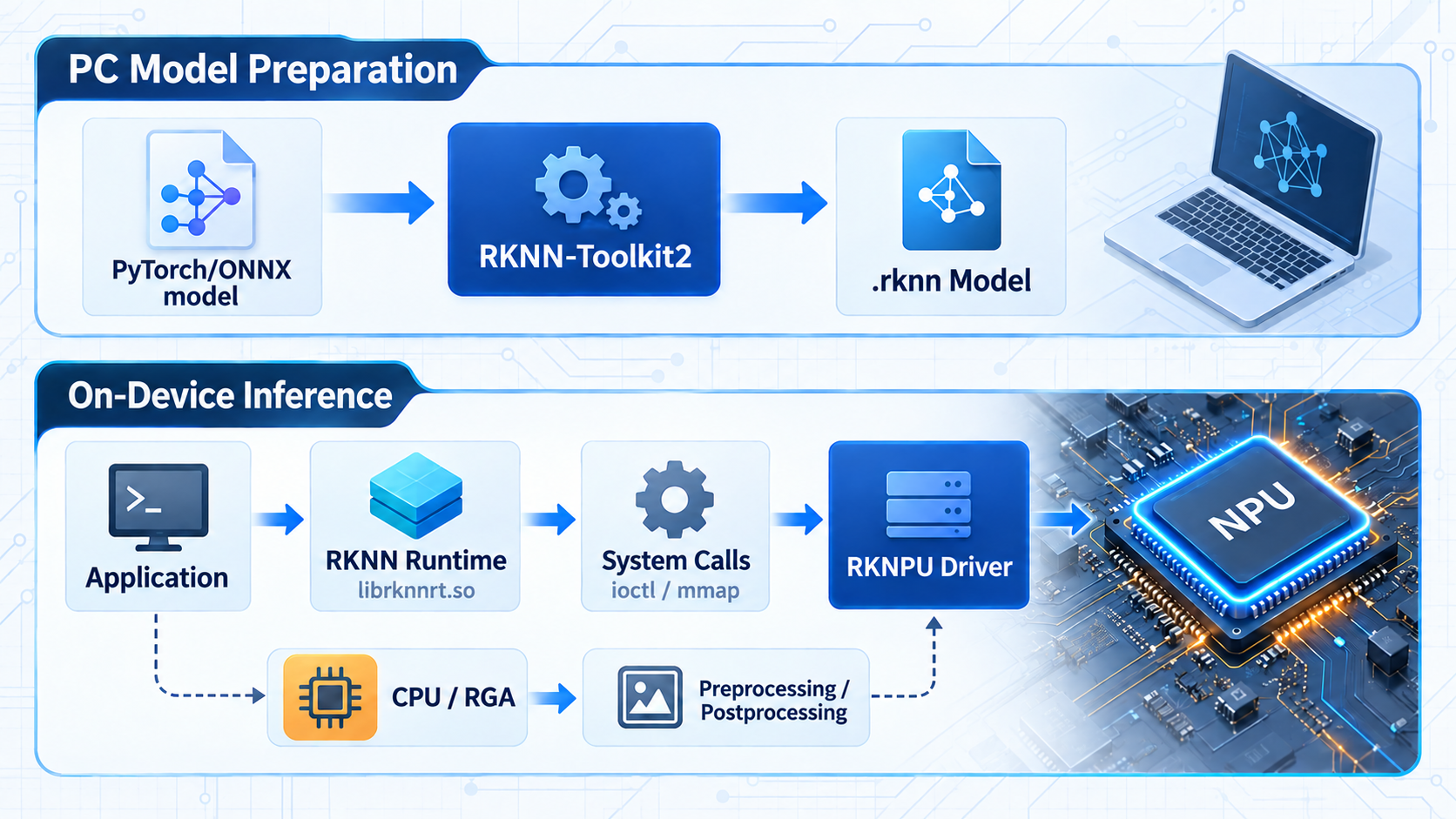
This chain can be divided into two stages.
The first stage prepares the model on a PC:
PyTorch / TensorFlow
        ↓
       ONNX
        ↓
RKNN-Toolkit2
        ↓
.rknn model compiled for RK3588 or RK3576
The second stage runs the model on the development board:
Application
   ↓
RKNNLite / RKNN C API
   ↓
librknnrt.so
   ↓
Linux system calls
   ↓
RKNPU kernel driver
   ↓
NPU hardware
Each component has a different responsibility:
| Component | Runs on | Main responsibility |
|---|---|---|
| RKNN-Toolkit2 | PC | Parse, optimize, quantize, and compile models |
.rknn | Generated on PC, loaded on board | Store the model and execution information for a specific Rockchip NPU |
| RKNN-Toolkit-Lite2 | On-device Python environment | Provide inference APIs for Python applications |
librknnrt.so | On-device user space | Load models, manage memory, and submit tasks to the driver |
| RKNPU driver | Linux kernel space | Manage NPU hardware, memory, interrupts, and task scheduling |
| NPU | Inside the SoC | Execute convolution, matrix multiplication, and other operations |
The official architecture follows the same design; see the official RKNN-Toolkit2 repository.
When a problem occurs, do not simply say “the NPU is broken” or “RKNN cannot run.” First determine which layer is failing.
2. How a .rknn Model Is Generated
An NPU cannot directly execute a normal PyTorch model and usually cannot directly execute ONNX either. ONNX is mainly an intermediate format for exchanging computation graphs, whereas .rknn is a deployment model optimized and compiled by the Rockchip toolchain.
For a typical ONNX model, the minimum conversion process looks like this:
from rknn.api import RKNN

rknn = RKNN(verbose=True)

rknn.config(
    target_platform="rk3576",
    mean_values=[[0, 0, 0]],
    std_values=[[255, 255, 255]],
)

rknn.load_onnx(model="model.onnx")
rknn.build(do_quantization=False)
rknn.export_rknn("model_rk3576.rknn")
rknn.release()
The most easily overlooked setting is target_platform. It means the generated model is compiled for a specific chip, so .rknn is not a universal format like ONNX. A model generated for RK3588 should not be assumed to run directly on RK3576, RK3568, or another platform.
When building a model, RKNN-Toolkit2 also performs the following work:
- Parse the computation graph and Tensor shapes;
- Fold constants and remove unused nodes;
- Fuse operations into operators better suited to the NPU;
- Convert data layouts such as NCHW and NHWC;
- Check whether operators, data types, and Shapes are supported by the target platform;
- Apply FP16, INT8, or other quantization according to the configuration;
- Generate an execution graph and weight data for the target NPU.
This explains a common misconception: A model running in ONNX Runtime does not guarantee that RKNN can convert it; successful RKNN conversion does not guarantee that the board can load it.
Conversion concerns the model and compiler; loading on the board also depends on the Runtime, driver, memory, and target chip.
3. What Exactly Is the Runtime?
On RK3588 and RK3576 Linux systems, the core on-device Runtime is usually:
librknnrt.soIt is a user-space shared library, not a Linux kernel driver or a complete “system environment.” High-level APIs called by an application eventually enter this library.
The call path for a Python application is usually:
Python application
   ↓
RKNNLite
   ↓
librknnrt.so
   ↓
RKNPU driver
For a C/C++ application, it is:
C/C++ application
   ↓
RKNN C API
   ↓
librknnrt.so
   ↓
RKNPU driver
A minimal Python inference program on the board looks like this:
from rknnlite.api import RKNNLite

runtime = RKNNLite()

ret = runtime.load_rknn("model_rk3576.rknn")
if ret != 0:
    raise RuntimeError("load_rknn failed")

ret = runtime.init_runtime(core_mask=RKNNLite.NPU_CORE_0_1)
if ret != 0:
    raise RuntimeError("init_runtime failed")

outputs = runtime.inference(inputs=[input_tensor])
runtime.release()
Here, init_runtime() does not install an environment. It creates an inference context for the current process, which may include:
- Checking the chip and driver;
- Parsing the RKNN model;
- Checking model and Runtime compatibility;
- Selecting NPU cores;
- Preparing memory for weights and intermediate Tensors;
- Creating the resources needed to submit tasks to the driver.
In simple terms, the Runtime is a translator and scheduler. The application tells it which model to run; it converts that request into tasks understood by the driver, which then controls the NPU hardware.
Is rknn_server Required?
No. rknn_server is mainly used when RKNN-Toolkit2 on a PC connects to a board for device debugging, performance analysis, and remote inference. It receives requests sent from the PC over USB or ADB and invokes the on-device Runtime.
When an application runs independently on the board, it can usually call librknnrt.so directly without routing every inference through rknn_server.
4. Where the RKNPU Driver Sits in Linux
Linux isolates ordinary applications from hardware. Applications run in user space and cannot directly access NPU registers, handle interrupts, or access arbitrary physical memory. The kernel-space RKNPU driver must perform these tasks.
User space: Application → RKNNLite / RKNN API → librknnrt.so
                         │
                    System call boundary
                         │
Kernel space:         RKNPU driver
                         │
Hardware:             NPU
The driver is mainly responsible for:
- Initializing the NPU hardware;
- Managing clocks, power domains, and resets;
- Managing memory accessible to the NPU;
- Receiving compute tasks submitted by the Runtime;
- Scheduling NPU cores;
- Handling interrupts and reporting task completion;
- Working with the IOMMU to map device addresses;
- Exposing the driver version and hardware capabilities to the Runtime.
What Are ioctl and mmap?
The Runtime must cross the user-space/kernel-space boundary to communicate with the driver. Common mechanisms include ioctl, mmap, poll, and DMA-based memory sharing.
ioctlsends device-specific commands to the driver, such as creating a context, submitting a task, or querying status;mmapmaps a driver-managed buffer into the application's virtual address space;DMAlets theNPUaccess memory directly without theCPUcopying every byte;- Mechanisms such as
pollcan wait for hardware tasks to finish.
A simple way to understand them is:
mmap: determines where data is placed and how both sides access it
ioctl: tells the device what operation to perform
These low-level operations are normally encapsulated by librknnrt.so. One call to inference() may perform memory synchronization, task submission, waiting for completion, and several other operations internally.
This architecture is fundamentally similar to network cards and USB devices. A network application reaches a NIC driver through sockets and the Linux network stack; libusb reaches USB devices through USB Core and a controller driver; an RKNN application reaches the NPU through the Runtime and RKNPU driver.
5. Why Version Compatibility Matters
RKNN is not a package with only one version number. A complete deployment involves at least these versions:
RKNN-Toolkit2 version
        ↓
.rknn model format and target chip
        ↓
RKNN-Toolkit-Lite2 / librknnrt.so version
        ↓
RKNPU driver version
        ↓
Linux kernel and BSP
Device debugging also introduces the rknn_server version. For C/C++ development, make sure the build-time headers and link libraries come from the same SDK.
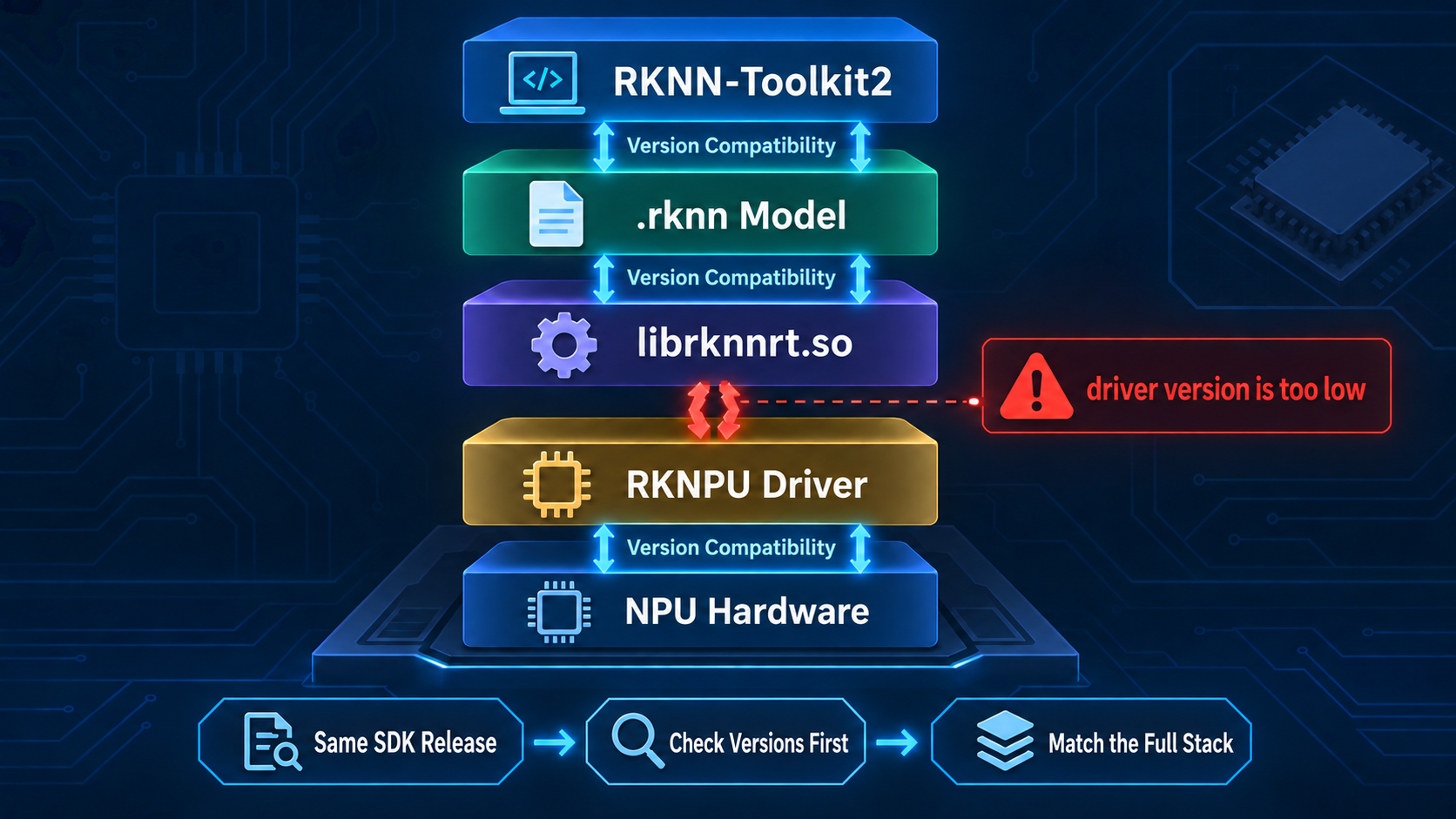
Typical incompatibilities include:
- A model generated with a new Toolkit cannot be parsed by an older on-device Runtime;
- Only
librknnrt.sois upgraded, but the driver lacks capabilities required by the new Runtime; - The Python package is new, but the application actually loads an old Runtime from a system directory;
rknn_serverand the on-device Runtime come from different releases;- The model targets RK3588, but the actual platform is RK3576;
- The Runtime is updated in a container, but the host still uses an old kernel driver.
Always consult the official documentation for your RK-based development board. If that material is outdated while you are trying to run the latest AI applications or models, you may encounter all of the issues above.
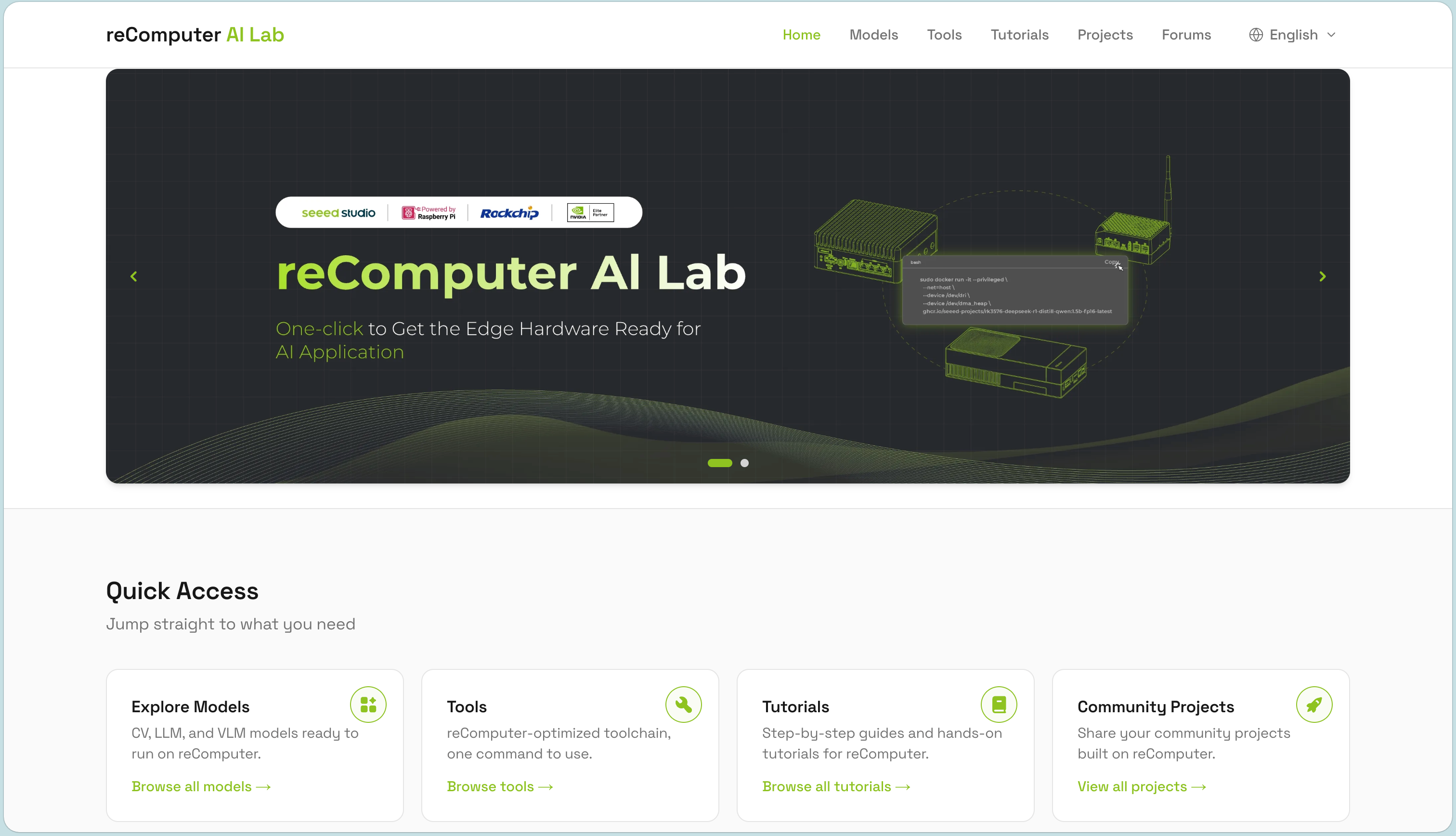
I strongly recommend Seeed Studio's reComputer AI Lab, which collects current AI-development resources for RK devices such as RK3588 and RK3576. You can deploy CV, LLM, and VLM models with one click, find detailed tools and documentation for technical problems on RK boards, and explore practical open-source projects for learning and development.
That is a developer's perspective. For a mature product, the safest principle is not “make every component as new as possible,” but:
Use a validated compatible combination of Toolkit, model, Runtime, Server, and driver.
6. How rknpu driver version is too low Occurs
When people see this error, their first reaction is often to download a newer rknpu.ko and overwrite the existing file. Before doing that, understand where the error comes from.
When initializing the Runtime, librknnrt.so queries the on-device RKNPU driver version and capabilities. If the Runtime requires interfaces or features newer than the driver provides, it may output:
rknpu driver version is too lowThis often happens when a recently released Rockchip application or model is run on an older board whose vendor has not updated its system image and wiki. Updating only the on-device Runtime then creates the mismatch. Some board vendors also lack a documentation maintenance team and shipped little technical information from the start. Do not choose a board solely because it is cheap; missing documentation tends to cause many problems later.
This error usually indicates a Runtime–driver mismatch. The message alone does not prove that the driver file is damaged.
Common causes include:
librknnrt.sowas upgraded without upgrading the BSP or driver;- Multiple copies of
librknnrt.soexist, and the application loads the wrong one; - A new driver module was copied to disk, but the running kernel still uses the old driver;
- The RKNPU driver is built into the kernel, so replacing a
.kohas no effect; - The new module does not match the current kernel's
vermagic, symbols, or configuration and fails to load; - A container uses a new user-space library while the host driver remains old;
- The board vendor's customized BSP and the Runtime are not from the same validated release set.
Start by collecting the following information:
# Check the kernel version
uname -a

# Check RKNPU driver initialization and error messages
dmesg | grep -i rknpu

# If the driver is loaded as a module, list the current modules
lsmod | grep rknpu

# Inspect the module on disk; adjust the path for your system
modinfo rknpu

# Find all Runtime copies on the system
find / -name 'librknnrt.so*' 2>/dev/null

# Check which shared libraries the application links to
ldd ./your_application
For a running process, also check:
grep librknnrt /proc/$(pidof your_application)/mapsThis answers a critical question: Which copy of librknnrt.so did the program actually load, rather than which copy did you expect it to load?
Use the following troubleshooting order:
Confirm the current kernel and driver versions
        ↓
Confirm the Runtime actually loaded by the application
        ↓
Confirm the model's target chip and conversion tool version
        ↓
Find a compatible SDK or system image from the board vendor
        ↓
If necessary, upgrade the complete BSP or rebuild the driver against the current kernel source
7. Why You Should Not Replace rknpu.ko Casually
A .ko file is a Linux kernel module, not an ordinary user-space shared library. It runs directly in kernel space and therefore must closely match the current kernel.
First determine how the driver was built:
CONFIG_ROCKCHIP_RKNPU=y   Driver built into the kernel
CONFIG_ROCKCHIP_RKNPU=m   Driver built as a separate module
If the driver is built into the kernel, the system uses the driver inside the kernel image at boot. Copying a new rknpu.ko will not replace it; you usually need to update the complete kernel or system image.
If the driver is a module, a standalone upgrade must still ensure that:
- The module was built from the current kernel source or a matching source tree;
- A compatible kernel configuration and cross-compilation toolchain were used;
vermagicmatches;- Required kernel symbols exist;
- Device Tree, power-domain, clock, IOMMU, and reserved-memory settings match;
- No process is using the NPU;
- Module-signing and secure-boot policies permit loading it.
Compare the running kernel and module information:
uname -r
modinfo ./rknpu.ko | grep vermagic
A successfully loaded module does not mean the whole system is compatible. The board vendor may have added BSP-specific Device Tree, power-management, or memory patches. Use this upgrade priority:
- Prefer a complete image or upgrade package from the board vendor;
- Otherwise, rebuild the kernel and module from the vendor's matching BSP version;
- Replace only the module only after verifying that the kernel, configuration, and dependencies match completely;
- Keep a bootable old image and a recovery method before making changes.
“Upgrading to RKNPU 0.9.8” really means confirming that the running kernel has loaded the 0.9.8 driver and that it is compatible with the current Runtime and BSP, not merely finding a .ko labeled 0.9.8 in the file system.
8. Deployment Paths for CNNs, Transformers, and LLMs
Although all are called AI models, they do not necessarily use the same deployment path.
CNN: The Typical RKNN Path
Image classification, YOLO detection, semantic segmentation, pose estimation, and similar models normally use:
PyTorch → ONNX → RKNN-Toolkit2 → .rknn → RKNN Runtime → NPUConvolution, activation, and pooling operators generally map more easily to the NPU. Pay particular attention to:
- Input dimensions and layout;
- RGB/BGR order;
- Whether mean and std duplicate application preprocessing;
- The INT8 quantization dataset;
- Detection-head decoding and NMS;
- Data copies among the camera, RGA, and NPU.
Regular Transformers: Focus on Operators and Dynamic Shapes
Vision Transformers and lightweight encoders can still be tried with RKNN-Toolkit2, but require extra attention to:
- MatMul;
- Softmax;
- LayerNorm or RMSNorm;
- reshape and transpose;
- Dynamic sequence lengths;
- Intermediate Tensor memory;
- Whether operators require CPU or GPU assistance.
Do not assume that a model can run entirely on the NPU merely because its name contains Transformer. Execution depends on whether the target platform supports the operators, Shapes, and data types in its computation graph.
LLM: Usually Use the RKLLM Toolchain
Large language models also involve KV Cache, Prefill, token-by-token Decode, long contexts, and sampling. Rockchip provides the separate RKNN-LLM toolchain for these models:
Hugging Face model
        ↓
RKLLM-Toolkit conversion and quantization
        ↓
.rkllm model
        ↓
RKLLM Runtime
        ↓
RKNPU driver and NPU
RKLLM still depends on the RKNPU driver, but its model, Runtime interfaces, and execution method are not identical to those used by a normal CNN. Check the official support list for the applicable version.
9. Two Paths for Running Large Models on RK3588
The common choices for running large models on RK3588 can be summarized as two paths.
Path 1: GGUF + llama.cpp + CPU
This path is easy to start with, has a broad model ecosystem, and is convenient to debug. After downloading a GGUF-quantized model suitable for the available memory, you generally avoid RKNN conversion and RKNPU driver-version issues.
It is suitable for:
- Quickly validating model capabilities;
- Switching models frequently;
- Prioritizing compatibility;
- Teams without NPU adaptation experience;
- Models outside RKLLM's current support range.
The tradeoff is higher CPU use; token speed, power consumption, and multitasking may be worse than with an NPU-optimized solution.
Path 2: RKLLM + NPU
This path can improve inference throughput and reduce some CPU compute load, but requires more engineering work:
- Confirm that the model architecture is supported;
- Quantize and convert it with the specified toolchain;
- Match RKLLM Runtime with the RKNPU driver;
- Evaluate accuracy after quantization;
- Plan memory for model weights, KV Cache, and the system;
- Distinguish Prefill speed from Decode speed;
- Verify stability at different context lengths.
The NPU path is therefore not “give a GGUF file to the NPU.” It normally uses another model format and Runtime, with targeted adaptation for a fixed model.
Use the following guidance when choosing:
| Requirement | Better starting point |
|---|---|
| Run as soon as possible | GGUF + CPU |
| Change models frequently | GGUF + CPU |
| Use a fixed model and pursue higher performance | Evaluate RKLLM + NPU |
| Model is not on the official support list | Prefer CPU or another backend |
| Prepare for production | Fix and validate the complete NPU software stack |
Whichever path you choose, measure end-to-end performance instead of looking only at advertised TOPS or one operator's execution time. LLM performance is often constrained by memory capacity, memory bandwidth, KV Cache, and CPU-side logic together.
10. A General Layered Troubleshooting Method
When facing an error log, first identify the layer where the failure occurs instead of immediately searching for and copying a command.
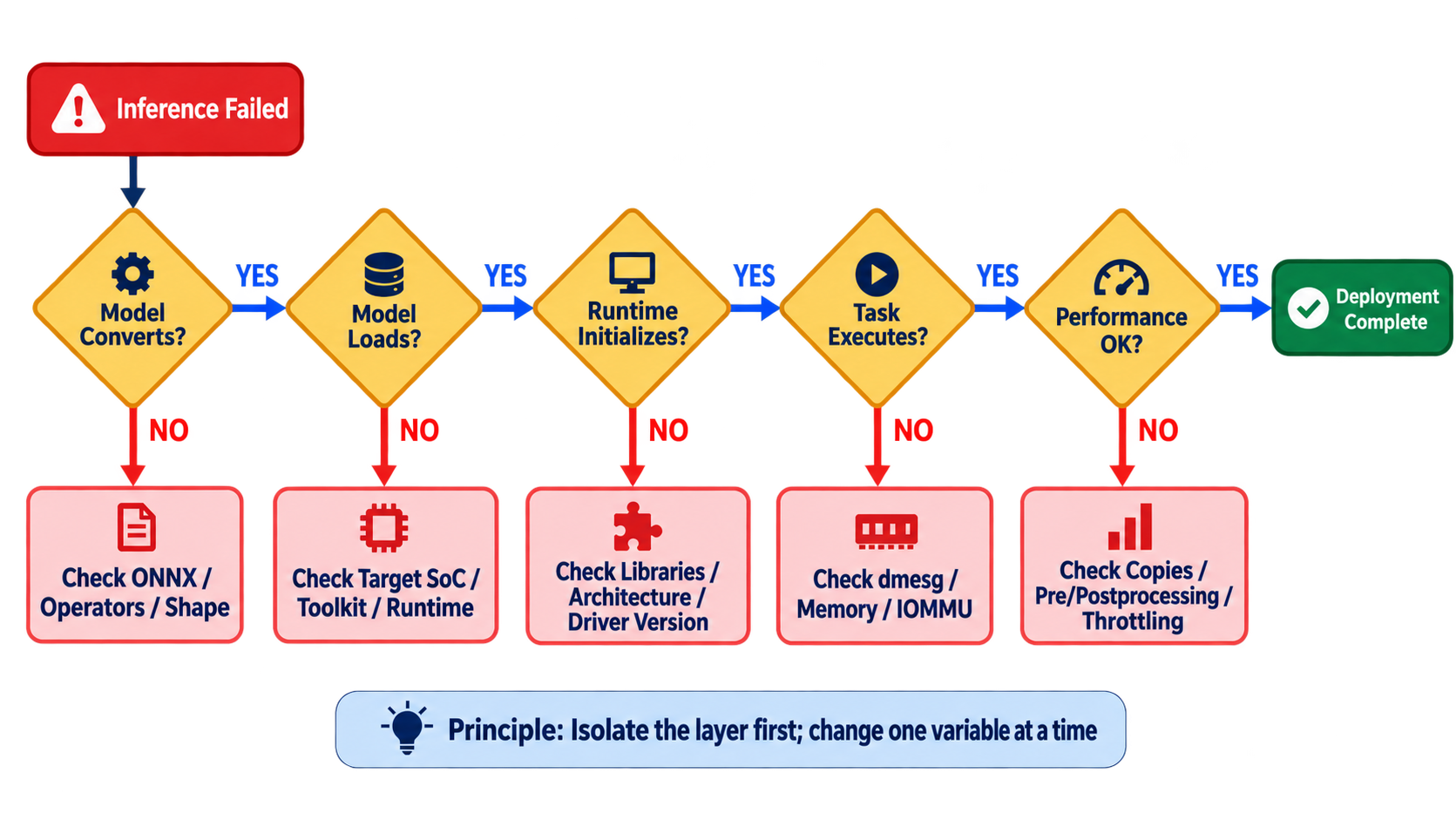
Layer 1: Model Conversion
Typical symptoms:
unsupported operator
shape inference failed
build model failed
Check ONNX validity, Opset, input Shape, dynamic dimensions, operator support, and conversion logs. For quantization, also verify that calibration data represents real inputs.
Layer 2: Model Loading
Typical symptoms:
invalid rknn model
unsupported target platform
load_rknn failed
Check which Toolkit version generated the model, its target_platform, whether the on-device Runtime can parse its format, and whether the copied file is complete.
Layer 3: Runtime Initialization
Typical symptoms:
failed to initialize rknn runtime
driver version is too low
cannot open shared object file
undefined symbol
Check the shared-library path, CPU architecture, 32/64-bit mode, actual Runtime location, driver version, and device nodes.
Layer 4: Task Execution
Typical symptoms:
failed to submit task
IOMMU fault
allocate memory failed
Inspect dmesg; check available memory, CMA or DMA buffers, IOMMU faults, input Tensor attributes, and whether concurrent tasks exceed resource limits.
Layer 5: Performance
A model running successfully does not mean it uses the NPU efficiently. The following costs are often absent from a single rknn_run() timing:
- Image reading and decoding;
- resize, letterbox, and color conversion;
- Data copying between CPU and NPU;
- Output decoding and NMS;
- Unnecessary synchronization waits;
- NPU core selection;
- CPU, NPU, or memory downclocking;
- Thermal throttling caused by high temperature;
- Poor multithreaded pipeline design.
At minimum, record these times separately:
Input loading time
Preprocessing time
Pure model inference time
Postprocessing time
Total end-to-end time
Reporting only pure NPU inference time can produce an attractive number that does not represent real application performance.
11. What to Collect Before Asking a Question or Filing an Issue
When you cannot solve a problem yourself, complete information is more useful than one error message. Provide at least:
SoC model:
Development board model:
Operating system and image source:
Linux kernel version:
RKNPU driver version:
RKNN-Toolkit2 version:
RKNN-Toolkit-Lite2 version:
RKNN Runtime version:
rknn_server version (if used):
Model source and ONNX Opset:
Target platform:
Quantized:
Complete application log:
Relevant dmesg log:
Can the official example run:
Whether the official example runs is especially important:
- If the official example also fails, the problem is more likely in the system, Runtime, or driver;
- If the official example runs but your model does not, the problem is more likely in conversion or input/output processing;
- If the C example runs for the same model but Python does not, check the Python package and shared-library path first;
- If the host works but a container does not, check device mapping, permissions, and the Runtime inside the container first.
12. Common Misconceptions
Finally, here are statements that often lead to incorrect conclusions:
- A chip having an NPU does not mean it can run every neural network;
- A model running in ONNX does not mean RKNN can convert it;
- Successful RKNN conversion does not ensure on-device version compatibility;
- Updating
librknnrt.sodoes not update the kernel driver; - Copying a new
rknpu.kodoes not mean the new driver has been loaded; - A newer driver is not necessarily compatible with the current kernel and BSP;
- Using the NPU does not mean preprocessing, postprocessing, and every operator run on it;
- Multiple NPU cores do not automatically multiply single-model performance by the core count;
- A container can carry a user-space Runtime but cannot replace the host kernel driver;
- NPU inference time is not the application's end-to-end time;
- Equal advertised TOPS does not mean equal real performance across chips, models, and precisions.