1. Solution Overview
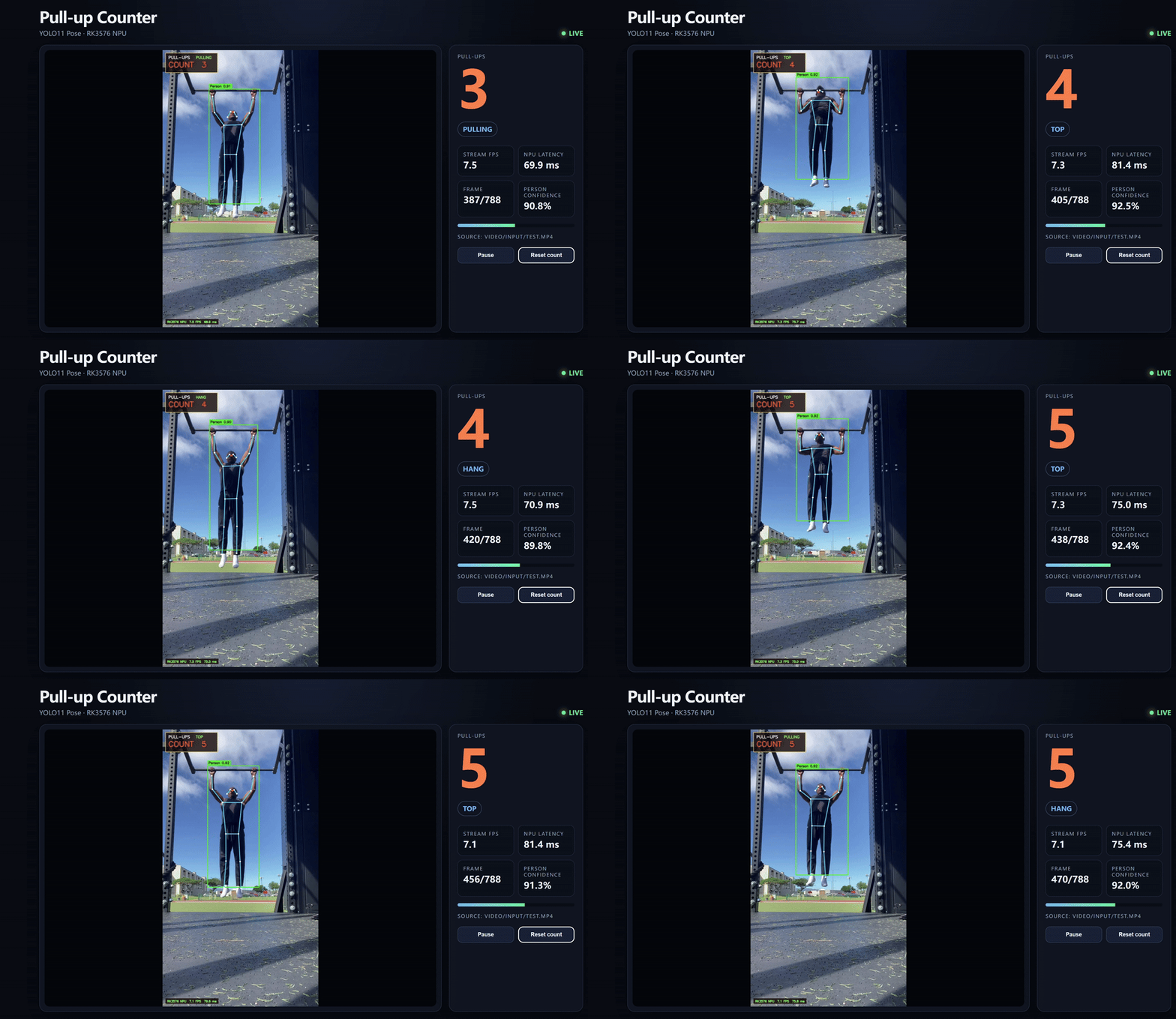
This project turns a reComputer RK3576 into a private, low-latency fitness counter. A YOLO11n-Pose model runs on the onboard NPU, while the application draws the detected person, 17 body keypoints, the pose skeleton, the current motion phase, and the completed pull-up count.
Source code and deployment files: https://github.com/Seeed-Projects/reComputer-AI-Lab-Project/tree/main/rk_project/pullup_counter
Project Capabilities
- Runs YOLO11n-Pose inference with RKNNLite on the RK3576 NPU.
- Detects the main person and renders a bounding box plus COCO-17 pose skeleton.
- Counts complete pull-up repetitions with a hysteresis state machine.
- Accepts a bundled video, USB camera, RTSP stream, or another local video.
- Provides a browser dashboard with count, phase, FPS, NPU latency, pause, and reset controls.
- Installs into an isolated Python virtual environment with bundled AArch64 wheels.
Hardware and Software
- reComputer RK3576 running 64-bit Linux
- Python 3.11 with
venv - RKNN Runtime and RKNPU driver supplied by the board image
- YOLO11n-Pose RKNN model with a fixed
640 × 640input - A computer or phone on the same network for Web preview
The project uses an FP16 RKNN model.
2. RK3576 Deployment Guide
Deploy to the Board
Clone the repository and install the environment (one-time setup):
git clone https://github.com/Seeed-Projects/reComputer-AI-Lab-Project.git
cd reComputer-AI-Lab-Project/rk_project/pullup_counter
bash install.sh
Run
Start the web service:
bash run_web.shThe installer creates .venv, installs the included AArch64 wheels offline, and performs an environment and one-frame NPU inference check.
When startup completes, open the following address from another device on the same network:
http://<RK3576_IP>:8000For example:
http://192.168.3.120:8000Input Sources
The default command loops the bundled demonstration video:
bash run_web.shUse a USB camera:
bash run_web.sh --source 0Use an RTSP stream:
bash run_web.sh --source 'rtsp://user:password@camera/stream'Use another video or Web port:
bash run_web.sh --source /path/to/video.mp4 --port 8080Only one process should normally use the NPU model at a time. If port 8000 is occupied, stop the older Web process or select another port.
Command-Line Video Processing
To create an annotated video and a CSV count log without starting the Web interface:
bash run_demo.shDefault output files:
video/output/test_counted.mp4
video/output/test_counted.csv
3. Counting Logic and Runtime Guidance
The tracker selects the highest-confidence person. Wrist keypoints estimate the pull-up bar level, and the nose and shoulder keypoints describe the athlete's vertical motion. Distances are normalized against body size so the thresholds remain useful at different camera distances.
A two-state counter with separate upper and lower thresholds prevents a person hovering near the boundary from generating duplicate repetitions. A repetition is added only after a stable top position followed by a stable return to the bottom position. Short keypoint dropouts are tolerated, while a prolonged loss resets the motion phase without erasing the completed count.
For reliable results, keep the full upper body visible, use a mostly fixed camera, avoid severe backlighting, and position the camera close to front-on.
Web Interface and API
The dashboard displays the annotated stream and live statistics. It also exposes:
GET /healthz— service health checkGET /api/status— current count, motion phase, FPS, and inference state
The service is intended for a trusted local network and does not include authentication or TLS by default.
Deployment Recommendations
- Run
sha256sum -c MANIFEST.sha256after copying the project to verify that the model, wheels, and demo files are complete. - Keep the RKNN Runtime and RKNPU driver supplied by the board image. Replace them only after confirming compatibility with the RKNN Toolkit version used to build the model.
- Use the generated
.venvinstead of installing packages into the system Python environment. - Run one inference process per NPU model. If port
8000is occupied, stop the old process or select another port. - Mount the camera firmly, keep the upper body and bar visible, and avoid strong backlighting.
- Keep the Web interface on a trusted LAN. For long-running or remote deployments, manage it with
systemdand add authentication and TLS through a reverse proxy.
Known Limitations
- The current implementation follows one primary person.
- Heavy occlusion of the face, shoulders, or wrists can delay phase transitions.
- Strong camera movement can reduce counting stability.
- The Web server is designed for demonstrations on a LAN, not direct exposure to the public Internet.