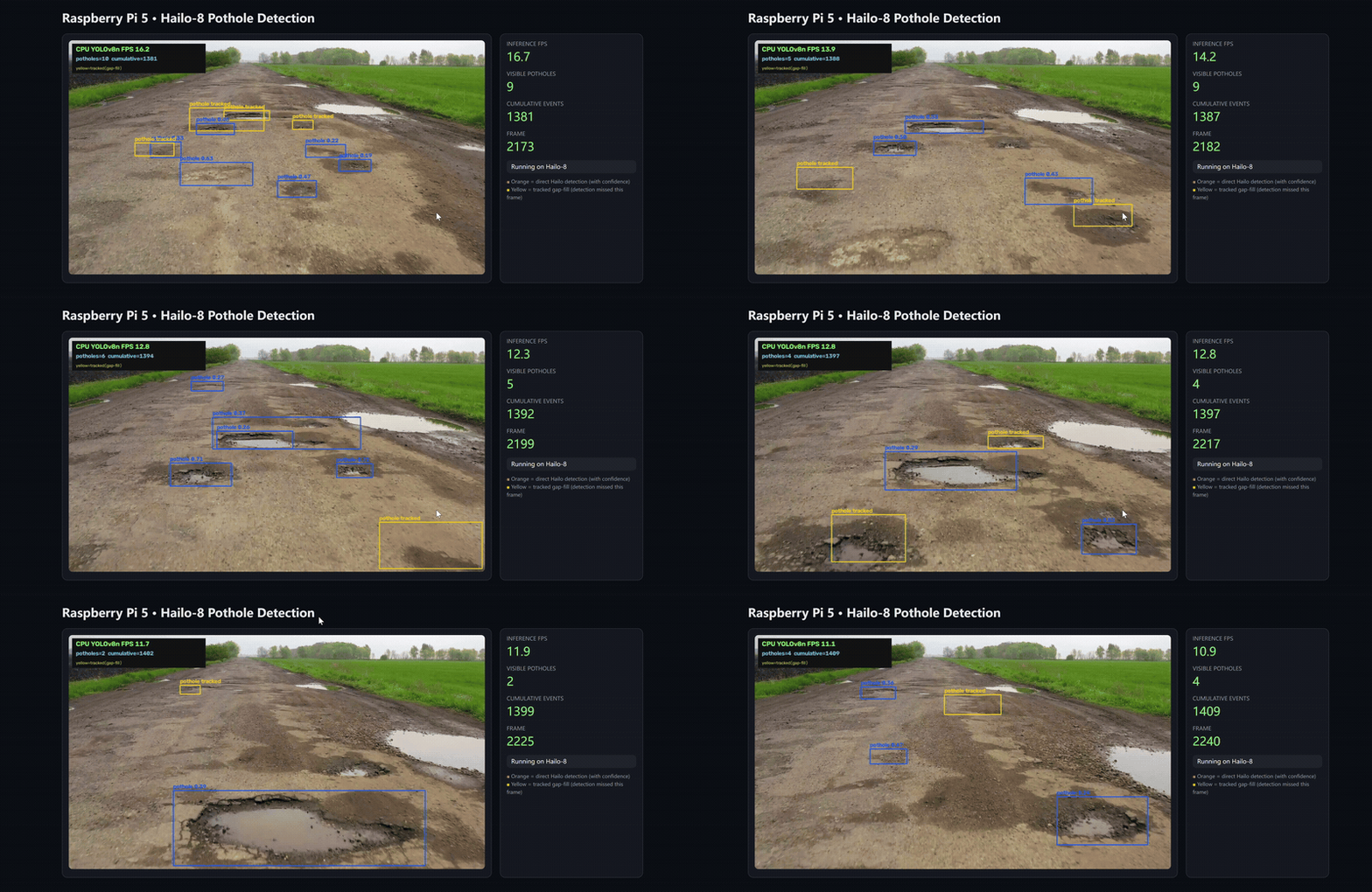
This project uses a Raspberry Pi 5 and Hailo-8 accelerator to detect road potholes from video using a YOLOv8n model compiled to Hailo HEF format. It provides both batch video inference with annotated output and a real-time MJPEG web preview with FPS, pothole count, and cumulative event counter. A road-area ROI filter suppresses sky and sidewalk false positives, while a temporal tracker bridges short detection gaps with yellow gap-fill boxes.
Source code: https://github.com/Seeed-Projects/reComputer-AI-Lab-Project/tree/main/pi_project/pothole_detection
Features
- Hailo-8 accelerated YOLOv8n inference on Raspberry Pi 5
- Single-class pothole detection with Hailo NMS postprocessing
- Road-area ROI trapezoidal filter to reject non-road detections
- Temporal tracker with short gap-fill (yellow boxes, max 3 missed frames)
- Cumulative event counter for unique pothole tracks
- Video batch inference with FPS overlay and confidence labels
- Browser-based MJPEG preview and status API on port 8000
- Included demo video, HEF model, and device validation tools
- Bare-metal and Docker deployment options
- 35 no-hardware unit tests for syntax, config, and postprocessing
Hardware and Software
| Component | Requirement |
|---|---|
| Board | Raspberry Pi 5, 64-bit ARM (aarch64) |
| Accelerator | Hailo-8 M.2 Key M 2280 (/dev/hailo0) |
| HailoRT | 4.23.0 |
| Python | 3.11 |
| Bare-metal OS | Raspberry Pi OS 64-bit Bookworm |
| Container runtime | Docker with arm64 support |
The host driver, firmware, shared library, and Python package must use compatible HailoRT versions. The included HEF model targets Hailo-8 rather than Hailo-8L.
Model Information
| Property | Value |
|---|---|
| Architecture | YOLOv8n |
| Classes | 1 (pothole) |
| Input size | 640 × 640 RGB |
| Input mode | uint8 (quantized) |
| Output | Hailo NMS (YXYX coordinates + confidence) |
| HEF SHA-256 | 6acec07e677cf4ae54919e0dd7105799ea8a50f1f48bd72528a6550b611b6856 |
Box Color Legend
| Color | Meaning |
|---|---|
| Orange | Direct Hailo detection (with confidence label) |
| Yellow | Tracked gap-fill — detection missed this frame, bridged from previous frames |
The tracker assigns unique IDs to each pothole. When a detection is briefly
lost (e.g., motion blur), the yellow box bridges the gap to avoid flickering.
After max_missed consecutive misses (default 3), the track is removed.
Quick Start with Docker
Pull the prebuilt linux/arm64 image from GHCR:
sudo docker pull \
  ghcr.io/seeed-projects/recomputer-ai-lab-project/pothole_detection:latest
Run the bundled video and web dashboard:
sudo docker run --rm \
  --name rpi5-hailo8-pothole-detection \
  --privileged \
  --net=host \
  -e PYTHONUNBUFFERED=1 \
  --device /dev/hailo0:/dev/hailo0 \
  -v /usr/lib/libhailort.so.4.23.0:/usr/lib/libhailort.so.4.23.0:ro \
  -v /usr/lib/libhailort.so:/usr/lib/libhailort.so:ro \
  ghcr.io/seeed-projects/recomputer-ai-lab-project/pothole_detection:latest \
  python web_detection.py \
    --config configs/runtime.json \
    --source input/demo.mp4 \
    --host 0.0.0.0 \
    --port 8000
Open the following address from a browser on the same network:
http://<PI_IP>:8000The dashboard shows the annotated video stream, inference FPS, visible pothole count, cumulative event count, and frame number.
Get the Project
git clone https://github.com/Seeed-Projects/reComputer-AI-Lab-Project.git
cd reComputer-AI-Lab-Project
Run on Raspberry Pi OS
Install the board dependencies and create a Python virtual environment:
cd pi_project/pothole_detection
chmod +x scripts/*.sh
./scripts/install_rpi5.sh
The installer checks aarch64 and Python 3.11, installs system packages,
creates a .venv with --system-site-packages, installs fastapi and
uvicorn from pip, and installs HailoRT from the bundled local wheel — no
internet download or version upgrade. After installing, reboot if the Hailo
PCIe driver was newly installed. Then verify the accelerator and models:
./scripts/probe.sh
python3 tools/check_deployment.py
Start the browser dashboard with the bundled video:
python3 web_detection.py \
  --config configs/runtime.json \
  --source input/demo.mp4
To generate a processed MP4 without the Web dashboard, run:
./scripts/run_demo.shThe processed result is saved to outputs/pothole_demo_hailo8.mp4 with a
companion .json report containing frame count, FPS, and detection statistics.
Build the Container from Source
The repository includes the Dockerfile and matching HailoRT 4.23.0 Python 3.11 aarch64 wheel. Build the image from the repository root:
sudo docker build \
  -f docker/hailo8/pothole_detection.dockerfile \
  -t pothole_detection:latest \
  pi_project/pothole_detection
If HailoRT is installed to a different host path, adjust the two shared-library mounts while keeping the host and container versions compatible.
Web API
GET /: browser dashboard with live MJPEG stream and metricsGET /api/video_feed: MJPEG annotated video streamGET /api/status: JSON with FPS, pothole count, cumulative events, and error stateGET /healthz: service and inference health check
Validate the Configuration Only
Use --check-config to check paths and configuration structure without loading
HailoRT:
cd pi_project/pothole_detection
python3 app/infer_video_hailo.py --check-config
python3 web_detection.py --check-config
Configuration Parameters
configs/runtime.json controls all runtime behavior:
| Section | Key | Default | Description |
|---|---|---|---|
model | path | models/hef/pothole_yolov8n_hailo8.hef | HEF model path |
model | imgsz | 640 | Input dimension (must match HEF) |
model | confidence | 0.18 | Minimum detection confidence |
model | iou | 0.55 | NMS IoU threshold |
road_roi | enabled | true | Enable road-area filtering |
road_roi | horizon_y | 0.18 | Horizon line (top of road area) |
temporal | max_missed | 3 | Max consecutive missed frames before track removal |
temporal | min_hits | 2 | Minimum hits before showing a track |
Command-line overrides: --source, --output, --confidence, --iou.
Use Another Video
Update configs/runtime.json to select another input and output path, or pass
--source on the command line. For a live camera, use --source 0.
Project Structure
pi_project/pothole_detection/
├── app/                 # Video inference entry point
├── configs/             # Model and runtime configuration
├── input/               # Bundled demo video
├── models/hef/          # Hailo-8 HEF model
├── pothole_monitor/     # Frame processor and temporal tracker
├── runtime/             # HailoRT integration and YOLO post-processing
├── scripts/             # Installation, probing, Docker, and demo scripts
├── tools/               # Deployment validation utilities
├── tests/               # No-hardware unit tests
└── web_detection.py     # FastAPI dashboard and MJPEG stream