Visual filter showcase based on reComputer-RK / Docker / RKNN / YOLO
Project Overview
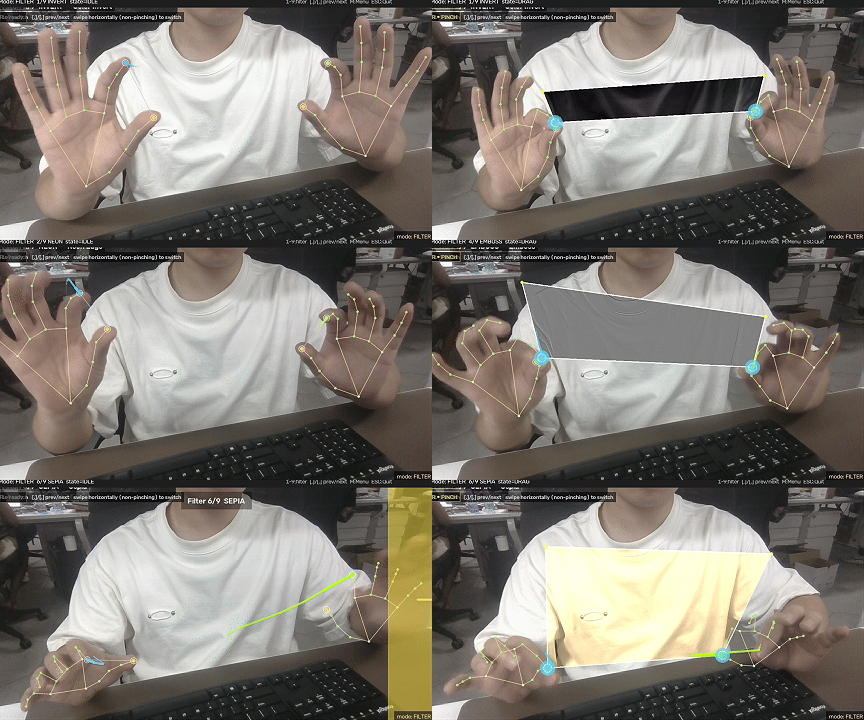
This project consolidates 9 filters into a single FILTER_LIST dictionary for easy extension—yielding a 191-line, filter-only studio: gesture.py detects both-hand pinches → filter_game.FilterGame maintains the quadrilateral vertices → filters.apply_filter processes the ROI pixels.
Quick Start
1. Clone and enter the project directory
git clone https://github.com/doublelf/filter_game
cd filter_game
2. Install dependencies
pip install -r requirements.txtrequirements.txt pins four dependencies:
opencv-python>=4.8.0
mediapipe>=0.10.14
numpy>=1.26.0
Pillow>=10.4.0
Of the 9 filters, EMBOSS / CONTOUR / POSTERIZE are provided by Pillow; INVERT / NEON / GRAY / SEPIA / HUE_SHIFT / PIXELATE are implemented with OpenCV + NumPy and still work without Pillow (returning the original frame when Pillow is missing, see
filters.py:36_pil_filter_safe).
3. Launch the game
python main.py                  # default camera 0, horizontal flip enabled
python main.py --cam 1          # use the 2nd camera
python main.py --no-flip        # disable horizontal flip
python main.py --no-landmarks   # disable the key-point overlay (enabled by default)
python main.py --hide-trails    # disable gesture trails (enabled by default)
After launching you will first see the "Filter Studio" menu screen; press any key to enter the game.
4. Controls
| Action | Player Input | Program Feedback |
|---|---|---|
| Single-hand pinch | Any hand starts pinching | Golden spread-ring at the index fingertip |
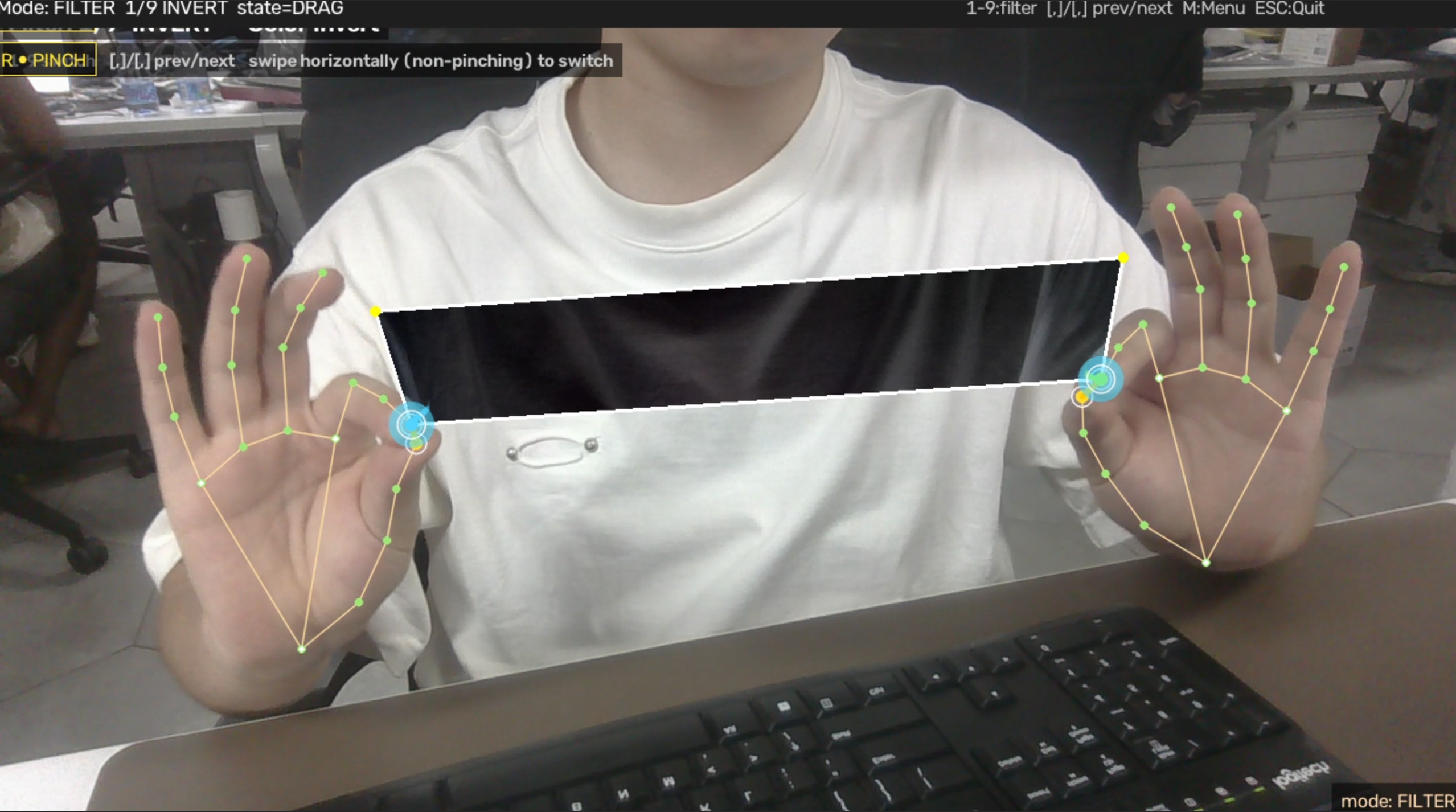
| Both hands pinch | Both hands pinch at the same time | Spread-ring at the midpoint between the two anchors + Toast CONNECTED |
| Hold pinch + move | Drag both hands | Quadrilateral (anchor_l, anchor_r, current_l, current_r) with the current filter applied to its inner pixels |
| Release either hand | Release one hand | Quadrilateral disappears, returns to IDLE |
| Horizontal swipe to switch filter | Swipe across the screen with any non-pinching hand | SwipeIndicator side gradient band + Toast Filter N/9 NAME |
| Keyboard filter switch | 1–9 direct jump / [ ] or , . next/prev | Toast Filter N/9 NAME |
| Anytime | M returns to menu | Camera keeps capturing, only the game loop is closed |
| Anytime | ESC quits | Releases the camera, closes MediaPipe, destroys the window |
Running Without a Camera
recomputer-rk3576-devkit ships without a USB camera connected by default. This project bundles three utilities so it can run end-to-end even without a camera:
tools/verify_all.py — 8-step verification suite
cd /home/seeed/hand/filter_game
python3 -m tools.verify_all
Prints each step:
- Module imports (
gesture/filter_game/filters/overlay/utils) utilsgeometry + text helpers- All 9 filters output correct shape and dtype
FilterGamestate machine +SwipeTrackerhorizontal-swipe detection- Real MediaPipe Hand Landmarker loaded on aarch64 (XNNPACK delegate, ~110 ms warm-up)
HandOverlay.add_event+ rendering (both_connected/filter_switch/swipe)- 120-frame synthesized both-hand pipeline finishes, and FilterGame has reached BOTH_PINCH at least once
tools/run_synthetic.py — Offline rendering to PNG
python3 -m tools.run_synthetic --frames 200 --out /tmp/filter_demo
ls /tmp/filter_demo | wc -l      # → 200
Drives the full FilterGame + HandOverlay pipeline and prints:
events total=N by_type={'both_connected': 1, ...}
BOTH_PINCH frames: 1   DRAG frames: 146
Writes each frame to out/filter_XXXX.png. In a camera-less environment, stitch the PNGs into an mp4 with ffmpeg:
ffmpeg -framerate 30 -i /tmp/filter_demo/filter_%04d.png -c:v libx264 -pix_fmt yuv420p filter.mp4tools/synthetic_source.py + tools/fake_tracker.py
A synthesized video source and a synthesized HandTracker that are interface-equivalent to cv2.VideoCapture / gesture.HandTracker. To switch to a real camera later, replace just these two lines:
cap = cv2.VideoCapture(args.cam)               # replace SyntheticHandSource
tracker = HandTracker(num_hands=2)              # replace SyntheticHandTracker
Then tools/run_synthetic.py upgrades into a real-camera driver script.