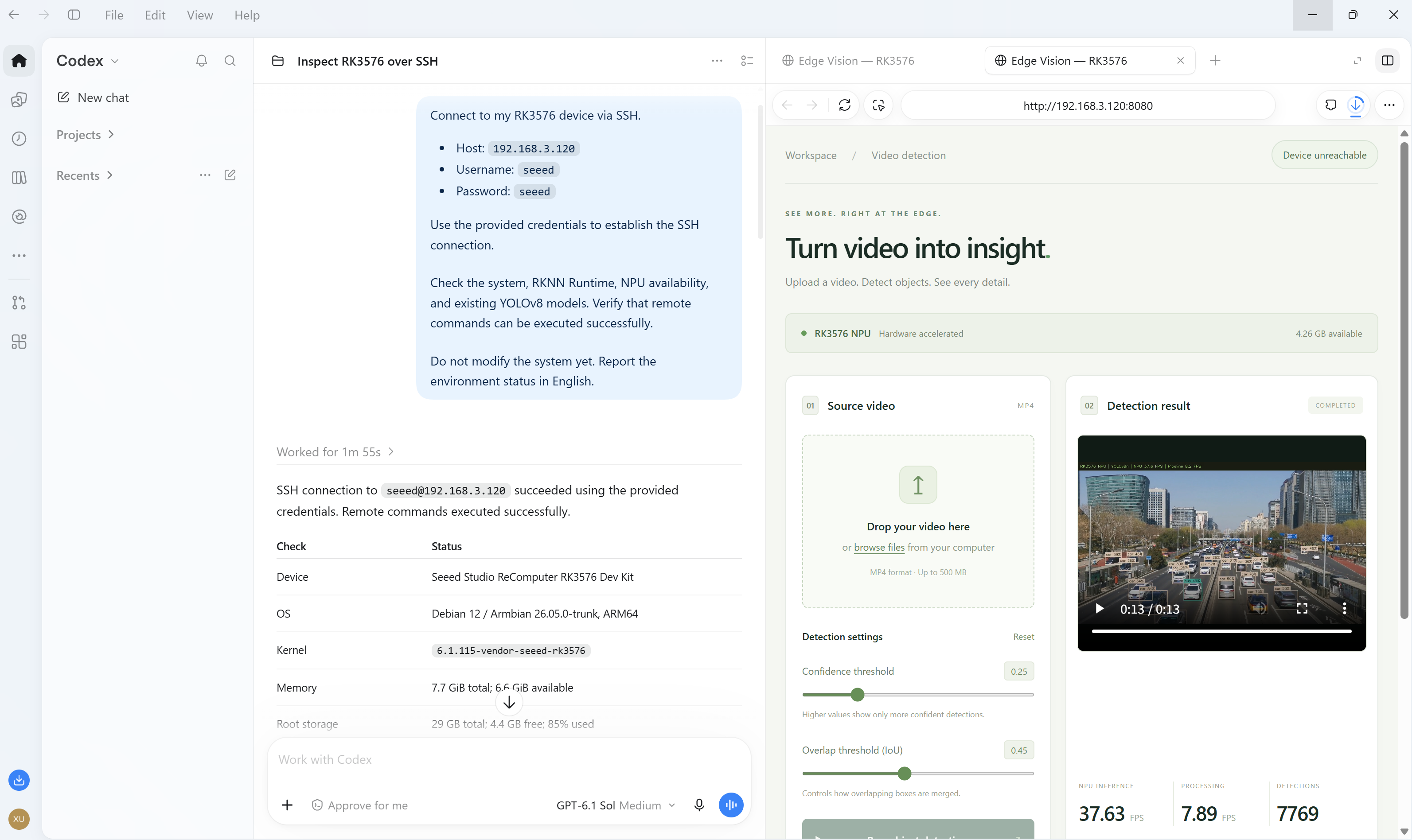
How do you turn an application idea into something that runs on an edge AI board? This project walks through a practical development session with Codex: connect to a reComputer RK3576, inspect its environment, describe the application, deploy it over SSH, and verify it on the actual device.
The example is a YOLOv8 video detection WebUI. From a PC browser, you can upload an MP4, run detection on the RK3576 NPU, and play or download a video with bounding boxes, class labels, and FPS. The source code, test video, and measured results are available in the GitHub repository.
The goal is to show a reusable way to build applications with AI assistance: provide device context, define constraints, ask for implementation, and check the result against concrete acceptance criteria.
How the workflow fits together
Codex runs on the development PC and uses SSH to work with the board. The finished application runs on reComputer RK3576; neural-network inference runs on its NPU. Object detection does not use an OpenAI API.
Requirements → Codex on the PC → SSH → reComputer RK3576
                                          ↓
PC browser ← upload / playback / download ← YOLOv8n on the NPU| Stage | What you provide | What to verify |
|---|---|---|
| Inspect | Board address, account, and read-only scope | SSH works and the NPU environment is accessible |
| Build | Application behavior and device constraints | Correct model, hardware inference, and usable UI |
| Deploy | Application directory and launch requirements | Server starts and the PC can reach its URL |
| Validate | Test video and acceptance criteria | Full upload-to-download workflow works |
Before you start
- A reComputer RK3576 Dev Kit with Linux, a working NPU driver, and RKNN Runtime.
- A PC with Codex, a local project folder, and SSH tools available to its shell.
- Network access between the PC and the board, and permission for Codex to use the required local tools and SSH connection.
- An MP4 test clip. This project's repository includes
video/test.mp4.
This example reuses an existing Python, RKNNLite, OpenCV, and NumPy environment. It does not cover flashing an OS or installing an NPU driver. If your board is missing dependencies, ask Codex to report what is missing before installing them.
Step 1: let Codex inspect the board
Open a local project folder in Codex on your PC. Start with a read-only request so the implementation is based on the board's actual environment.
Connect to my reComputer RK3576 via SSH.

Host: <DEVICE_IP>
Username: <DEVICE_USER>
Use my SSH key, or ask for the credentials needed to connect.

Check the OS, architecture, memory, available storage, RKNN Runtime, Python
environments, NPU driver and device access, and existing YOLO models.
Verify that remote commands can execute successfully.

Do not install packages or modify the system yet. Report the environment and
any issues that could block deployment.
Replace the placeholders with your device details. Keep connection credentials out of project files and commits.
In the original session, this inspection found Debian 12 ARM64, an accessible RKNPU device, existing RKNNLite and OpenCV dependencies, and limited root storage. These findings led to reusing the installed environment and adding upload limits and storage checks to the application.
Step 2: describe the application you want
Give Codex a complete user journey, hardware requirements, and a definition of completion. The following prompt is adapted from the request used for this build:
Build and deploy a YOLOv8 object detection WebUI on my reComputer RK3576 via SSH.

Download a precompiled RK3576-compatible YOLOv8n .rknn model from Rockchip's
official resources or a verified source. Record its source and verify its
published checksum. Do not train or convert models.

Use the RK3576 NPU for inference. Create a modern English WebUI where I can
upload an MP4 from my PC, run detection, and play or download the processed
video with bounding boxes, class labels, confidence scores, and FPS.

Reuse existing RKNN dependencies and official examples where possible.
Keep application files in a dedicated directory. Do not reinstall drivers
or modify system configurations without permission.

Test the complete workflow on the actual board, fix errors, and provide the
working WebUI URL, measured performance, and remaining limitations.
This keeps the model selection, UI, deployment, and testing connected to the same outcome. The prompts are starting points, rather than a guarantee of an identical implementation or performance on every board.
Step 3: verify the model and NPU path
Before processing a full video, check the inference path with a known image. Ask Codex to report the following evidence:
- Model download source, pinned revision, checksum, and RK3576 target.
- Successful RKNNLite model loading and NPU initialization.
- Expected objects detected in a known test image.
- Runtime warnings and the versions involved.
For this project, Codex downloaded a precompiled YOLOv8n INT8 model from RKNNAI/RK3576-CNN-yolov8n and verified its published SHA-256. It reused the existing RKNNLite installation and adapted the official Rockchip YOLOv8 postprocessing example, using NumPy for DFL instead of adding Torch. The known-image test detected people and a bus.
The installed runtime was 2.3.0, while the model reported compiler version 2.4.2. RKNN emitted a version mismatch warning. The image and full-video tests passed on this board without a runtime upgrade; this result does not establish general compatibility for other models or environments.
Step 4: deploy and open the WebUI
Codex deployed the application to /home/seeed/codex-yolov8-webui and started a
background server on port 8080. On your own board, open:
http://<DEVICE_IP>:8080The resulting UI includes MP4 upload, confidence and IoU controls, progress previews, an annotated video player, downloads, and a history of local runs. All processing and uploaded files stay on the board.
If you are deploying the existing repository instead of rebuilding the app, ask Codex to read its deployment instructions, inspect your board, transfer the application files, adjust application paths for your Python environment, run the NPU probe, and start the server. The included scripts reference the original device's environment paths and are not universal installation scripts.
On the original device, the commands are:
cd /home/seeed/codex-yolov8-webui
/home/seeed/venvs/rknn-lite2-test/bin/python -B probe.py
sh start.sh
No boot service was installed. After a board reboot, run sh start.sh again.
Step 5: test from upload to download
Use your PC browser to upload video/test.mp4 and start detection. Check the
visible output yourself, then ask Codex to verify the full path:
Test the deployed WebUI end to end with video/test.mp4.

Verify upload, NPU inference, progress updates, bounding boxes and labels,
browser playback, seeking, and downloading the result back to the PC.
Confirm that every frame of the downloaded video decodes successfully.

Check invalid uploads, busy-device handling, cancellation, and cleanup with
disposable test runs. Fix errors and rerun the affected checks.

Report NPU inference FPS separately from full processing FPS. Save the test
results and document limitations and compatibility warnings.
The original test on October 15, 2026 produced these results:
| Measurement | Result |
|---|---|
| Source video | 3840 × 2160, 29.97 FPS, 394 frames |
| Annotated output | H.264 MP4, 1280 × 720, 13.146 seconds |
| Frames processed and decoded after download | 394 / 394 |
| NPU inference throughput | 37.63 FPS |
| Full processing throughput | 7.89 FPS |
| Processing time | 49.92 seconds, excluding upload and model startup |
| Classes observed | car, bus, truck, traffic light |
NPU FPS measures time inside inference. Processing FPS includes video decoding,
preprocessing, inference, postprocessing, drawing, and encoding. These numbers
are measurements from this run, not a performance guarantee or the video's
playback frame rate. Reports are available in the repository's verification/
directory.
Step 6: turn the result into a reusable project
After the application works, ask Codex to organize the source, deployment instructions, screenshots, model provenance, licenses, and test reports. Include only media you have authorized for upload, and exclude credentials and runtime uploads or logs.
For your next application, reuse the same sequence: inspect the board, describe the user journey, define hardware and system constraints, deploy, and verify on real inputs. Change the application requirements and acceptance tests to match the new task.
Scope and resources
- The example is designed for a trusted LAN, with no login or TLS configured.
- Uploads are limited to 500 MiB. Inputs up to 4K are supported; output fits 1280 × 720 while preserving aspect ratio and source timing. Output is silent.
- Original application code is MIT-licensed. The bundled model retains AGPL-3.0, and the Rockchip example and derived postprocessing retain Apache-2.0.
- Project source, deployment notes, and test reports
- Official Rockchip YOLOv8 example
- OpenAI Codex best practices