Multi-scenario Fall Detection Based on reComputer RK3576
Fall behavior detection in multi-scenario and multi-target situations using the YOLOv8n‑pose model, with inference acceleration powered by the reComputer RK3576, and simple information feedback via a web page.
Multi-scenario Fall Detection Based on reComputer RK3576
A fall detection project based on RK3576 / RKNN / YOLO / RGA
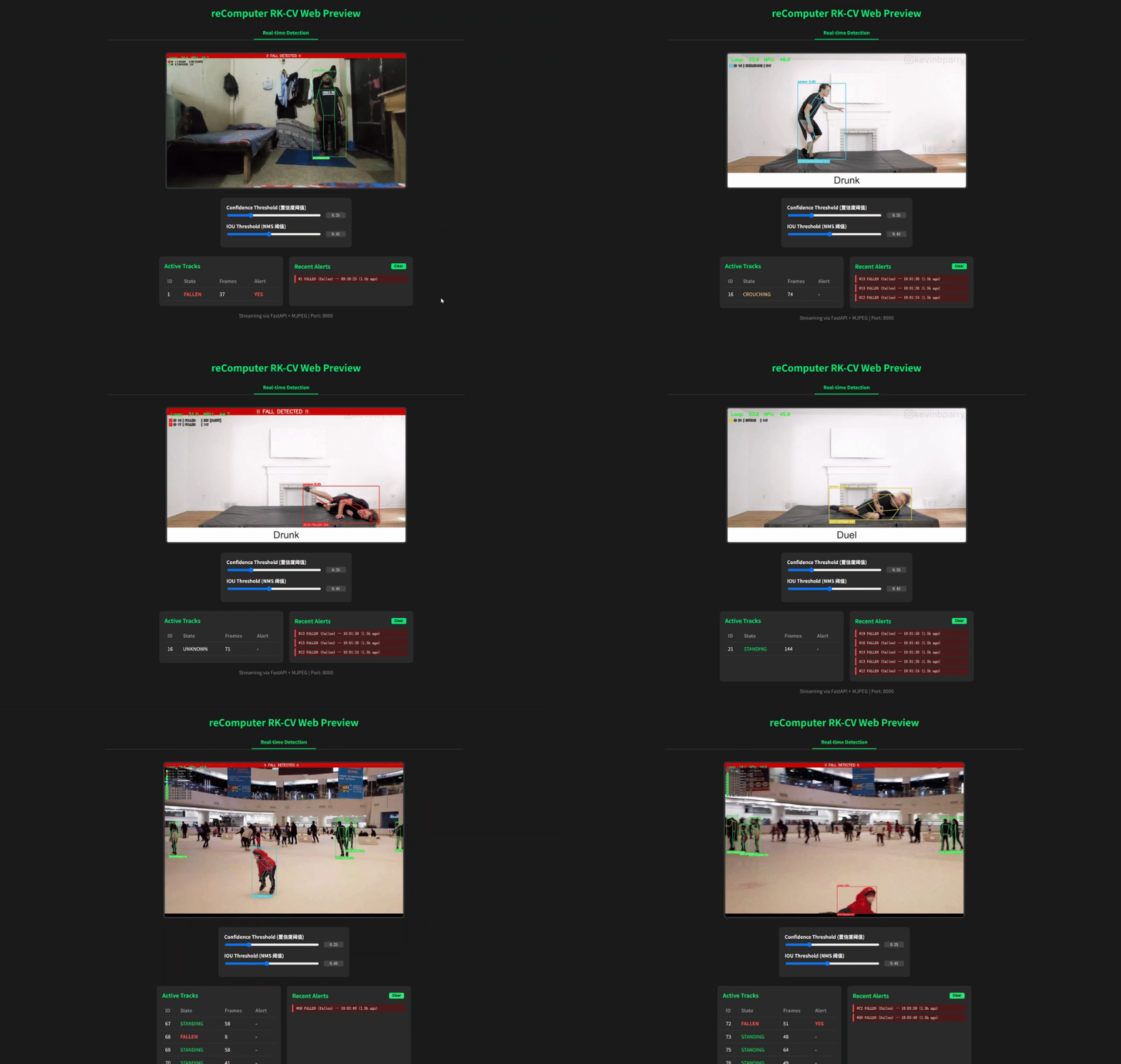
You can view the source code of this project at: https://github.com/doublelf/fall_detection
Quick Start
Pull the project image via Docker
docker pull ghcr.io/doublelf/pose_optimized:v1Test the model effect using the built-in example
sudo docker run --rm --privileged --net=host \
  -e PYTHONUNBUFFERED=1 \
  -e RKNN_LOG_LEVEL=0 \
  --device /dev/video1:/dev/video1 \
  --device /dev/dri/renderD129:/dev/dri/renderD129 \
  -v /proc/device-tree/compatible:/proc/device-tree/compatible \
  -v $(pwd)/video:/app/video \
  seeed/pose_optimized:local \
  python3 web_detection.py --model_path model/yolov8n_pose.rknn --video video/example1.mp4
Where "-v $(pwd)/video:/app/video" - maps the local video folder to the /app/video location in the image.
If you want to use a local video for inference, store the local file in the folder specified by $(pwd)/video.
After the project runs successfully, go to http://<board_ip>:8000/ to view the real-time inference effect.
Secondary Development Based on the Project
Pull the image to the local machine using the cp command
sudo docker cp pose_optimized:/app/web_detection.py ./After modifying the web_detection.py code, remember to rebuild the local code into the image
sudo docker build -t seeed/pose_optimized:localThen run it again.
Calling the Camera for Real-time Inference
When running inference, change the "--video" parameter to "--camera_id" to invoke the camera for inference.
sudo docker run --rm --privileged --net=host \
  -e PYTHONUNBUFFERED=1 \
  -e RKNN_LOG_LEVEL=0 \
  --device /dev/video1:/dev/video1 \
  --device /dev/dri/renderD129:/dev/dri/renderD129 \
  -v /proc/device-tree/compatible:/proc/device-tree/compatible \
  -v $(pwd)/video:/app/video \
  seeed/pose_optimized:local \
  python3 web_detection.py --model_path model/yolov8n_pose.rknn --camera_id 1
Here, "--camera_id" is related to the device you specified in "--device /dev/video1:/dev/video1".
AI Inference Extensions
Inference Engine: Wrapped based on the RKNN C API, with the main entry in web_detection.py and actual calls to utils/rknn_wrapper.py, supporting RK3576 NPU hardware acceleration. Model Input: Accepts the yolov8n_pose.rknn quantized model with a fixed input size of 640×640. The output includes object detection boxes and 17 keypoint coordinates. Post-processing: Parses the three feature maps from the model output, removes duplicate boxes via NMS, and uses the OKS algorithm to optimize keypoint confidence, finally generating structured pose data.
Preprocessing and Image Processing
Hardware Acceleration: Utilizes the RK3576's RGA unit for image scaling, color space conversion (YUV→RGB), and format conversion, significantly reducing CPU load. Video Capture: Supports direct capture from V4L2 cameras or reading from local video files, switching input sources via the --camera_id and --video parameters. Frame Rate Control: The capture thread and inference thread are separated, using a double-buffer queue to avoid frame drops and ensure minimal latency for real-time streams.
Deployment Recommendations
Runtime Permissions: Must use the --privileged container mode and explicitly map /dev/video*, /dev/dri/renderD* (for RGA), and the device tree compatibility file to ensure normal access to the NPU and VPU. Image Packaging: The image already includes all dependencies (RKNN Runtime, OpenCV, Flask). It is recommended to use --net=host to avoid port mapping complexity. If you need to persist models or configurations, you can mount external directories. Long-running Operation: It is recommended to use a systemd service or supervisor to monitor the container process, and set the --restart=always policy.
Known Limitations
Single-stream Inference: The current design only supports single video stream input. Multi-stream concurrency requires additional development of multi-threading/multi-process management logic. Rendering Overhead: Although RGA accelerates preprocessing, OpenCV's drawing operations still consume some CPU resources. At high resolutions, the frame rate may drop to 15-20 FPS. Network Stream Support: Currently only supports local cameras or files; RTSP/HTTP network stream pulling is not yet integrated. No Persistent Caching: Detection results are only used for real-time display and are not stored in a database or file system. Historical records require custom extensions. Hardware Compatibility: RGA acceleration depends on RK3576-specific drivers. Other RK series chips (such as RK3568) may not run directly and may require recompiling OpenCV and adjusting the RGA call interface.