Football Player Tracking Analysis Using reComputer RK3576
Leverage reComputer RK3576 RGA 2D hardware acceleration and VPU MPP acceleration. Run the YOLOv8n model to detect football players and achieve real-time analysis.
reComputer RK3576 Football Player Tracking Analysis
An intelligent football field analysis project based on RK3576 / RKNN / MPP / RGA / ZLMediaKit.
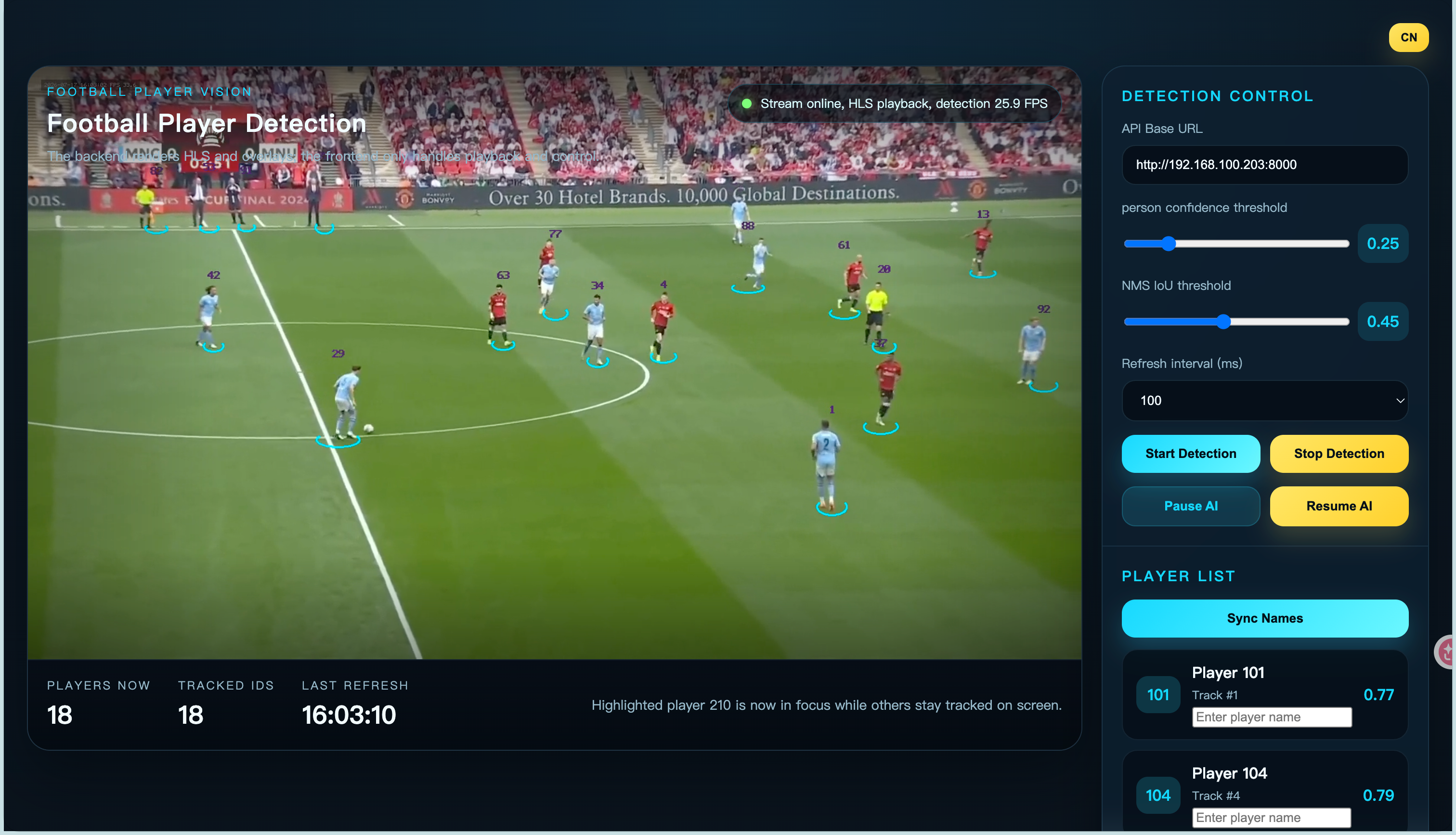
You can view the source code of the project at this link:
https://github.com/litxaohu/football_project
Alternatively, you can download the compiled version to run the project locally on your reComputer RK3576:
note: This project has low memory requirements, but high CPU usage. Optimization of CPU usage will be considered in the future.
wget -O rk3576_football_demo-linux-aarch64.tar.gz https://github.com/litxaohu/football_project/releases/download/v1.0.0/rk3576_football_demo-linux-aarch64.tar.gz
tar -xzvf rk3576_football_demo-linux-aarch64.tar.gz

cd install
export LD_LIBRARY_PATH="$(pwd)/lib:${LD_LIBRARY_PATH}"
You can upload local videos to the device for analysis and processing, or add an RTSP video source for real-time analysis:
Local Video Analysis:
sudo ./bin/rk3576_football_demo \
  --source localvideo \
  --localvideo ./video/football.mp4 \ #Change it to the local path of your video file
  --model model/yolov8n_rk3576.rknn \
  --output-width 1280 \
  --output-height 720 \
  --fps 30 \
  --http-port 8000 \
  --streams ai \
  --ai-conf-threshold 0.25
RTSP Video Analysis:
sudo ./bin/rk3576_football_demo \
  --source rtsp \
  --rtsp-input-url "rtsp://192.168.100.101:554/live" \
  --rtsp-username admin \
  --rtsp-password 123456 \
  --model model/yolov8n_rk3576.rknn \
  --output-width 1280 \
  --output-height 720 \
  --fps 30 \
  --http-port 8000 \
  --streams ai \
  --ai-conf-threshold 0.25
Preview:
- page entry
http://<board-ip>:8000/
Project Features
Current Capabilities
- Input sources:
v4l2rtsplocalvideo
- Output streams:
- main stream
rtsp://<board-ip>:8554/live/camera - sub stream
rtsp://<board-ip>:8554/live/camera_sub - AI debug stream
rtsp://<board-ip>:8554/live/camera_ai
- main stream
- Web:
- page entry
http://<board-ip>:8000/ - HLS status endpoint
/api/hls/status - HLS playlist
/api/hls/playlist.m3u8 - live detection endpoint
/api/live_state
- page entry
- AI:
- fixed NPU input
640x640 - default detection target
person --enable-ballenablesballoutput--ball-trailenables ball trajectory drawing on the AI debug stream
- fixed NPU input
- Tracking:
- stable
track_idoutput - JSON returns
track_id,appear_frames,first_seen_sec,last_seen_sec
- stable
Web Playback
Currently using:
- protocol:
HLS - codec:
H.264 - frame rate:
30 FPS - resolution:
1280x720
Build and Run
GitHub CI and Release Packaging
This repository includes a GitHub Actions workflow that will:
- build the project automatically on push or pull request
- run the same build script used locally:
./scripts/build-linux.sh - produce a release archive for Linux/aarch64 under
dist/ - publish the archive as a GitHub release when a tag such as
v1.0.0is pushed
To use it:
- Create a GitHub repository and push the project there.
- Add the repository to GitHub Actions.
- Push a tag like
git tag v1.0.0 && git push origin v1.0.0to trigger a packaged release.
Dependencies
- RK3576 board runtime environment
- RKNN Runtime
- Rockchip MPP
- RGA
- ZLMediaKit
- FFmpeg
Build
cd rk3576_football_demo
chmod +x scripts/build-linux.sh
./scripts/build-linux.sh
Preparation Before Running
cd install
export LD_LIBRARY_PATH="$(pwd)/lib:${LD_LIBRARY_PATH}"
Model Directory
model/
  yolov8n_rk3576.rknn
  yolov8s_rk3576.rknn
  yolov8m_rk3576.rknn
When --model is not explicitly provided, the default model names above are tried automatically.
Startup Examples
RTSP Live Football Analysis + Web
./bin/rk3576_football_demo \
  --source rtsp \
  --rtsp-input-url "rtsp://192.168.100.101:554/live" \
  --rtsp-username admin \
  --rtsp-password 123456 \
  --model model/yolov8n_rk3576.rknn \
  --output-width 1280 \
  --output-height 720 \
  --fps 30 \
  --http-port 8000 \
--streams main,sub,aisudo ./bin/rk3576_football_demo \
--source localvideo \
--localvideo ./video/football.mp4 \
--model model/yolov8n_rk3576.rknn \
--output-width 1280 \
--output-height 720 \
--fps 30 \
--http-port 8000 \
--streams ai \
--ai-conf-threshold 0.15AI Debug Stream + Web Only
./bin/rk3576_football_demo \
  --source rtsp \
  --rtsp-input-url "rtsp://192.168.100.101:554/live" \
  --rtsp-username admin \
  --rtsp-password 123456 \
  --model model/yolov8n_rk3576.rknn \
  --streams ai \
  --http-port 8000
Enable Ball Detection and Trajectory
./bin/rk3576_football_demo \
  --source rtsp \
  --rtsp-input-url "rtsp://192.168.100.101:554/live" \
  --model model/yolov8n_rk3576.rknn \
  --enable-ball \
  --ball-trail \
  --ball-trail-length 20
Debug Low-Confidence Targets
./bin/rk3576_football_demo \
  --source localvideo \
  --localvideo /home/rk76/CPP_yolov8/video/football.mp4 \
  --model model/yolov8n_rk3576.rknn \
  --streams ai \
  --ai-conf-threshold 0.15 \
  --detail-info
Export NPU Input Frames
./bin/rk3576_football_demo \
  --source localvideo \
  --localvideo /home/rk76/CPP_yolov8/video/football.mp4 \
  --model model/yolov8n_rk3576.rknn \
  --streams ai \
  --dump-ai-input-dir ./debug_ai_input \
  --dump-ai-input-every 30 \
  --detail-info
Show Help
./bin/rk3576_football_demo --helpWeb API
Live Status
GET /api/live_state
Response example:
{
  "success": true,
  "message": "",
  "stream_type": "hls",
  "detect_fps": 28.7,
  "updated_at": 1720851200,
  "source": "live frame",
  "image": {
    "width": 1280,
    "height": 720
  },
  "predictions": [
    {
      "class": "person",
      "confidence": 0.92,
      "track_id": "#12",
      "track_numeric": 12,
      "appear_frames": 35,
      "first_seen_sec": 3,
      "last_seen_sec": 5,
      "box": {
        "x1": 100,
        "y1": 200,
        "x2": 300,
        "y2": 500
      }
    }
  ]
}
HLS Status
GET /api/hls/status
HLS Playback
GET /api/hls/playlist.m3u8
Upload/File API
POST /api/video/uploadGET /api/video/listGET /api/video/download/<filename>
Notes:
- This version prioritizes real-time Web/HLS and live JSON.
POST /api/video/analyzeand full offline analysis task management are reserved for future extension.
Key Parameters
--streams <main,sub,ai>: select which output streams to enable--ai-width <value>/--ai-height <value>: AI debug stream output size--http-host <value>: Web listening address--http-port <value>: Web listening port, default8000--web-root <path>: static resource root directory--hls-dir <path>: HLS output directory--uploads-dir <path>: uploads directory--results-dir <path>: results directory--enable-ball: enable football detection output--ball-trail: enable ball trajectory drawing--ball-trail-length <value>: number of trajectory points to keep--ai-conf-threshold <value>: AI detection confidence threshold, default0.25--disable-web: disable built-in Web/HLS service--detail-info: enable detailed logs
Project Structure
rk3576_football_demo
├── CMakeLists.txt
├── football_players.html
├── static
│   └── hls.min.js
├── include
│   └── rk3576_yolo_demo
│       ├── ai
│       ├── app
│       ├── branch
│       ├── common
│       ├── tracking
│       └── web
├── src
│   ├── ai
│   ├── app
│   ├── branch
│   ├── common
│   ├── tracking
│   ├── web
│   └── ...
└── third_party
AI Inference Extensions
- RKNN entry point is in
src/ai/yolov8_engine.cpp - preprocessing primarily uses
RGA - detection results are stored in
DetectionFramecache, then matched and merged by the AI branch based onPTS
Logging and Debugging
- by default, only startup summary is printed
- detailed runtime logs are enabled with
--detail-info - logger is in
include/rk3576_yolo_demo/common/logger.hpp
Deployment Recommendations
- for production deployment, configure permissions for
/dev/rga, video devices, and related runtime libraries - it is recommended to package models, runtime libraries, and config files together with
install/ - RTSP input prefers
libavformat; older environments automatically fall back toffmpeg pipe - for long-term stable operation, use systemd or supervisor for process management and restarts
Known Limitations
camera_aibounding box rendering and watermark overlay still incur some CPU overheade2eis not full end-to-end latency; it only represents internal branch timelocalvideocurrently uses compressed stream reading path, mainly for offline validation and looped inference